page 71
06_Uso_en.fm
Use
Bisky
Edit a recipe
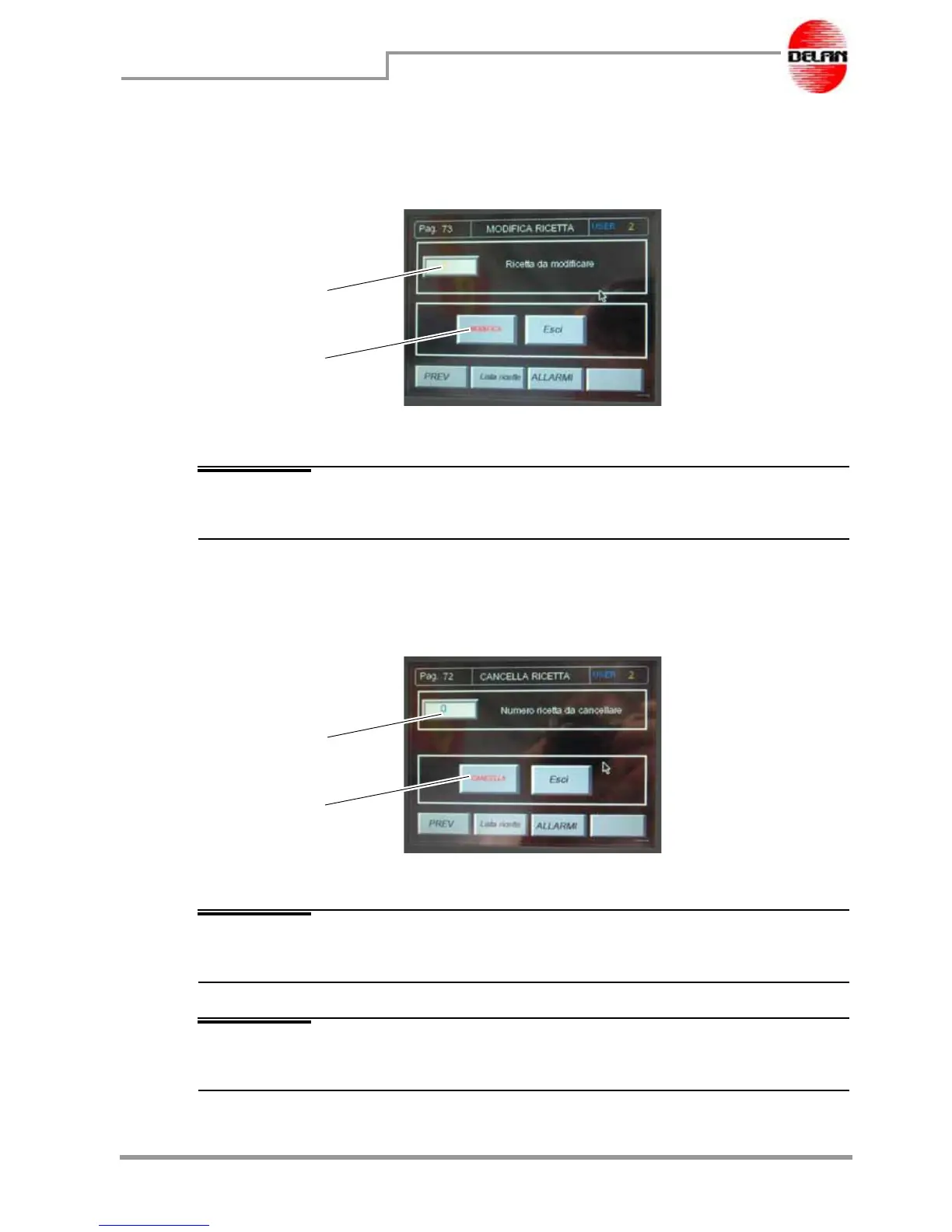
This button allows the data about stored recipes to be retrieved from the database and
access the setting pages and modify various different parameters.
In field 1 digit the number of the recipe to be modified, then press button 2 "Modify".
NOTE To have the list of the stored recipes, consult the "List of the recipes" by
pressing the dedicated button.
You have entered the parameters pages from where you can modify the recipes. In the
last page press button "Save" to confirm the modifications made.
Delete recipes
This button allows the data about stored recipes to be cancelled from the database.
In field 1 digit the number of the recipe to be deleted, then press button 2 "Delete".
NOTE To have the list of the stored recipes, consult the "List of the recipes" by
pressing the dedicated button.
NOTE The recipe is going to be definitively deleted from the database and can no
longer be called up.
1
2
1
2



 To Next Page