64 Appendices
www.dell.com | support.dell.com
9
The 2161DS Console Switch will begin the FLASH upgrade process. On-screen indicators
will display the upgrade progress. When the upload is complete, the 2161DS Console Switch
will reset and upgrade the internal subsystems.
CAUTION: Do not cycle power to the 2161DS Console Switch during this process. A loss of power will
render the 2161DS Console Switch inoperable and require the unit be returned to the factory for repair.
10
Once the upgrade is complete, a verification message will appear on screen.
Upgrading the SIP
The Server Interface Pods (SIPs) or Avocent® AVRIQs can be upgraded individually or
simultaneously. As long as an upgrade is in progress, you cannot initiate another.
NOTICE: Do not cycle power to the server or disconnect the SIP during this process. A loss of power
will render the SIP inoperable and require the unit be returned to the factory for repair.
To simultaneously upgrade multiple SIPs:
1
Press <Print Screen>. The
Main
dialog box will appear.
2
Click
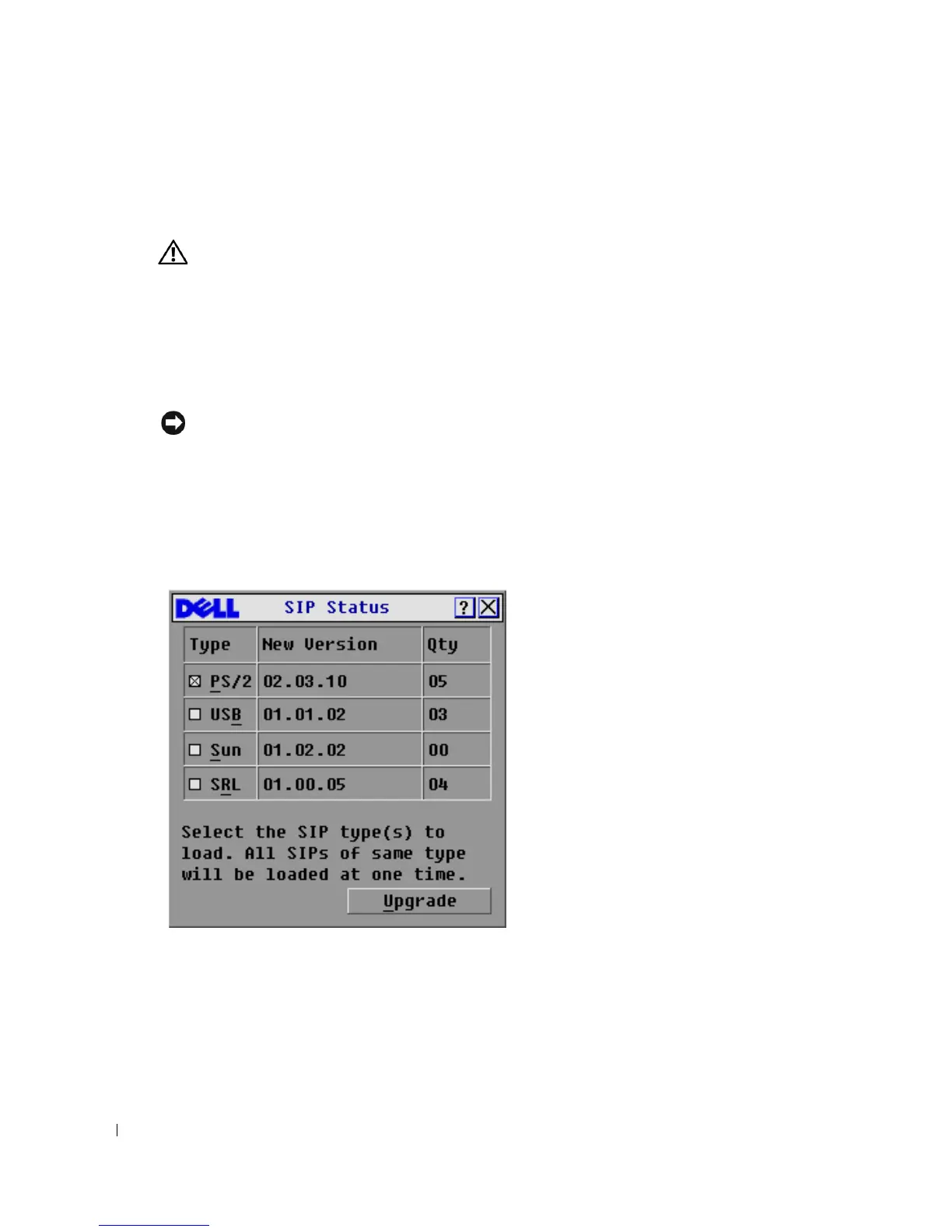
Commands-SIP Status
. The
SIP Status
dialog box appears.
Figure 5-40. SIP Status Dialog Box.
3
Click one or more types of SIPs you wish to upgrade. Click
Upgrade
. The
SIP Load
dialog box
appears.






 To Next Page