select Show Info.
3. Select Installable Options, and select the options that have been installed on
the printer, and then click Apply Changes.
Mac OS 9 1. Select a desktop printer related to the model.
2. Click Printing on the System menu bar, and select Change Setup.
3. Select Output Expander on the Change menu.
4. Select the option that has been installed on the printer on the To menu, and
then click OK.
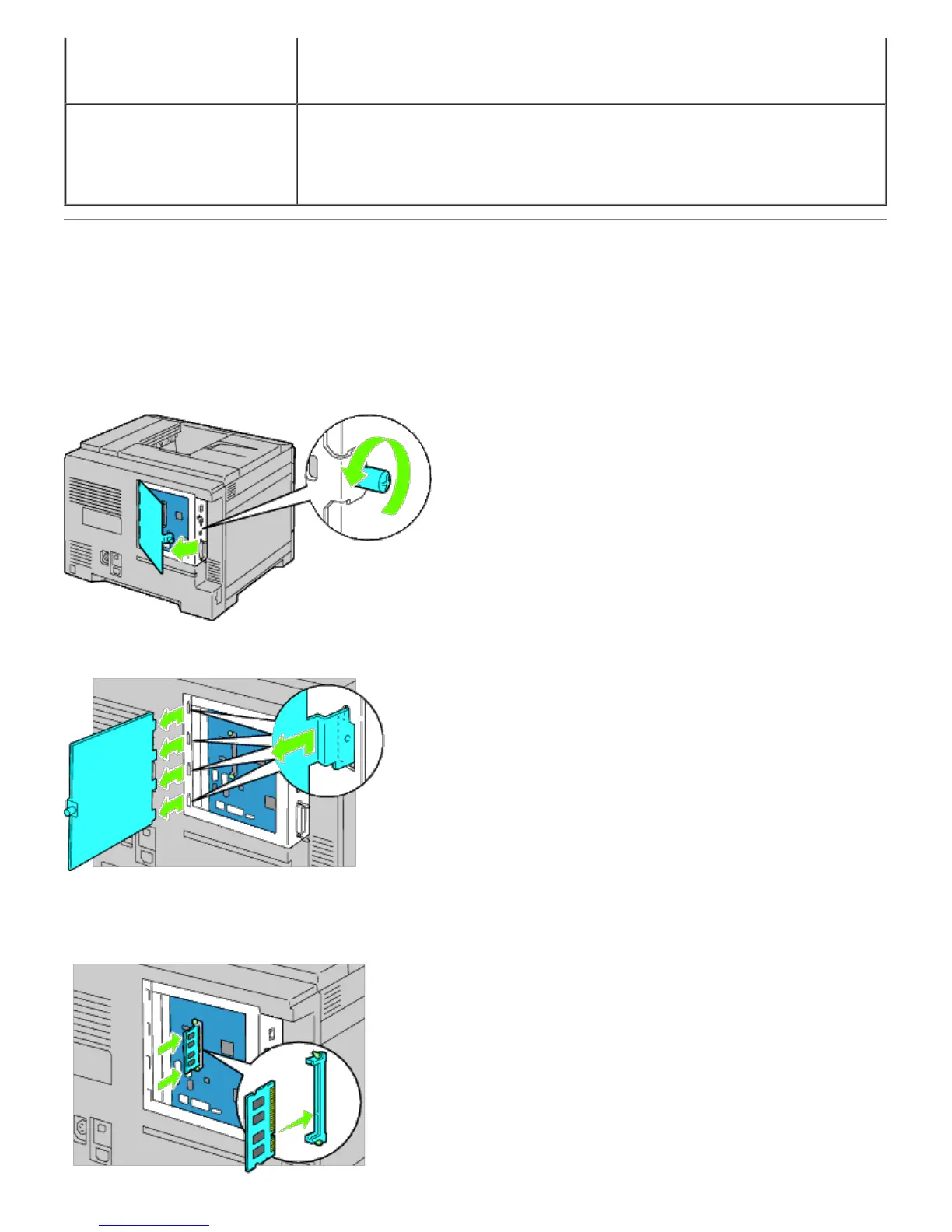
Installing a Memory Module
Your printer comes with 256 MB of memory installed. To increase memory, you can add an optional 1024 MB memory
module on the control board.
1. Ensure that the printer is turned off.
2. Rotate the screw counterclockwise on the metal casing to open the cover.
3. Remove the control board cover.
4. Pay attention to the direction of the memory module to align the notches of the memory module with those of the
slot. With the connector of the memory module toward the slot, insert the memory module vertically into the slot.
Then press down evenly on both sides of the memory module until it stops.













 To Next Page