Removing the Palm Rest | 48
5 Turn the computer over and open the display as far as possible.
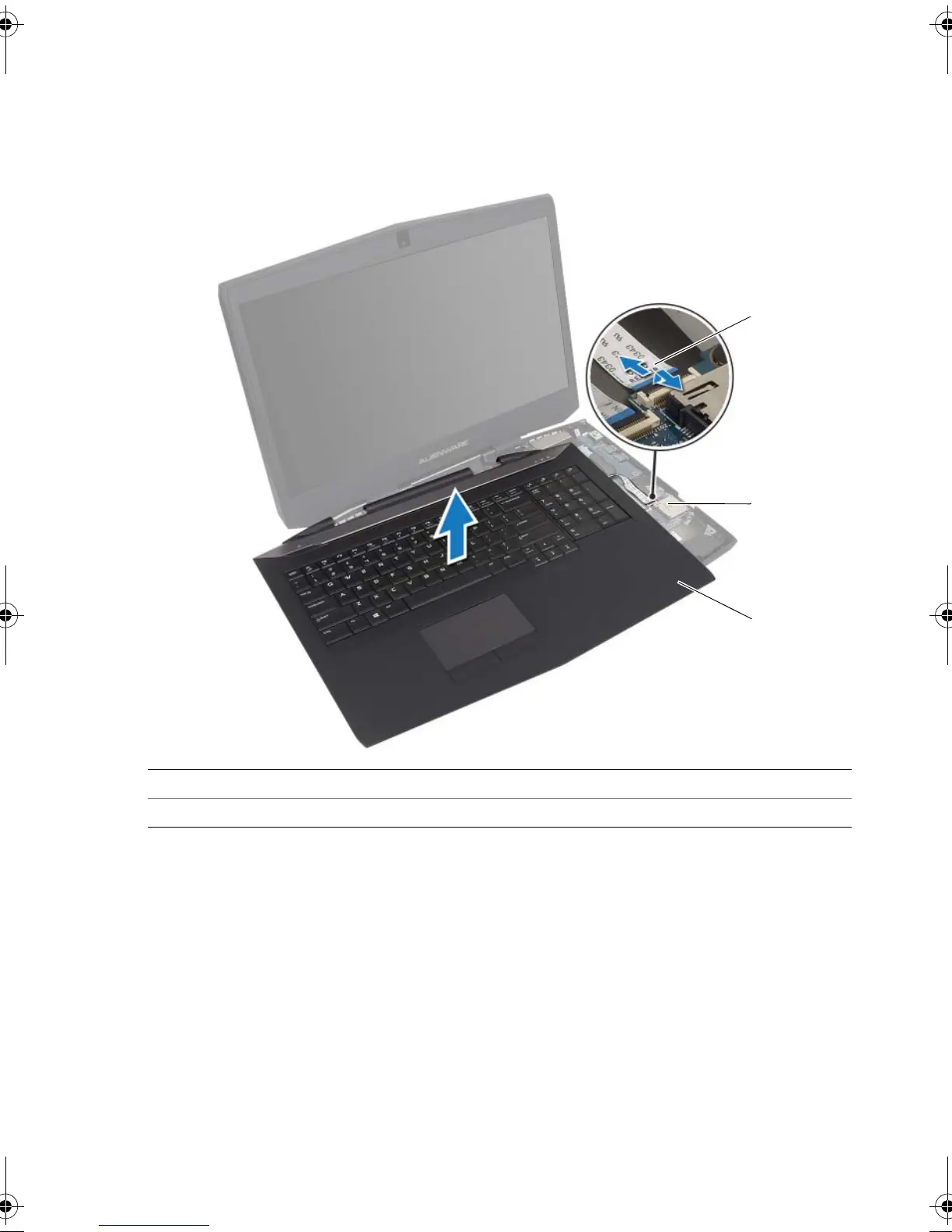
6 Carefully lift the palm-rest assembly off the computer base and place it aside.
7 Disconnect the status-light board cable from the media-card reader.
8 Lift the palm-rest assembly off the computer base.
9 Remove the keyboard. See "Removing the Keyboard" on page 53.
10 Remove the power-button board. See "Removing the Power-Button Board" on
page 57.
11 Remove the status-light board. See "Removing the Status-Light Board" on page 60.
12 Remove the keyboard daughter board. See "Removing the Keyboard Daughter Board"
on page 63.
1 status-light board cable 2 media-card reader
3 palm-rest assembly
book.book Page 48 Friday, June 28, 2013 3:27 PM












 To Next Page