Removing the Keyboard | 54
Procedure
CAUTION: The key caps on the keyboard are fragile, easily dislodged,
and time-consuming to replace. Be careful when removing and
handling the keyboard.
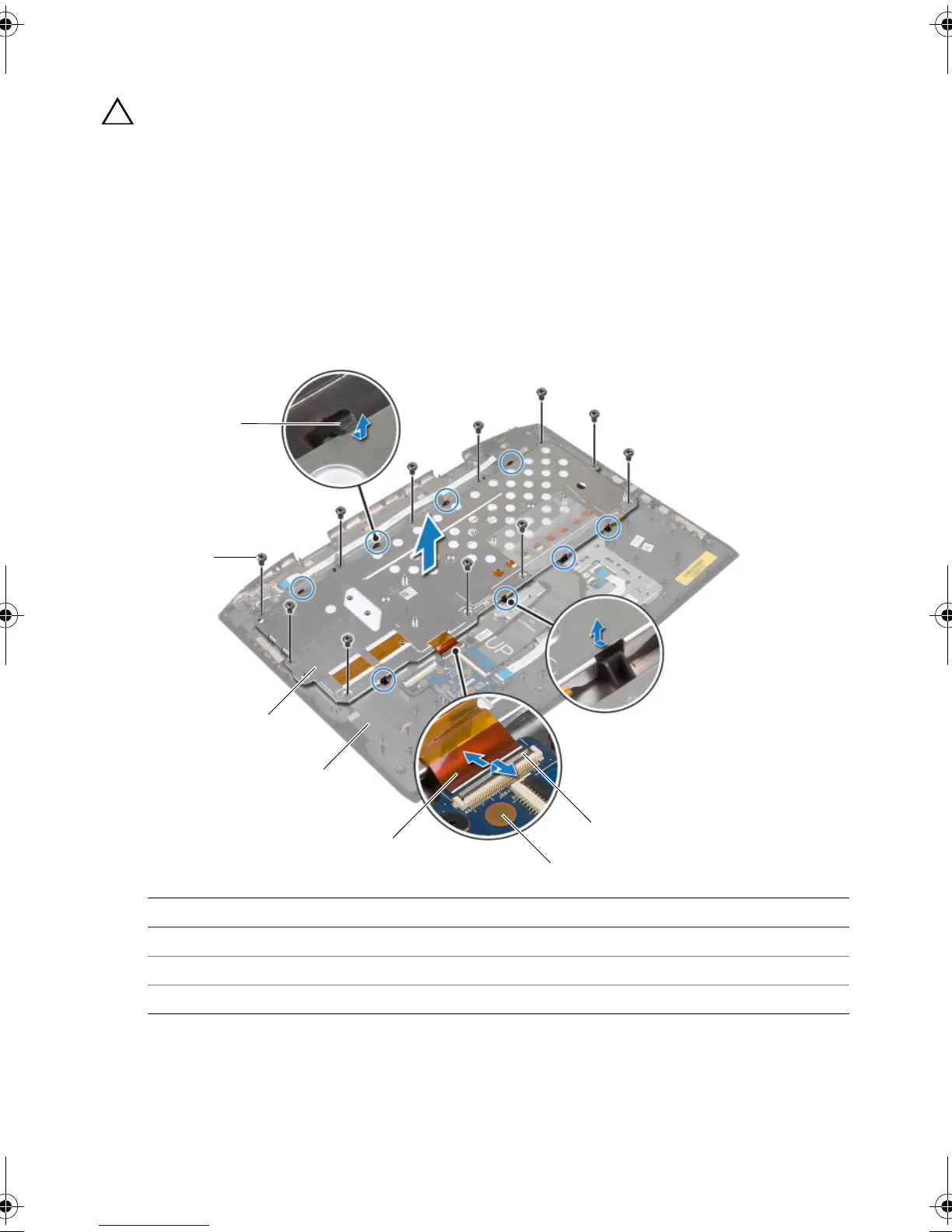
1 Remove the screws that secure the keyboard bracket to the palm-rest assembly.
2 Lift the latch and disconnect the keyboard-backlight cable from the keyboard
daughter board.
3 Slide the keyboard-backlight cable through the keyboard bracket.
4 Release the keyboard bracket from the tabs on the palm-rest assembly.
5 Lift the keyboard bracket off the palm-rest assembly.
1tabs 2screws (11)
3 keyboard bracket 4 palm-rest assembly
5 keyboard-backlight cable 6 keyboard daughter board
7latch
book.book Page 54 Friday, June 28, 2013 3:27 PM












 To Next Page