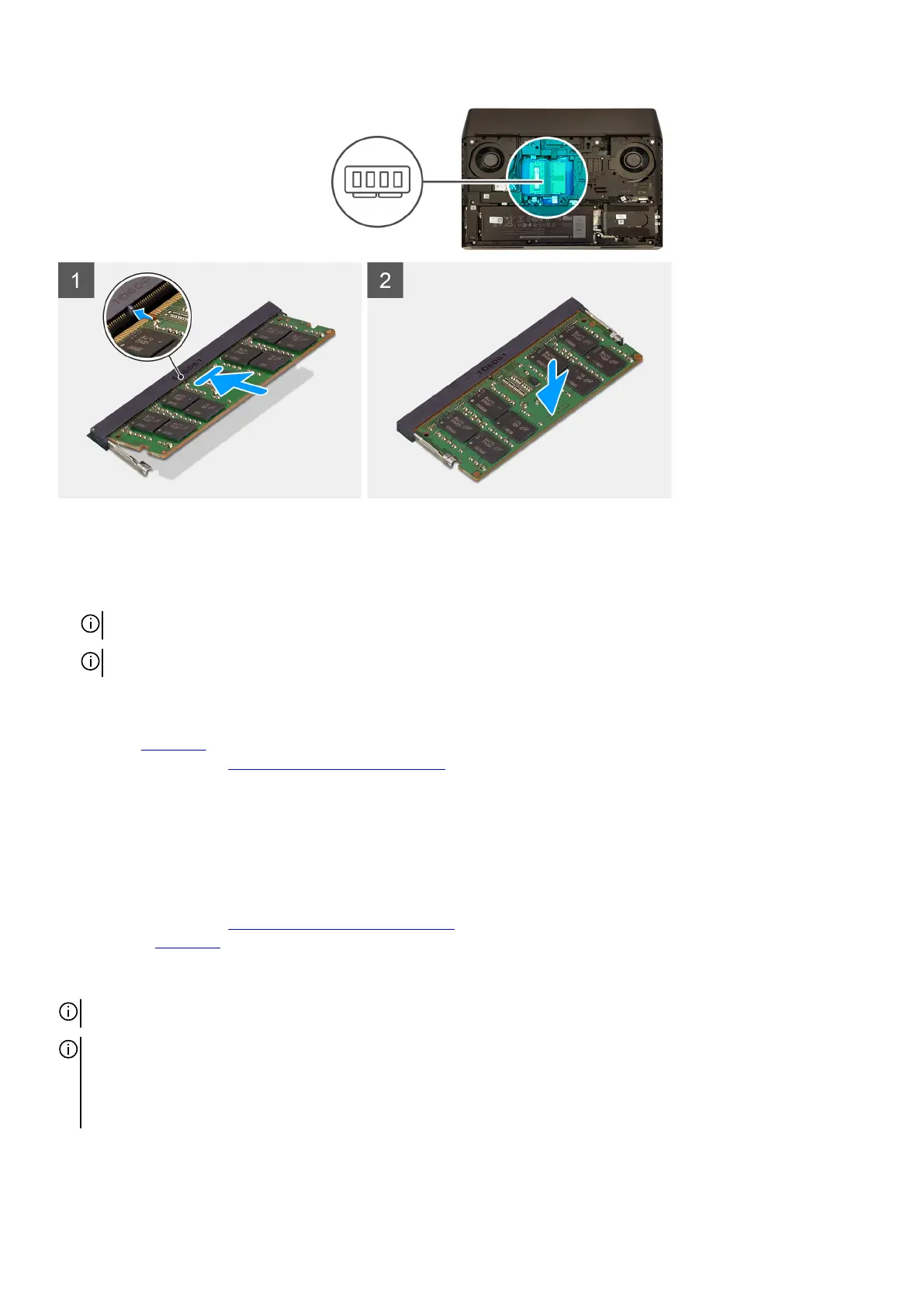
Steps
1. Align the notch on the memory module with the tab on the memory-module slot.
2. Slide the memory module firmly into the slot at an angle.
3. Press the memory module down until it clicks into place.
NOTE: If you do not hear the click, remove the memory module and reinstall it.
NOTE: Repeat steps 1 to 3 if you are installing two memory modules.
Next steps
1. Install the base cover.
2. Follow the procedure in After working inside your computer.
Solid-state drive—M.2 slot one
Removing the M.2 2280 solid-state drive from M.2 slot one
Prerequisites
1. Follow the procedure in Before working inside your computer.
2. Remove the base cover.
About this task
NOTE: This procedure applies only to computers shipped with an M.2 2280 solid-state drive installed in M.2 slot one.
NOTE: Depending on the configuration ordered, the computer may have up to four M.2 solid-state drive installed. The
solid-state drive configurations that are supported on M.2 slot one are as follows:
• M.2 2230 solid-state drive
• M.2 2280 solid-state drive
The following image indicates the location of the M.2 2280 solid-state drive in M.2 slot one and provides a visual representation of
the removal procedure.
18










 To Next Page