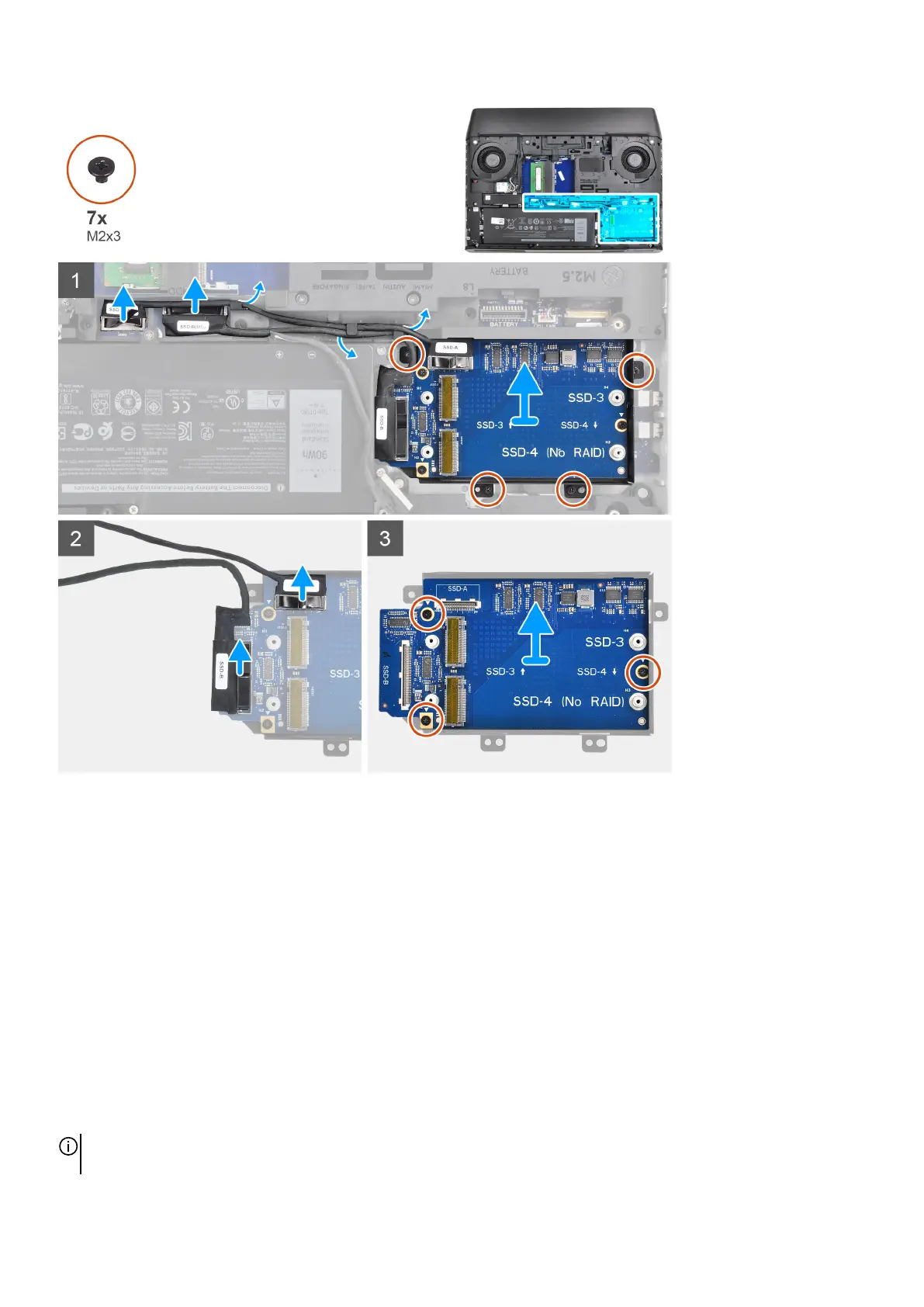
Steps
1. Disconnect the solid-state drive interposer board cables from the system board.
2. Remove the solid-state drive interposer board cables from the routing guides on the computer base.
3. Remove the four screws (M2x3) that secure the solid-state drive interposer board bracket to the palm-rest assembly.
4. Lift the solid-state drive interposer board assembly off the palm-rest assembly.
5. Disconnect the solid-state drive interposer board cables from the solid-state drive interposer board.
6. Remove the three screws (M2x3) that secure the solid-state drive interposer board to the solid-state drive interposer board
bracket.
7. Lift the solid-state drive interposer board off the solid-state drive interposer board bracket.
Installing the solid-state drive interposer board
Prerequisites
If you are replacing a component, remove the existing component before performing the installation procedure.
About this task
NOTE: Depending on the configuration ordered, the computer may have up to four M.2 solid-state drives installed. This
procedure applies only to computers shipped with more than two solid-state drives.
31










 To Next Page