84 Internal Card With Bluetooth Wireless Technology
8
Remove the status light board (see "Removing the Status Light Board" on
page 75).
9
Remove the palm rest assembly (see "Removing the Palm Rest Assembly"
on page 79).
10
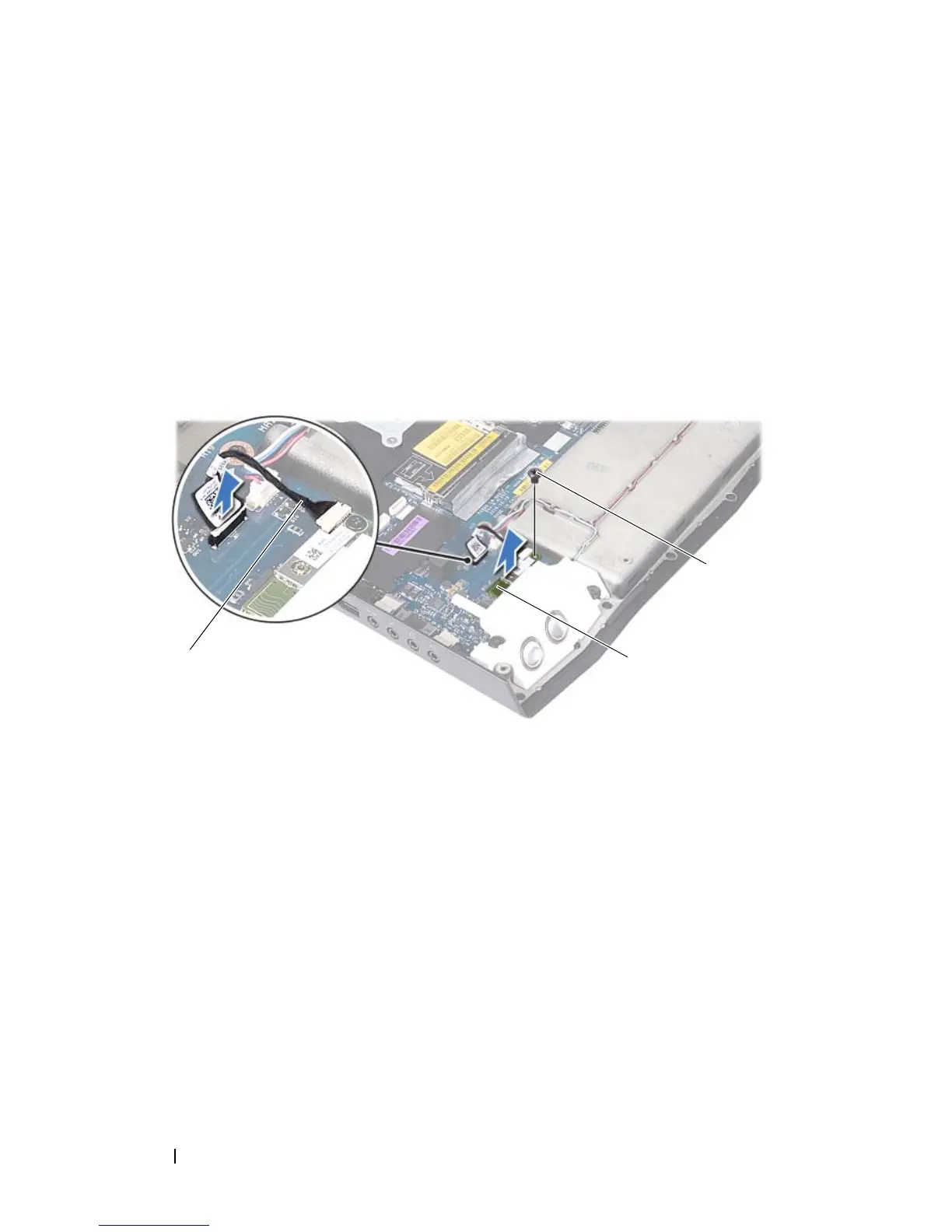
Disconnect the Bluetooth-card cable from the connector on the system
board.
11
Remove the screw that secures the Bluetooth card to the system board.
12
Lift the Bluetooth card away from the system board.
Replacing the Bluetooth Card
1
Follow the instructions in "Before You Begin" on page 9
2
Align the screw hole on the Bluetooth card with the screw hole on the
system board.
3
Replace the screw that secures the Bluetooth card to the system board.
4
Connect the Bluetooth-card cable to the connector on the system board.
5
Replace the palm rest assembly (see "Replacing the Palm Rest Assembly"
on page 81).
1 Bluetooth-card cable 2 Bluetooth card
3 screw













 To Next Page