Identifier GUID-6FD32244-34F4-4843-983D-B6C14903EFC9
Status Released
Replacing the display panel
WARNING: Before working inside your computer, read the safety information that shipped with your computer and follow the
steps in Before working inside your computer. After working inside your computer, follow the instructions in After working inside
your computer. For more safety best practices, see the Regulatory Compliance home page at www.dell.com/
regulatory_compliance.
Topics:
• Procedure
• Post-requisites
Identifier GUID-349273A7-D57D-4CCE-9A9D-E31C7FD15092
Status Released
Procedure
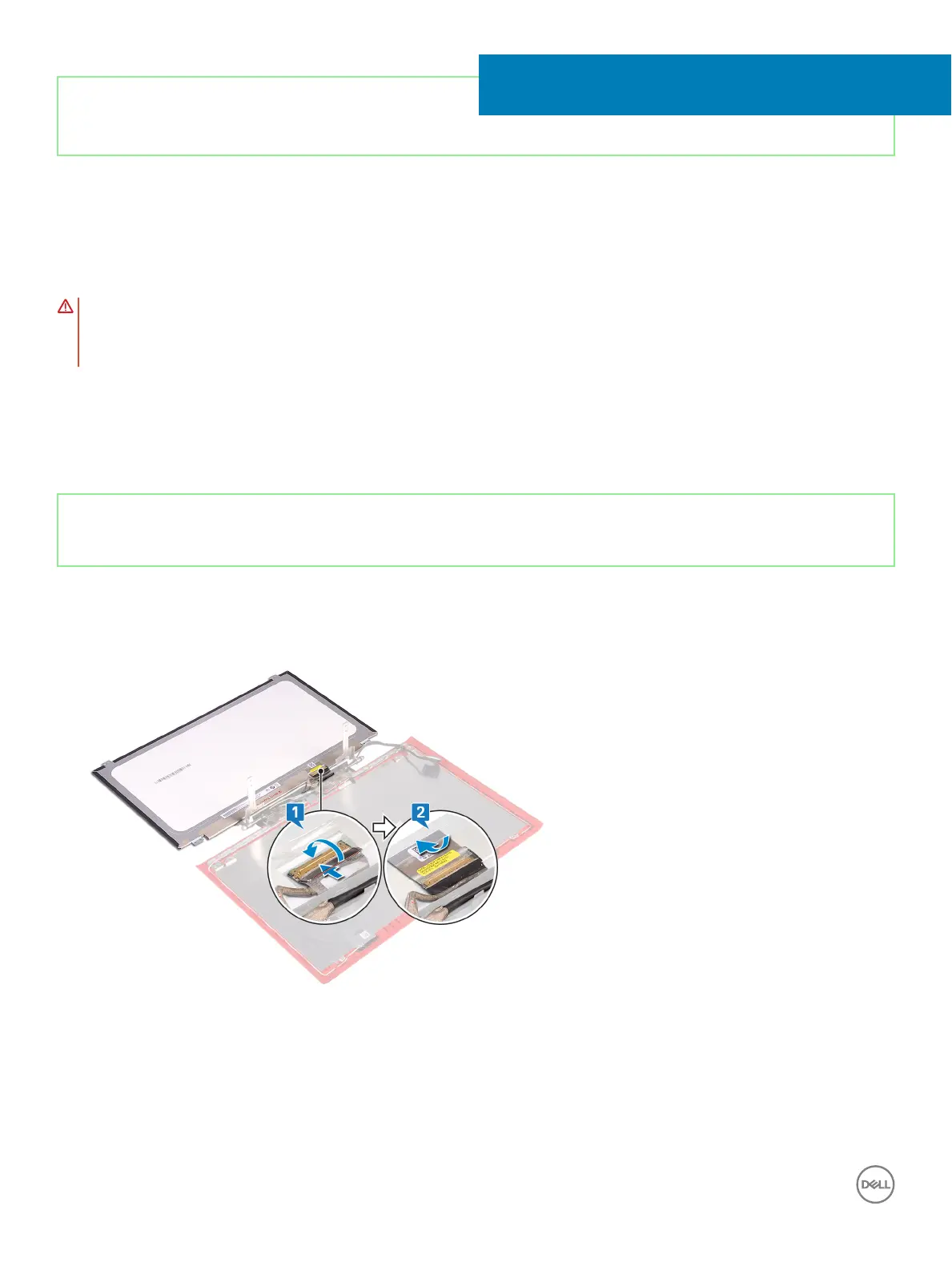
1 Slide the display cable into the connector on the display panel and close the latch to secure the cable.
2 Adhere the tape that secures the display cable to the display panel.
3 Turn the display panel over and gently place it on the display back-cover.
4 Align the screw holes on the display panel with the screw holes on the display back-cover.
5 Replace the four screws (M2x2.5) that secure the display panel to the display back-cover.
48
112 Replacing the display panel



 To Next Page