FInstalling SD card reader
1 Insert the SD card reader into the slot on the system board.
2 Replace the screw(6+/-1) to secure the SD card reader to the front panel door.
NOTE: The screw holder is beneath the SD card reader.
3
Connect the SD card reader cable to the connector on the system board.
4 Close the front panel door.
5 Install the:
a Front bezel
b Back cover
6 Follow the procedure in After working inside your computer.
Memory modules
Removing memory module
1 Follow the procedure in Before working inside your computer.
2 Remove the:
a Back cover
b Front bezel
3 Open the Front panel door.
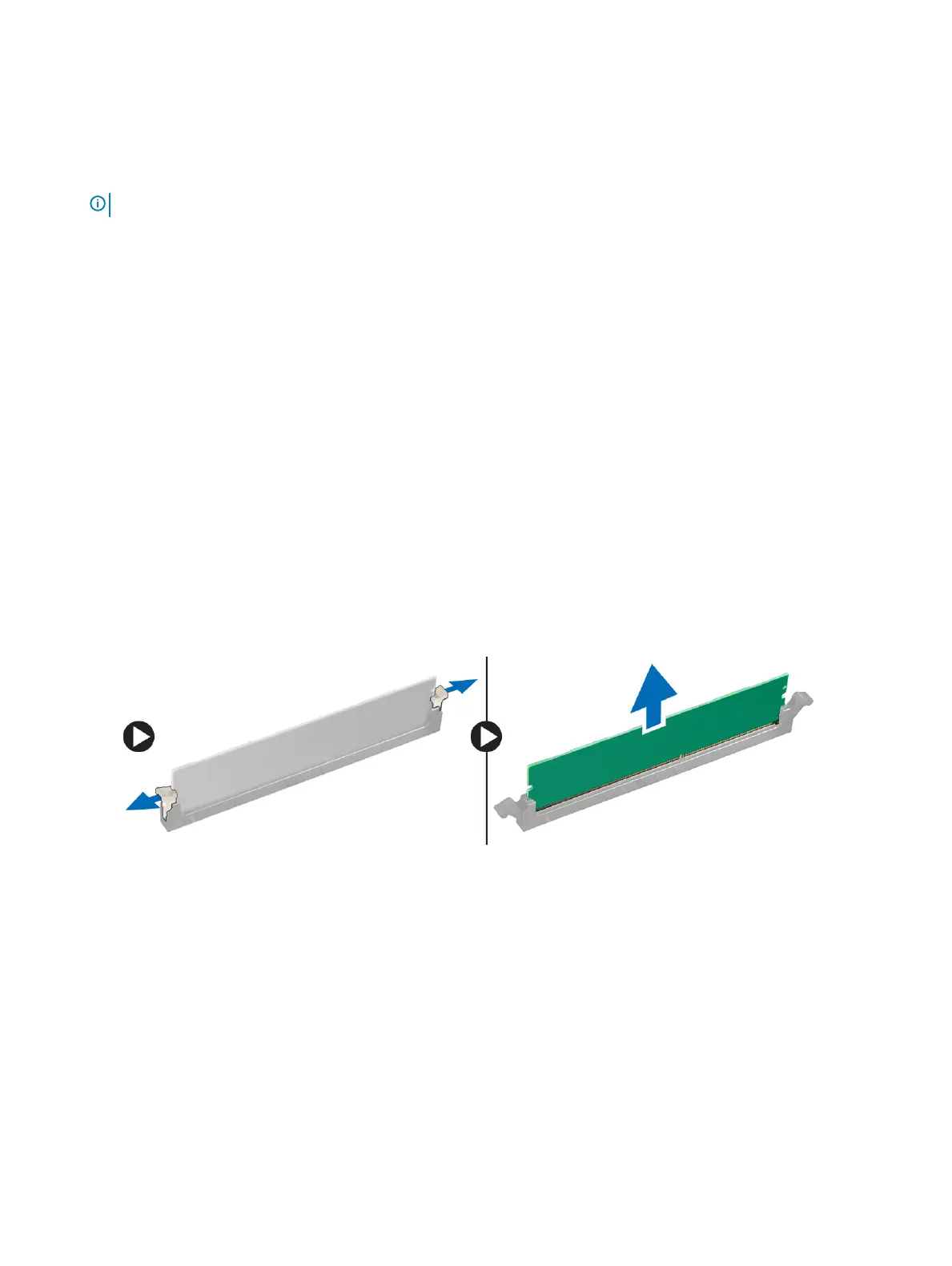
4 To remove the memory module:
a Pull the clips securing the memory module until the memory module pops up.
b Lift the memory module from the connector on the system board.
Installing memory module
1 Align the notch on the memory module with the tab on the connector.
2 Insert the memory module into the connector.
3 Press the memory module until the memory module retention tabs click into place.
4 Close the front panel door.
5 Install the:
a Front bezel
b Cover
6 Follow the procedure in After working inside your computer.
Disassembly and reassembly
25








 To Next Page