ASDA-M Chapter 4 Panel Display and Operation
Revision December, 2014 4-5
4.3.5 Monitor Display
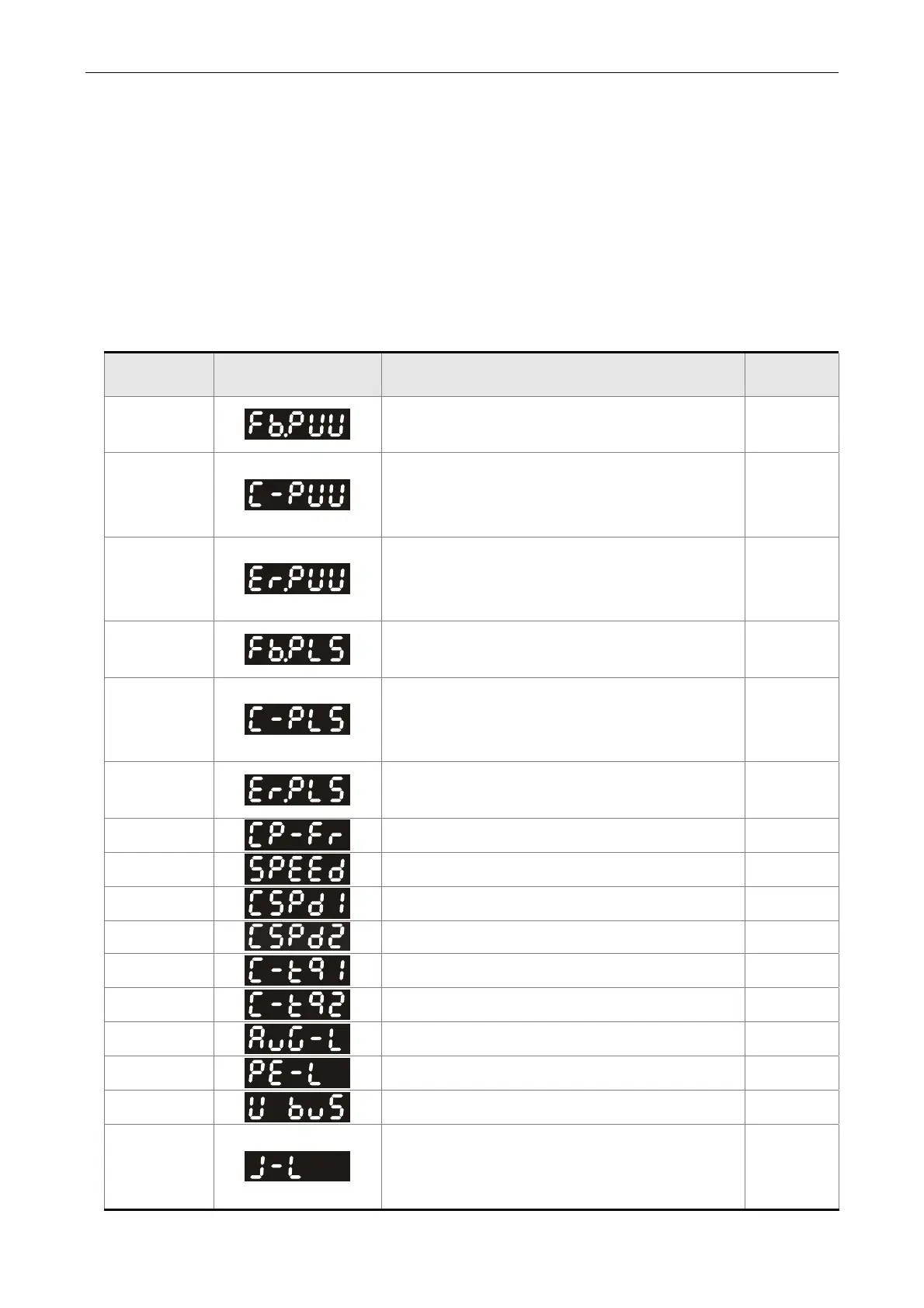
When the drive is applied to the power, the display will show the monitor displayed symbol
for a second, and then enter into the Monitor Mode. In Monitor Mode, SEL Key can select
the desired monitor axis. The UP / DOWN Key can change the desired monitor variable. Or,
the user can directly change parameter P0-02 to set the monitor code. When applying to
the power, the system will pre-set the monitor code according to the setting value of P0-02.
For example, the setting value of P0-02 is 4. Every time when applying to the power, it will
display C-PLS monitor sign first, and then shows the input pulse number of pulse
command.
P0-02
Setting Value
Monitor Displayed
Symbol
Description Unit
0
Motor feedback pulse number (after the
scaling of electronic gear ratio) (User unit)
[user unit]
1
Input pulse number of pulse command
(after the scaling of electronic gear ratio)
(User unit)
[user unit]
2
The difference of error pulse number
between control command pulse and
feedback pulse number (User unit)
[user unit]
3
Motor feedback pulse number (encoder
unit) (1.28 millions Pulse/rev)
[pulse]
4
Input pulse number of pulse command
(before the scaling of electronic gear ratio)
(encoder unit)
[pulse]
5
Error pulse number (after the scaling of
electronic gear ratio) (encoder unit)
[pulse]
6
Input frequency of pulse command [Kpps]
7
Motor speed [r/min]
8
Speed input command [Volt]
9
Speed input command [r/min]
10
Torque input command [Volt]
11
Torque input command [%]
12
Average torque [%]
13
Peak torque [%]
14
Main circuit voltage [Volt]
15
Ratio of load / motor inertia
(note: If the panel shows 13.0, the inertia ratio
is 13.)
[1times]


 To Next Page
 Loading...