32
Amplon N Series
z
For models UPS602N2004N0B0 (6 kVA ) & UPS103N2004N0B0 (10 kVA ) &
UPS602N2004N0BA (6kVA ) & UPS103N2004N0BA (10kVA ):
NOTE :
For models UPS602N2004N0B0 (6 kVA) & UPS103N2004N0B0 (10 kVA)
& UPS602N2004N0BA (6kVA) & UPS103N2004N0BA (10kVA), their
external battery pack wiring methods are the same. Below, we only use
model UPS103N2004N0B0 (10 kVA) as an example for illustration.
1
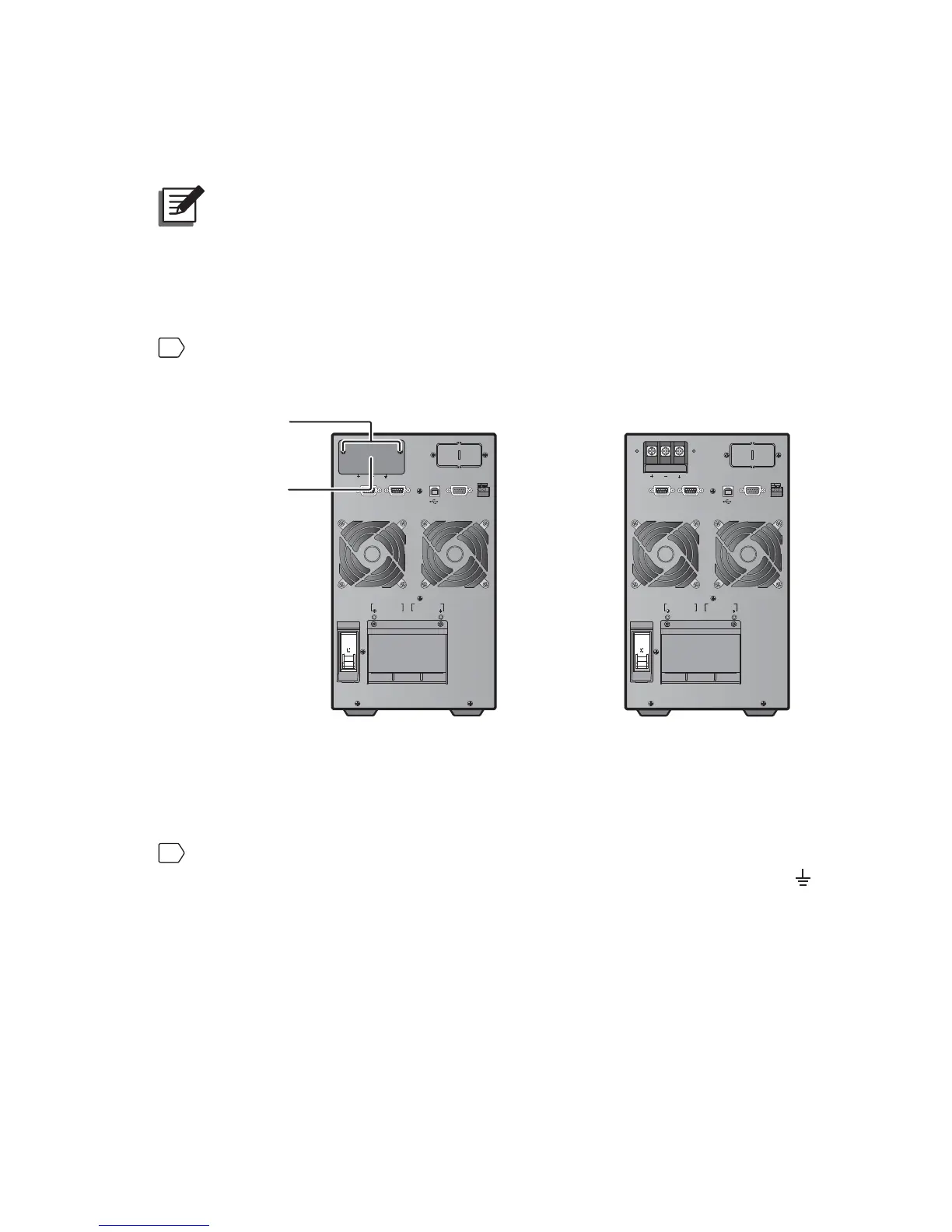
Remove the two screws from the external battery connector’s panel shown
below.
)LJXUH5HPRYDORI([WHUQDO%DWWHU\&RQQHFWRU¶V3DQHO
(After Removal of External
Battery Connector’s Panel)
(Before Removal of External
Battery Connector’s Panel)
ON
OFF
RS-23 2 REPOREPO
PARALLEL PARALLEL
INPUT
BREAKER
UPS O UTPU T
N
N
L
L
AC INPUT
EXTERNAL BATT. CONNECTOR 240Vdc.48A
MINI SLOT
ON
OFF
RS-23 2 REPOREPO
PARALLEL PARALLEL
INPUT
BREAKER
UPS O UTPU T
N
N
L
L
AC INPUT
EXTERNAL BATT. CONNECTOR 240Vdc.48A
MINI SLOT
Two Screws
External Battery
Connector’s Panel
2
Connect the three provided CU terminals (type C) to the battery cables, and
then connect the three CU terminals (type C) to the battery terminals (+, -,
).








 To Next Page