EasyManua.ls Logo

Denon DCD-3560 - Tracking Gain and Offset Verification

Denon DCD-3560
46 pages
Print Icon
To Next Page IconTo Next Page
To Previous Page IconTo Previous Page
Loading...
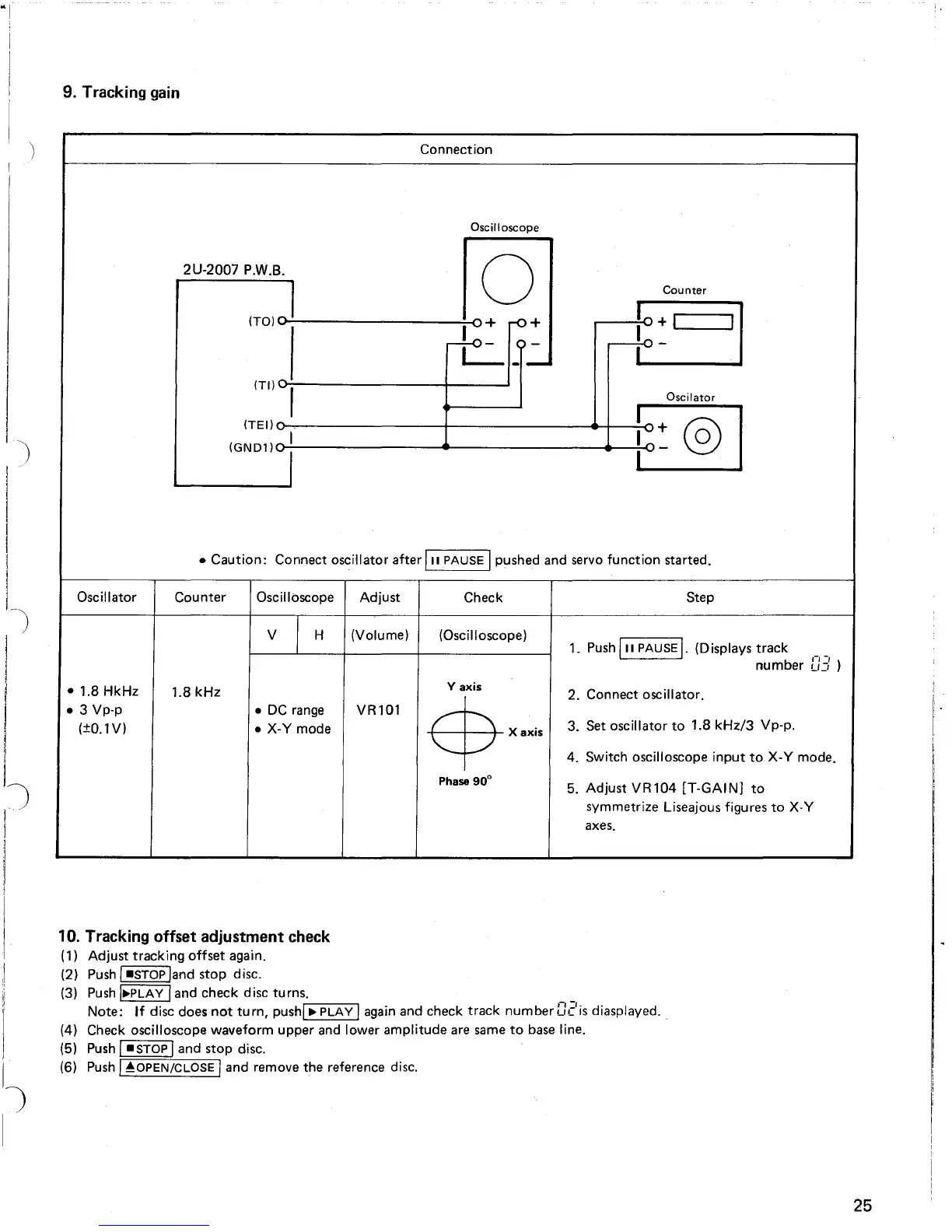
9. Tracking gain
Connection
Oscilloscope
Counter
2U-2007 P.W.B. 0
(TO)
o...:.I-------~I~O
+ rO +
I
r+o-
<;>-
L-
__
(Til
",
Oscilator
(TEI)~o--.-.
__
------t----_---<l~-!
+_
01
IOND1J i
\::::.J
Caution:
Connect oscillator after
III
PAUSE Ipushed and servo
function
started.
Step
1.
Push
III
PAUSE
I.
(Displays
track
__
number
U:::
)
2. Connect oscillator.
3.
Set
oscillator
to
1.8
kHz/3
Vp-p.
4. Switch oscilloscope
input
to
X-Y
mode.
5. Adjust
VR104
[T-GAIN]
to
symmetrize Liseajous figures
to
X-Y
axes.
Oscillator
Counter
Oscilloscope
Adjust
Check
V
I
H
(Volume)
(Oscilloscope)
1.8 HkHz
1.8
kHz
Yaxis
3 Vp-p
DC
range
VR101
$x.~,
(±O.1V)
X-Y
mode
Phase
90
0
10. Tracking offset adjustment check
(1) Adjust tracking
offset
again.
(2)
Push
I-STOP
land stop disc.
(3)
Push
I~PLAY
Iand check disc turns.
Note:
If
disc does
not
turn,
pushrl
~""'P::-:L""'AC:-y""l
again
and check
track
number c:eis diasplayed
..
(4) Check oscilloscope waveform upper
and
lower amplitude
are
same
to
base
line.
(5)
Push
I-STOP
Iand stop disc.
(6)
Push
I
~OPEN/CLOSE
, and remove the reference disc.
25

Table of Contents

Related product manuals