EasyManua.ls Logo

Denon DCD-3560 - Special Modes and IC Functions; Heat Run Mode Operation; CXA1081 S IC Terminal Functions

Denon DCD-3560
46 pages
Print Icon
To Next Page IconTo Next Page
To Previous Page IconTo Previous Page
Loading...
IHEAT RUN MODE FUNCTION
Heat Run Mode
1)
To
activate
While hold pushing
AUTO
EDIT, A-B and I+lI keys
simultaneously,
turn
the
unit
power
on.
The
remote
control
sensor
indicator will light
to
show
that
the
unit
is
shifted
in
Heat Run
mode.
Be
sure
to
load
the
disc previously.
Press
the
disc
holder
open/close
button
(6
OPEN/CLOSE)
to
cancel
Heat
Run mode.
* This
mode
functions
only
for a disc with 21 pieces
of
music
or
more.
For
a disc with
20
pieces
of
music
or
lesser, please
do
not
use.
2)
Operation
During
the
Heat Run
mode
to
shift
the
unit
in
Play
mode
makes
the
unit
replays from
the
first music
after
opens
the
loader once
and
re-closes it when finish playing
the
last
track
(comes
into
lead
out).
Hereafter,
operates
open/close
of
loader, servo
on,
reading
of
TOC, and playing repeatedly,
and
repeats playing
the
two
traks;
the
first
and
the
last ones.
3) Error Message
When
the
system
error
occurs while
in
Heat Run
mode,
the
following
error
message will display
on
the
Track
No.
indicator and
stops
operation.
1.
E1
At
the
time
of
Focus
Servo does
not
activate.
2. E2
When unable
to
detect
synchronous
pattern
however
the
disc
is
in
rotating. (GFS
does
not
drive.)
3.
E3
No
synchronous
pattern
can be
detected
while
in
Play
mode.
(No
GFS
drives.)
4.
E4
When TOC
is
unreadable
in
despite
of
servo
is
activated.
5.
E5
In
case
of
loader
malfunctions. (Unable
to
turn
on
the
switch,)
6.
E6
The
inner ci rcle switch
of
Pick-up does
not
tu rn off.
7.
E7
The inner circle switch
of
Pick-up does
not
turn
on.
*
The
number
of
operation
up
to
the
stop
will be displayed
on
the
minute
and second
portion
of
the
indicator.
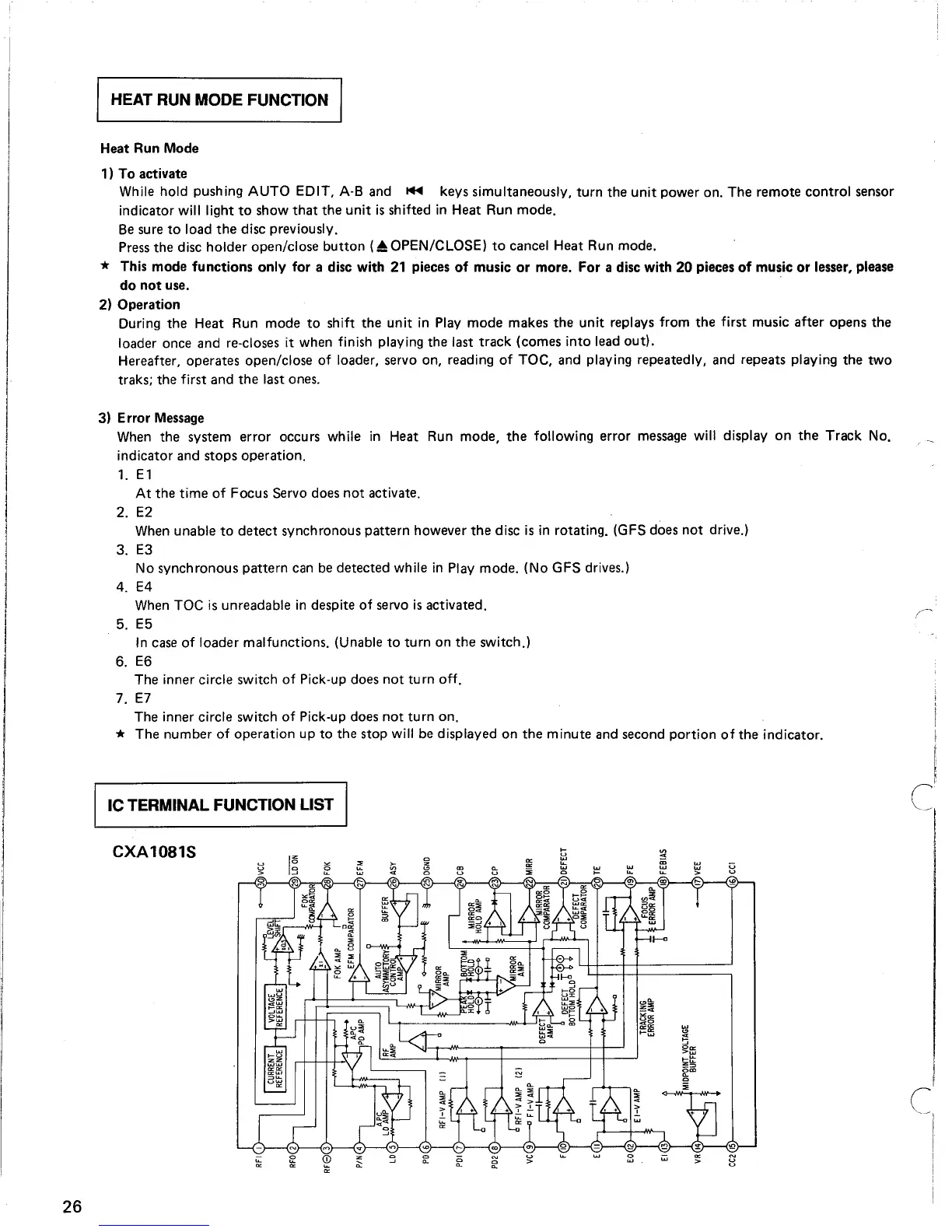
IC TERMINAL FUNCTION LIST
26
CXA1081S
~
~
~
..,
~
i;
>-

Table of Contents

Related product manuals