Part Number
Issue
Date
Page
6159938880
13
01/2018
142 / 249
01/2018 142 (249)
10.2 Transfer the Offline Data to the Delta
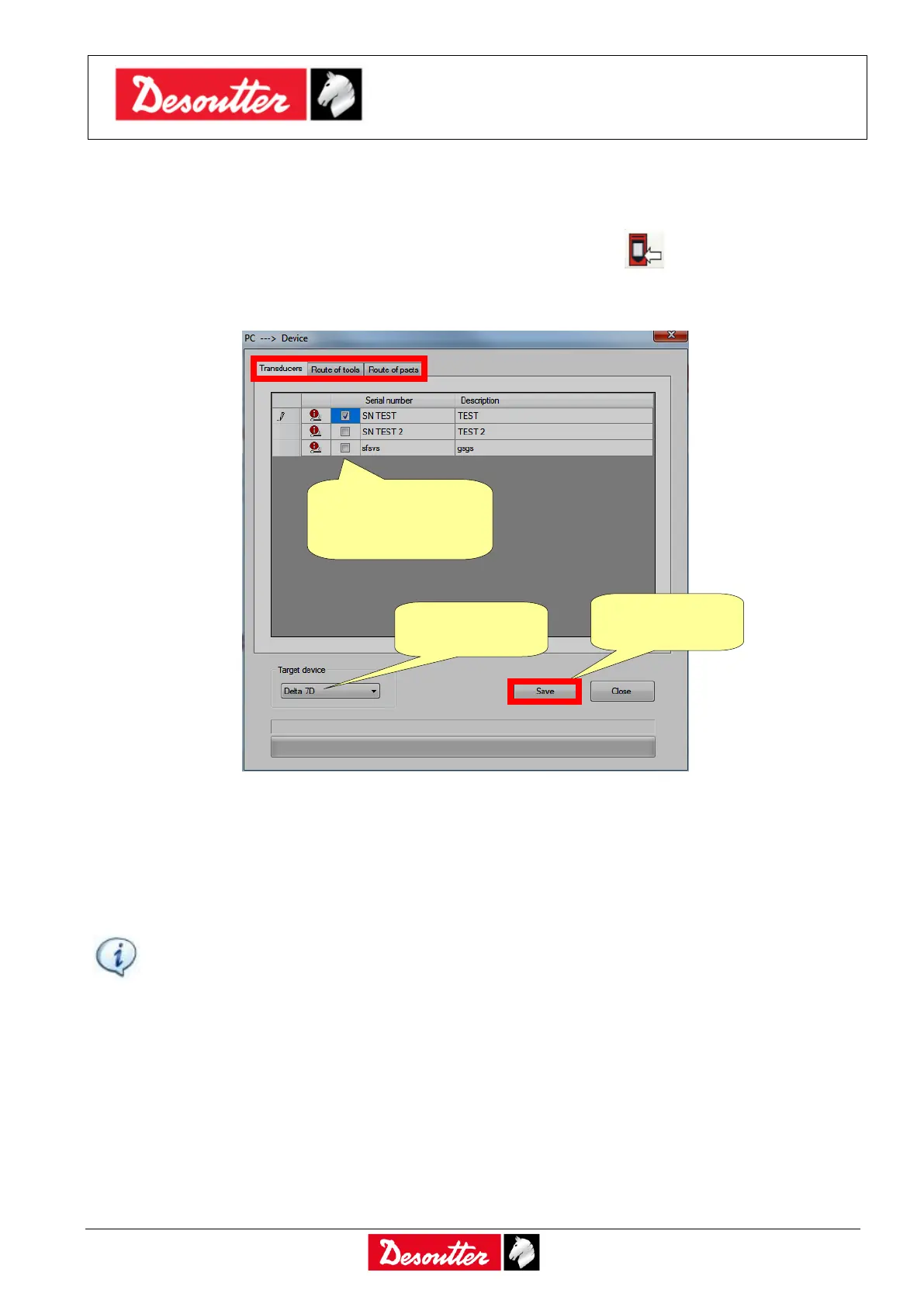
Once the Route is defined in the Offline mode either click on the icon Transfer PC ---> Device placed
in the main toolbar (refer to the paragraph “Toolbar” for further details) or select the Transfer →
PC ---> Device from the Menu List (refer to the paragraph “Menu list” for further details) to transfer it
to the Delta:
Select either the Route of tools/psets or the transducers and click on Save to send data to the Delta.
It is possible to send one Route of tools and/or one Route of Psets to each Delta.
It is also possible to transfer to the Delta the analog transducers defined offline.
NOTE: When the Route is sent to the Delta, all of the Psets / Tools / Transducers previously
stored in the Delta memory are deleted. If the user wants to keep a copy of the existing Psets
and Tools currently in use on the Delta, save them on the database before sending the Route
to the Delta.
Refer to the paragraph “Online mode” for further details.
Select the Route of
tools/psets or the
transducers



 To Next Page