EN - 10 A-306-1
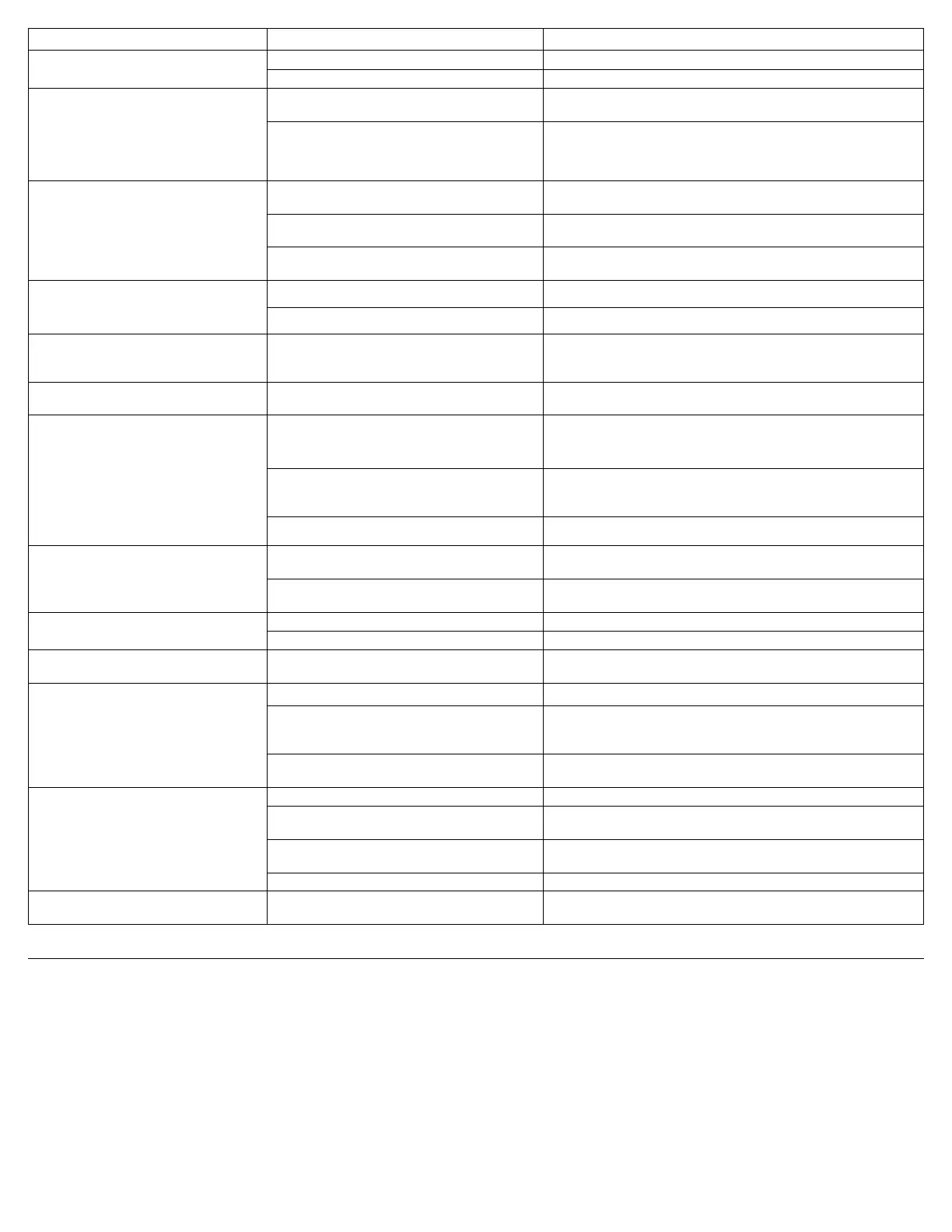
SYMPTOM POSSIBLE CAUSE REMEDY
Cannotadjust/changetheowrate. 1. Flow rate has been locked by your provider. 1. Contact your DeVilbiss provider.
2. Unit malfunction. 2. Contact your DeVilbiss provider.
Yellow Low Oxygen light is illuminated.
OR
Red Service Required light is illuminated with
audible alert.
External Power and/or Battery Power lights
illuminated. Unit is operating.
1.Airlterisblocked. 1.Checktheairlter.Ifthelterisdirty,washitfollowingthecleaning
instructions.
2. Exhaust is blocked. 2. Check the exhaust area; make sure there is nothing restricting the unit
exhaust.
Red Service Required light is illuminated.
External Power and/or Battery Power lights
illuminated. Audible alert is sounding. Unit does
not operate.
1.Airlterisblocked. 1.Checktheairlter.Ifthelterisdirty,washitfollowingthecleaning
instructions.
2. Exhaust is blocked. 2. Check the exhaust area; make sure there is nothing restricting the unit
exhaust.
3. Unit is overheated. 3a. Allow unit to cool and try again.
3b. Move unit to cooler location.
Power Fail Alert activates (External Power light
ashesandaudiblealertsounds).
1. Battery completely discharged. 1. Recharge battery.
2. Lost external power without battery installed. 2. Install battery or plug into external power.
RedServicerequiredlightisashing.Flow
Indicatorlightisashing.AudibleAlertis
sounding. Unit is operating.
1. Blocked or defective cannula or oxygen tubing 1.Detachcannula.Ifproperowisrestored,cleanorreplaceifnecessary.
Disconnecttheoxygentubingattheoxygenoutlet.Ifproperowisrestored,
check oxygen tubing for obstructions or kinks. Replace if necessary.
Unit does not operate when using with charged
battery. Power Fail alarm activates.
1. Battery is overheating. 1. Allow battery to cool.
DC Adapter is attached. Unit runs from Battery
or does not run. The External Power Present
Light not illuminated.
1. Poor connection to DC power source. 1. Ensure the DC accessory outlet is clean and a good connection can be
made. Insert the other end of the DC Adapter into the vehicle's DC
accessory outlet.
2. Vehicle power source (vehicle accessory connector)
dropped too low for the DC Adapter.
2. If the vehicle power source drops too low for the DC Adapter, the iGo will
revert to Battery operation (if present) or will cease operation until power is
restored.
3. Fuse in vehicle is blown. 3. Check the fuse and replace if necessary.
Lowest Battery Status Light is Yellow. Unit
beeps once.
1. Battery needs to be charged. 1. Plug unit into AC power or replace discharged battery with charged
battery.
2. Plug unit into DC accessory outlet to operate unit (battery will not
recharge on DC power).
Battery Status Lights never indicate fully
charged.
1. Battery needs to be conditioned. 1. Fully discharge battery then recharge.
2. Defective battery. 2. Contact your DeVilbiss provider.
YellowBatteryStatuslightisashing. 1. Unit is equipped with built-in battery test and the
battery pack is being checked.
1.Iflightasheslongerthan5minutes,batteryisdefective.Contactyour
DeVilbiss provider for a replacement.
Audible Alert sounds intermittently when
operating from DC Adapter.
1. Vehicle not running. 1. Start vehicle.
2. Poor connection to DC power source. 2. Ensure the DC accessory power port outlet is clean and a good
connection can be made. Insert the DC Adapter into the vehicle’s DC
accessory outlet.
3. Vehicle electrical system overloaded or defective. 3.HaveaqualiedautotechniciancheckelectricalsystemwhileiGois
attached.
Short Battery Run Time. 1. Battery needs to be reconditioned. 1. Perform a complete discharge and then a 100% charge of the battery.
2.Airlterisblocked. 2.Checktheairlter.Ifthelterisdirty,washitfollowingthecleaning
instructions.
3. Exhaust is blocked. 3. Check the exhaust area; make sure there is nothing restricting the unit
exhaust.
4.Intakeltersilencerisblocked. 4.Replacetheintakesilencer/lter.
If any other problems occur with your iGo. 1. Turn your unit Off and switch to your reserve oxygen system. Contact
your DeVilbiss provider immediately.
CARING FOR YOUR DEVILBISS IGO PORTABLE OXYGEN SYSTEM
WARNING
Before attempting any cleaning procedure, turn the unit Off and disconnect from AC or DC power.
Do not use lubricants, oils, or grease.
Air Filter
Theairltershouldbecleanedatleastonceaweek.Toclean,followthesesteps:
1. Removetheairlter.
2. Wash in a solution of warm water and dishwashing detergent.
3. Rinsethoroughlywithwarmtapwaterandtoweldry.Theltershouldbecompletelydrybeforereinstalling.
CAUTION-To prevent product damage, do not attempt to operate the unit without the air lter or while the lter is still damp.
NOTE- Device has an internal intake lter that must be inspected by a qualied provider/technician every 3 years.


 To Next Page
 Loading...