EN - 9A-306-1
NOTE– You will get longer operating time on your Battery if you operate your iGo in PulseDose mode.
7. ChecktheFlowRatetomakesureitissettoyourprescriptionsetting.Ifadjustmentisneeded,usetheFlowRateSettingbuttonstoadjusttheowratetothesetting
prescribed by your physician. NOTE– Your DeVilbiss provider may have set the ow so that it cannot be adjusted.
WARNING
Under certain circumstances, oxygen therapy can be hazardous. Seeking medical advice before using an oxygen concentrator is advisable. It is very important to
follow your oxygen prescription. Do not increase or decrease the ow of oxygen - consult your physician.
8. WhenyouhavenishedusingtheiGo,pressandholdthePowerButtontoturnOff.StoretheiGoinacool,drylocationwhennotinuse.
TRAVEL
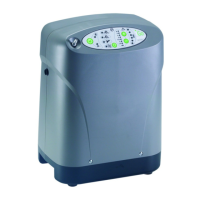
The iGo has two options for portability; both are for use on pedestrian surfaces:
Rolling Carry Case
1. Place the iGo in the carry case.
2. Thecarrycasehasanopeningforthecannulaandoneforexternalpowerconnections.Italsohasseveralscreenedopeningsforairow.Neverblocktheairopenings.
Do not use a carry case other than one approved by DeVilbiss.
3. Toadjustthehandleheighteitherpulluponthehandleand/orpressthebuttonandpushdownonthehandle.
CAUTION–The iGo should be taken as a carry-on item if traveling by air. If you are checking the iGo as luggage, it must be packed in a protective case. The Rolling
Carry Case does not provide adequate protection if checking the iGo.
Detachable Wheeled Cart
1. Align the locator holes on the bottom of the unit to the tabs on the cart.
2. Align the screw to the insert on the back of the iGo and hand- tighten the knob on the cart.
3. Pushthebuttononthecarthandletoadjusttheheight.
CAUTION– When transporting the iGo, care should be taken to avoid excessive shock.
NOTE– Before starting a trip, check with your DeVilbiss provider for options (e.g. extra battery/AC Cord for use at destination). Refer to Accessories for appropriate cord.
RESERVE OXYGEN SYSTEM
As a precaution, your DeVilbiss provider may supply you with a reserve oxygen system. If your unit loses electrical power or fails to operate correctly, the Patient Alert System
will sound to signal you to switch to your reserve oxygen system (if provided). Contact your DeVilbiss provider.
WARNING
Availability of an alternate source of oxygen is recommended in case of power outage or mechanical failure. Consult your physician for the type of back-up
system required. Do not ignore alerts.
TROUBLESHOOTING
The following troubleshooting chart will help you analyze and correct minor iGo malfunctions. If the suggested procedures do not help, switch to your reserve oxygen system
and call your DeVilbiss homecare provider. Do not attempt any other maintenance.
WARNING
To avoid electric shock hazard, do not remove the covers. There are no user serviceable internal components. The covers should only be removed by a qualied
DeVilbiss provider/DeVilbiss homecare technician.
SYMPTOM POSSIBLE CAUSE REMEDY
Unit does not operate. No lights are illuminated
and nothing happens when power button is
pressed and held for 1 second.
1. Power button was not held. 1. Press Power button and hold for 1 second.
2. No External Power and no charged battery installed. 2. Plug into external power or install charged battery.
3. Unit malfunction. 3. Contact your DeVilbiss provider.
Unit does not operate. External Power Light
asheswithaudiblealert.PowerFailAlertis
activated.
1. AC power cord not properly inserted into wall outlet
or DC adapter not attached.
1. Check power cord connection at the wall outlet and adapter connection to
unit.
2. Charged battery not installed or defective battery. 2. Install charged battery or contact your provider for a replacement battery.
3. No power at wall outlet. 3. Check your home circuit breaker and reset if necessary. Use a different
wall outlet if the situation occurs again.
4. Faulty AC Adapter. 4. Contact your DeVilbiss provider.
5. Faulty DC accessory power port outlet. 5. Check automotive fuse.
6. Faulty DC Adapter. 6. Contact your DeVilbiss provider.
NoBreathDetectedlightashingandaudible
alert sounding (PulseDose Mode only).
Unit set up for PulseDose mode but changed
to Continuous Flow because no breath was
detected.
1. Obstructed cannula or oxygen tubing. 1.Detachcannula.Ifproperowisrestored,cleanorreplaceifnecessary.
Disconnecttheoxygentubingattheoxygenoutlet.Ifproperowisrestored,
check oxygen tubing for obstructions or kinks. Replace if necessary.
2.Cannulaisnotadjustedproperly. 2.Checkallcannulaconnectionstomakesuretheyaretight,andadjustthe
cannulatotcomfortablyinyournose.Ensuretubingisnotkinked.
3. Tubing/cannula too long. 3. Replace with shorter tubing/cannula.
4.Humidierattached. 4.Removehumidier.
5.Lowowcannulabeingused. 5. Replace with standard cannula.
6. Atmospheric Pressure Port obstructed. 6. Remove obstruction.
7. Patient not candidate for PulseDose delivery.
NOTE-Unit will automatically change to CF Mode if
this condition is not corrected.
7. Use CF delivery for patients that fail to trigger equipment (e.g. mouth
breather with closed soft palate.)


 To Next Page
 Loading...