EN - 5A-306-1
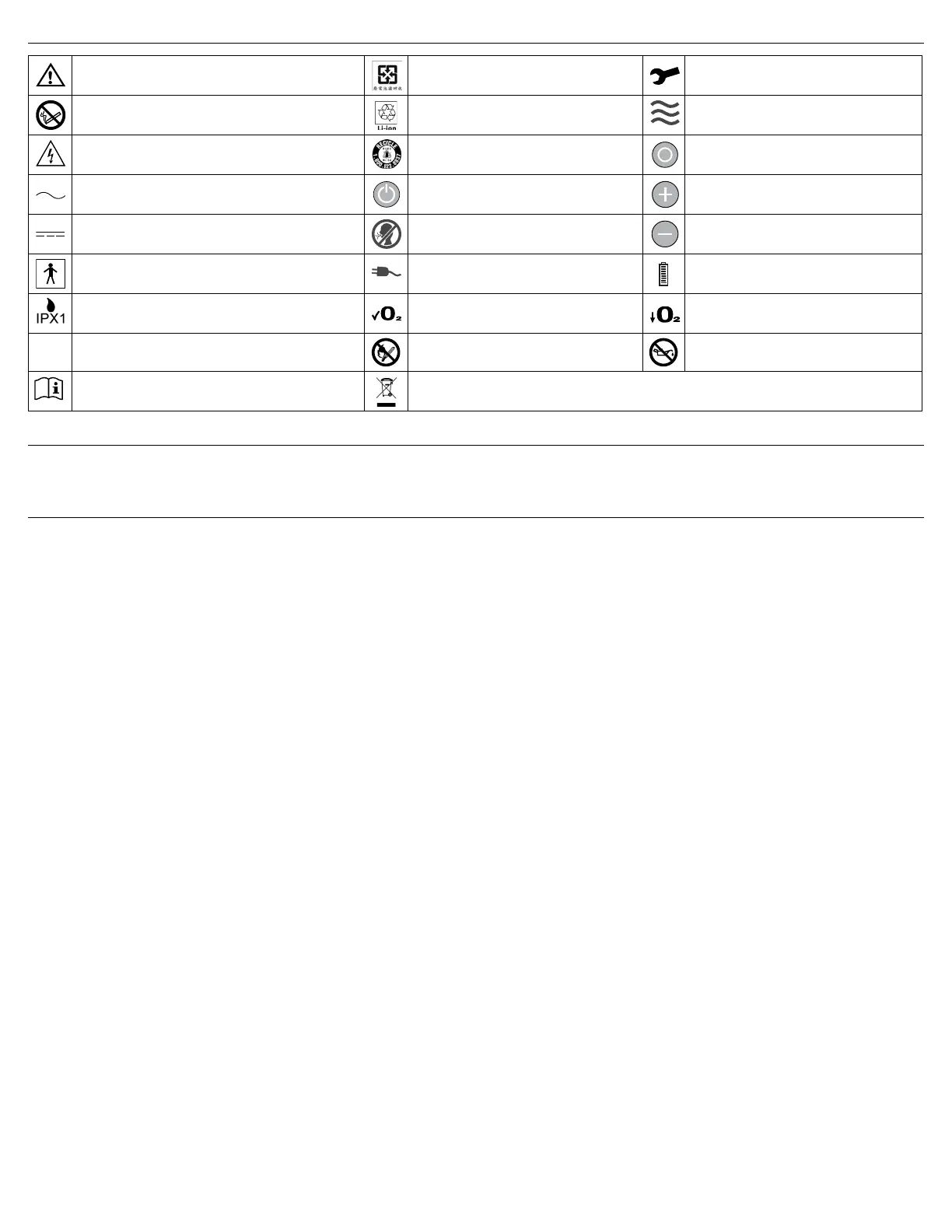
IEC SYMBOLS AND SYMBOL DEFINITIONS
Attention - Consult Instruction Guide WEEE Taiwan Service Required
Danger-No Smoking or Naked Flame Recyclable Li-ion Battery Flow Indicator
Electric Shock Hazard RBRC Recycle
Mode Select (Continuous Flow/PulseDose)
Button
Alternating Current Power Button Increase Flow Setting
Direct Current (DC Power)
No Breath Detected in PD Mode with
audible alert
Decrease Flow Setting
Type BF Equipment
External Power Present Indicator (solid
light).PowerFailAlarm(ashinglight)
Rechargeable Battery Status Symbol
Drip Proof Equipment IPX1 Normal Oxygen Low Oxygen
IPX0
Non-protected (ordinary equipment) No Naked Flames Use no oil or grease
Follow instructions for use
The device contains electrical and/or electronic equipment that must be recycled per EC Directive
2002/96/EC - Waste Electrical and Electronic Equipment (WEEE)
INDICATIONS FOR USE
The Model 306 DeVilbiss iGo Portable Oxygen Concentrator System is indicated for the administration of supplemental oxygen. The device is not intended for life support, nor
does it provide any patient monitoring capabilities.
IMPORTANT PARTS (Page 2)
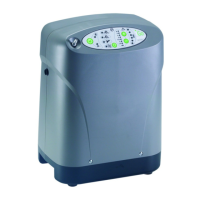
DeVilbiss iGo Portable Oxygen System (Fig. A-E)
1. Handle (one on top rear/two on bottom-sides)
2. Control Panel - Refer to iGo Control Panel below
3. Power Button - Press and hold the Power On/Off
Button to turn your unit on or off.
4. Oxygen Outlet - oxygen is dispersed through this
port.
5. Power Input - Connect either AC or DC power.
6. Communication Port - This port allows service
personnel to diagnose and monitor iGo
performance. It is not for patient use.
7. Air Filter
8. Rating Label (on bottom)
9. Exhaust Vents (on each side)
10. Cart Connection
11. Battery Bay
12. Slot in Battery Bay
13. Rechargeable Battery
14. Battery Tabs
15. Battery Latch
16. Battery Contacts
17. AC Adapter
18. DC Adapter
iGo Control Panel (Fig. 1)
1. Power Button - turns the system ON or OFF
2. NoBreathDetectedinPulseDoseModeLight--WhentheiGoisinPulseDosemodeanddoesn’tsenseanybreathingfor30seconds,lightashes;audiblealertwill
beep every 3 seconds when this activates. If a breath is detected during the alert, the alert condition is cleared. If a breath is not detected during the alert, the unit
changes to Continuous Flow mode after 60 seconds of alerting. NOTE–Once the unit changes to Continuous Flow, use the Mode Select Button to change back to
PulseDose.
3. External Power Present Light/Power Fail Alert
3a. External Power Present Light – Light illuminates when the iGo system is connected to either AC or DC power.
3b. PowerFailAlert–AudibleAlertsoundsinconjunctionwithashinglightfor15minuteswhenPowerFailAlertactivates.PressingthePowerButtonstopsthealert.
4. Oxygen Concentration Lights:
4a. Green Normal Oxygen Light = Normal Operation, Acceptable Oxygen Level; illuminates when your iGo is operating properly.
4b. Yellow Low Oxygen Light = Operating Below an Acceptable Oxygen Level; illuminates when there is a problem with your unit. Refer to Troubleshooting for
instructions
4c. Red Service Required Light = Abnormal Operation/Malfunction, Concentration Below an Acceptable Oxygen Level; illuminates with an audible alert when there is a
problem with your unit. Switch to your reserve oxygen system. Refer to Troubleshooting and/or call your DeVilbiss provider for instructions. Do not attempt any other
maintenance.
5. Mode Select Button and Flow Indicator Light
5a. Use Mode Select Button to select either PulseDose or Continuous Flow.
5b. Flow Indicator Light pulses with every breath when in PulseDose mode; illuminates continuously when in Continuous Flow mode
6. Green Flow Rate Setting Lights (1-6) and Flow Rate Setting Buttons
6a. YourproviderhassetyourprescribedowratesforbothPulseDoseandContinuousFlow.Donotchangethesesettingsunlessitisundertheorderofyour
physician.
6b. IncreaseFlowRateSettingButtonandDecreaseFlowRateSettingButton–usebuttonstoincreaseordecreaseyourowrateifachangeisorderedbyyour
physician.
7. Battery Status Gauge and Low Battery Alert – when a Battery is installed, this indicates the charge remaining in battery. All 6 lights illuminate Green when fully charged.
As battery becomes depleted, the top lights will go out. When battery gets to lowest operating level, the lowest light will turn Yellow and one short audible alert will sound.
The lights cycle when battery is being charged.


 To Next Page
 Loading...