25
EPAD2/CPAD2/CPAD3 series modules • Technical Reference Manual • Printing version 1.0.2 • October 04, 2016
Push button
Use the ID button to dene the module address via software. Detailed information how to use the button is
available in chapter: "Module reset".
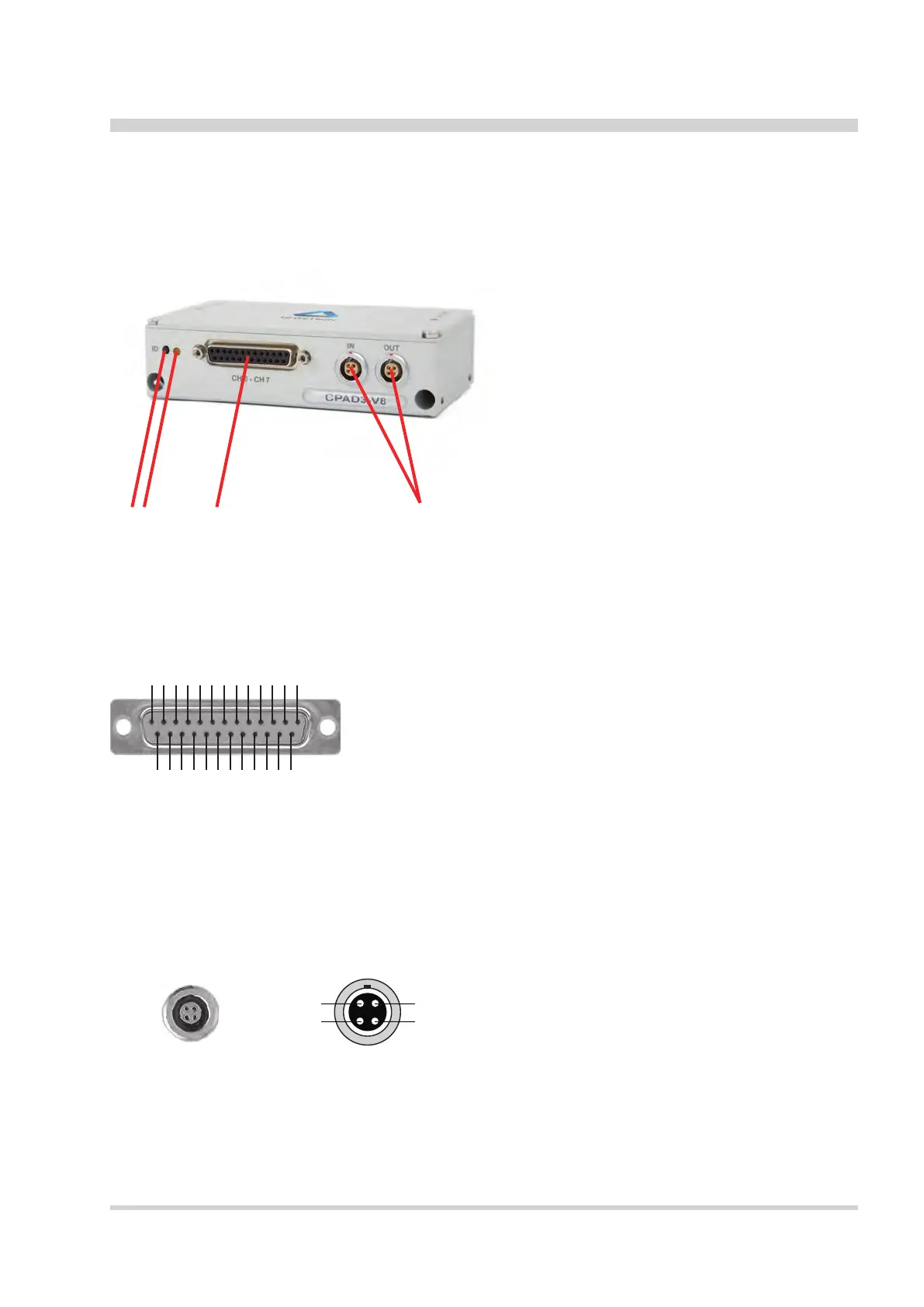
Connection
1 Voltage input connector
2 State LED
3 ID button
4 2x xPAD2/CPAD3 interface connector
12 3 4
Voltage input connector
The CPAD3-V8 module offers 8 differential voltage input channels.
Pin assignment:
1 Channel 0 (+)
2 Channel 0 (-)
3 Channel 1 (+)
4 Channel 1 (-)
5 Channel 2 (+)
6 Channel 2 (-)
7 Channel 3 (+)
8 Channel 3 (-)
9 Channel 4 (+)
10 Channel 4 (-)
11 Channel 5 (+)
12 Channel 5 (-)
13 Channel 6 (+)
14 Channel 6 (-)
15 Channel 7 (+)
16 Channel 7 (-)
17 Reserved
18 Reserved
19 Reserved
20 Power supply (+)
21 Reserved
22 GND
23 Reserved
24 Reserved
25 Reserved
25-pin female DSUB connector
1
14
2
15
3
16
4
17
5
18
6
19
7
20
8
21
9
22
10
23
11
24
12
25
13
xPAD2/CPAD3 interface connector
This connector can be used to connect the module to other xPAD2/CPAD3 series modules.
4
3
Pin assignment CPAD3:
1 CAN high
2 CAN low
3 Power supply (+)
4 GND
Schematic
4 pin LEMO series
connector
CPAD3-V8 Module


 To Next Page