DIMAX804KC User’s Manual
14
DEXON Systems
3.3
Custom Output Timing
The device contains several computer resolutions used by standard display systems today.
However, some applications (LED walls) may require a native format that isn’t enumerated on
device’s output timing list. The user can expand the output timing list with custom specified
timing parameters.
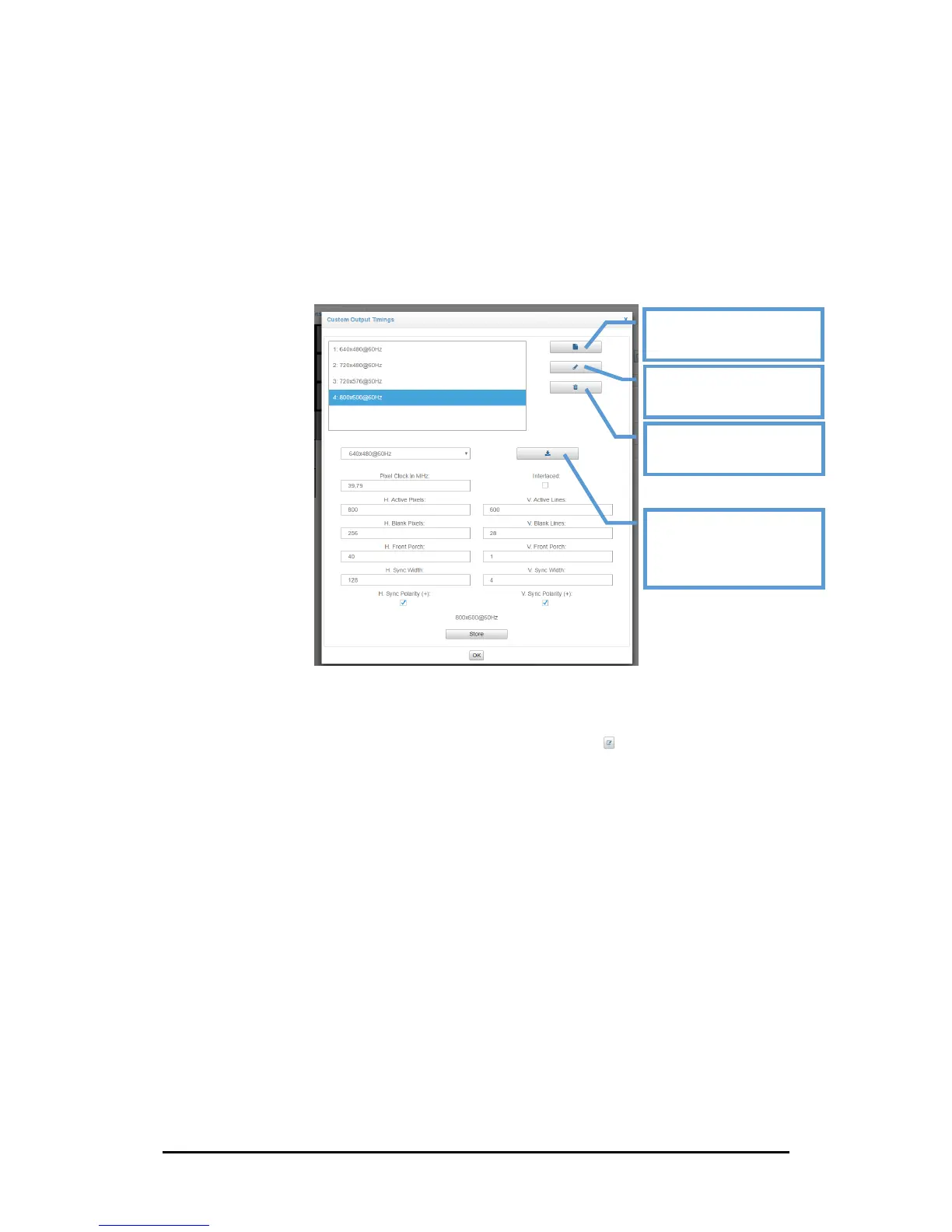
Figure 3-7. Custom Output Timing Editor
Custom Output Timing Editor helps to create a new output timing, modify a created timing or
delete one of created timings. This editor can be achieved by the button on output settings
page (this button will be hidden if the output channel is not capable to set custom output timing
parameters)
The Custom Output Timing feature will expand the output timing list on output settings page, if it
is compliant with the output card capabilities. Several custom timings can be created and they
can be used for several output channels also.
This editor gives total access to the parameters in order to create a custom output timing:
• The Pixel Frequency (unit: MHz) - the number of pixels per second
• The Active Area Width (unit: pixels) - the number of visible pixels per line
• The H Blanking Interval (unit: pixels)
• The H Front Porch (unit: pixels)
• The H Sync Width (unit: pixels)
• The Active Area Height (unit: lines) - the number of visible lines
• The V Blanking Interval (unit: lines)
• The V Front Porch (unit: lines)
• The V Sync Height (unit: lines)
• The Sync polarities (positive or negative)


 To Next Page