www.dfi .com
17
Chapter 2 Hardware Installation
Chapter 2
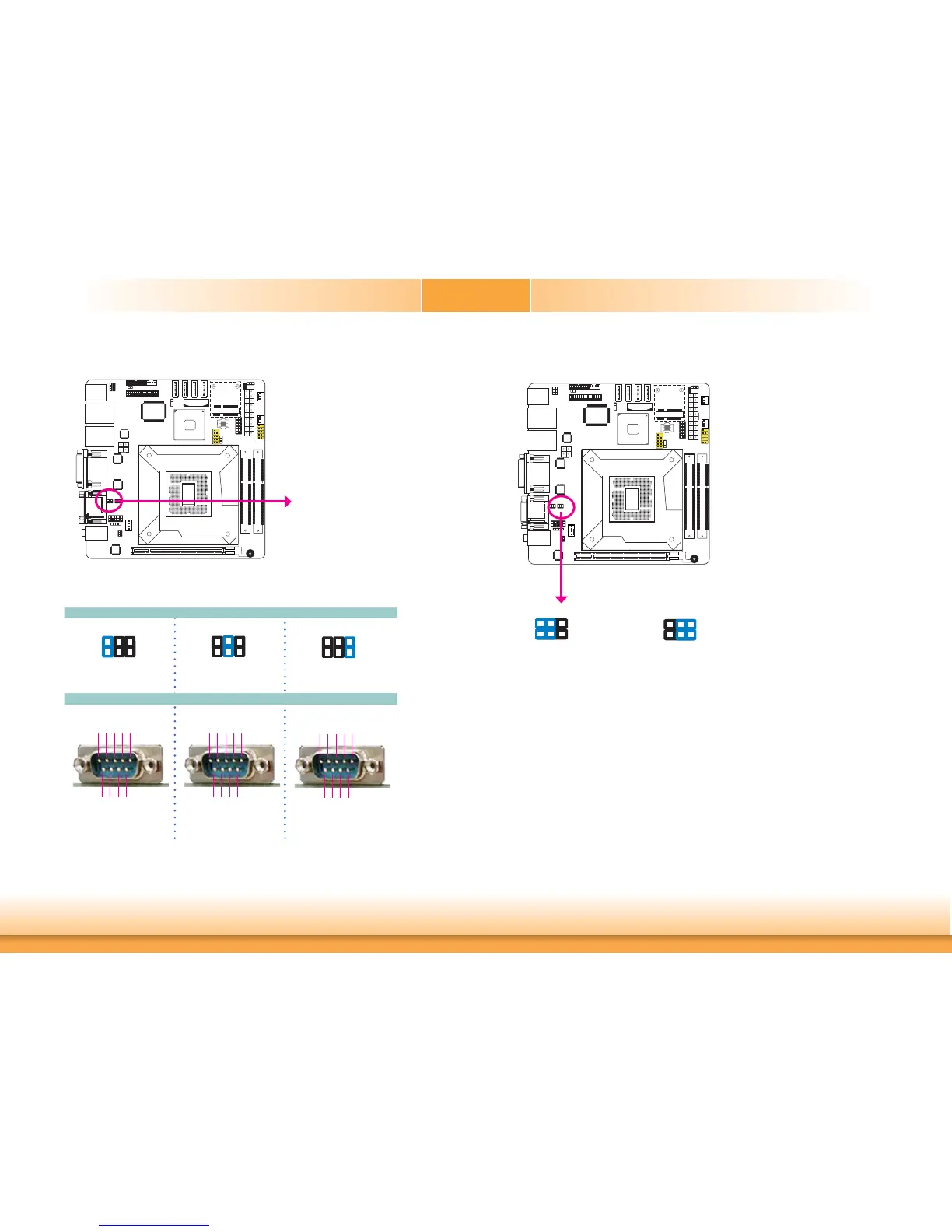
COM1 RS232/RS422/RS485 Select
JP1 (for COM1) is used to configure the COM ports to RS232, RS422 (Full Duplex) or RS485.
The pin function of the COM ports will vary according to the jumper’s setting.
JP1
5-6 On: RS485
6
42
531
JP1
RS232
RS422
Full Duplex
RS485
COM 1
DCD-
TD
RD
DTR-
GND
1
2345
RTS-
RI-
DSR-
CTS-
6789
642
531
1-2 On: RS232
(default)
3-4 On: RS422
Full Duplex
6
42
531
RXD+
TXD+
RXD-
TXD-
N.C.
12345
6789
N.C.
N.C.
N.C.
N.C.
DATA+
DATA-
N.C.
N.C.
N.C.
N.C.
6789
12345
N.C.
N.C.
N.C.
COM1 RS232/Power Select
JP3
JP3 (for COM1) is used to configure Serial COM port to pure RS232 or RS232 with power.
6
42
531
642
531
1-3 (RI), 2-4 (DCD) On:
RS232 (default)
3-5 (+5V), 4-6 (+12V) On:
RS232 with power


 To Next Page