DI-600 Service Manual
4.2.2. RS-232 Protocol
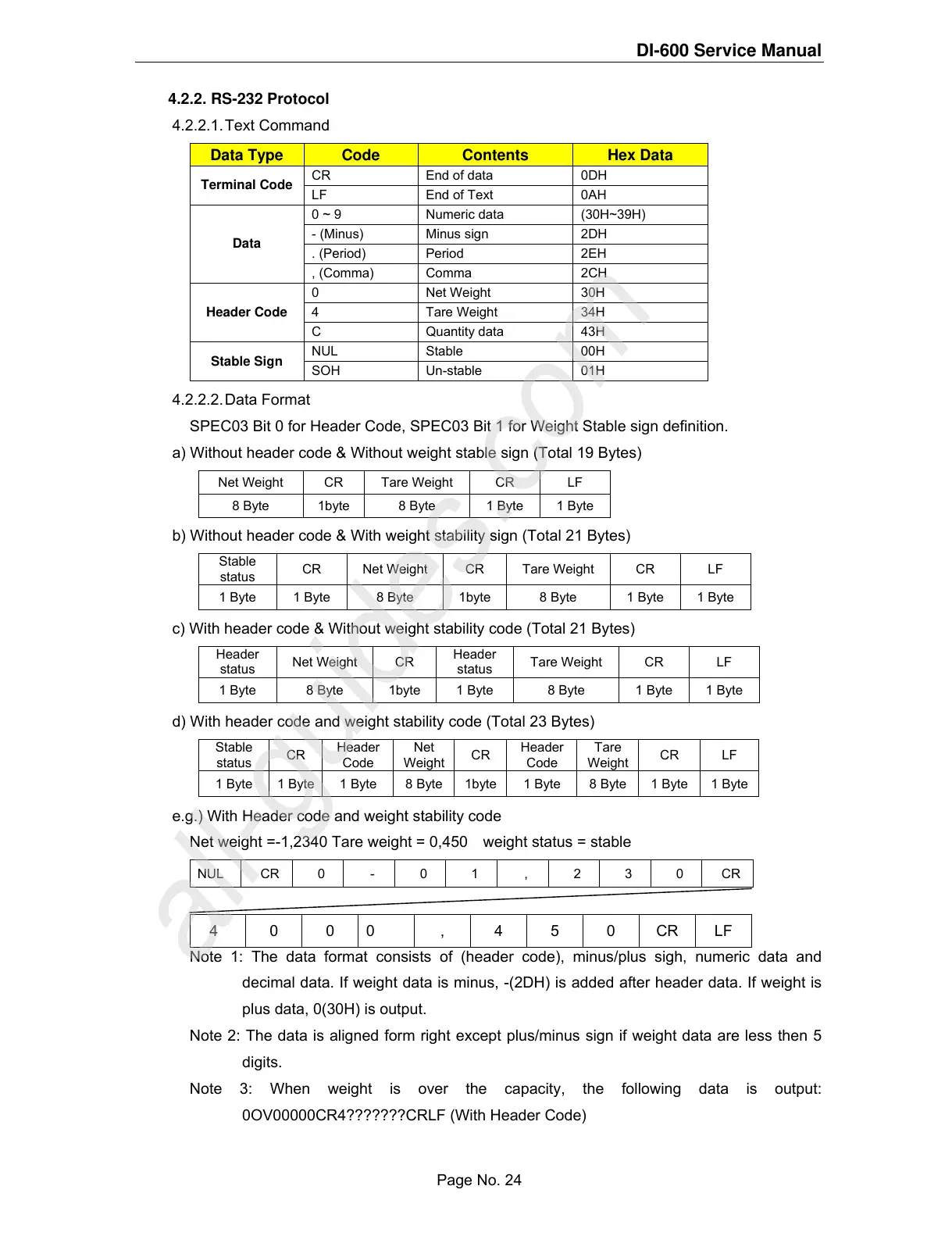
4.2.2.1. Text Command
Data Type Code Contents Hex Data
CR End of data 0DH
Terminal Code
LF End of Text 0AH
0 ~ 9 Numeric data (30H~39H)
- (Minus) Minus sign 2DH
. (Period) Period 2EH
Data
, (Comma) Comma 2CH
0 Net Weight 30H
4 Tare Weight 34H
Header Code
C Quantity data 43H
NUL Stable 00H
Stable Sign
SOH Un-stable 01H
4.2.2.2. Data Format
SPEC03 Bit 0 for Header Code, SPEC03 Bit 1 for Weight Stable sign definition.
a) Without header code & Without weight stable sign (Total 19 Bytes)
Net Weight CR Tare Weight CR LF
8 Byte 1byte 8 Byte 1 Byte 1 Byte
b) Without header code & With weight stability sign (Total 21 Bytes)
Stable
status
CR Net Weight CR Tare Weight CR LF
1 Byte 1 Byte 8 Byte 1byte 8 Byte 1 Byte 1 Byte
c) With header code & Without weight stability code (Total 21 Bytes)
Header
status
Net Weight CR
Header
status
Tare Weight CR LF
1 Byte 8 Byte 1byte 1 Byte 8 Byte 1 Byte 1 Byte
d) With header code and weight stability code (Total 23 Bytes)
Stable
status
CR
Header
Code
Net
Weight
CR
Header
Code
Tare
Weight
CR LF
1 Byte 1 Byte 1 Byte 8 Byte 1byte 1 Byte 8 Byte 1 Byte 1 Byte
e.g.) With Header code and weight stability code
Net weight =-1,2340 Tare weight = 0,450 weight status = stable
NUL CR 0 - 0 1 , 2 3 0 CR
4 0 0 0 , 4 5 0 CR LF
Note 1: The data format consists of (header code), minus/plus sigh, numeric data and
decimal data. If weight data is minus, -(2DH) is added after header data. If weight is
plus data, 0(30H) is output.
Note 2: The data is aligned form right except plus/minus sign if weight data are less then 5
digits.
Note 3: When weight is over the capacity, the following data is output:
0OV00000CR4???????CRLF (With Header Code)
Page No. 24



 To Next Page
 Loading...








