Chapter 2: D-Command Overview 9
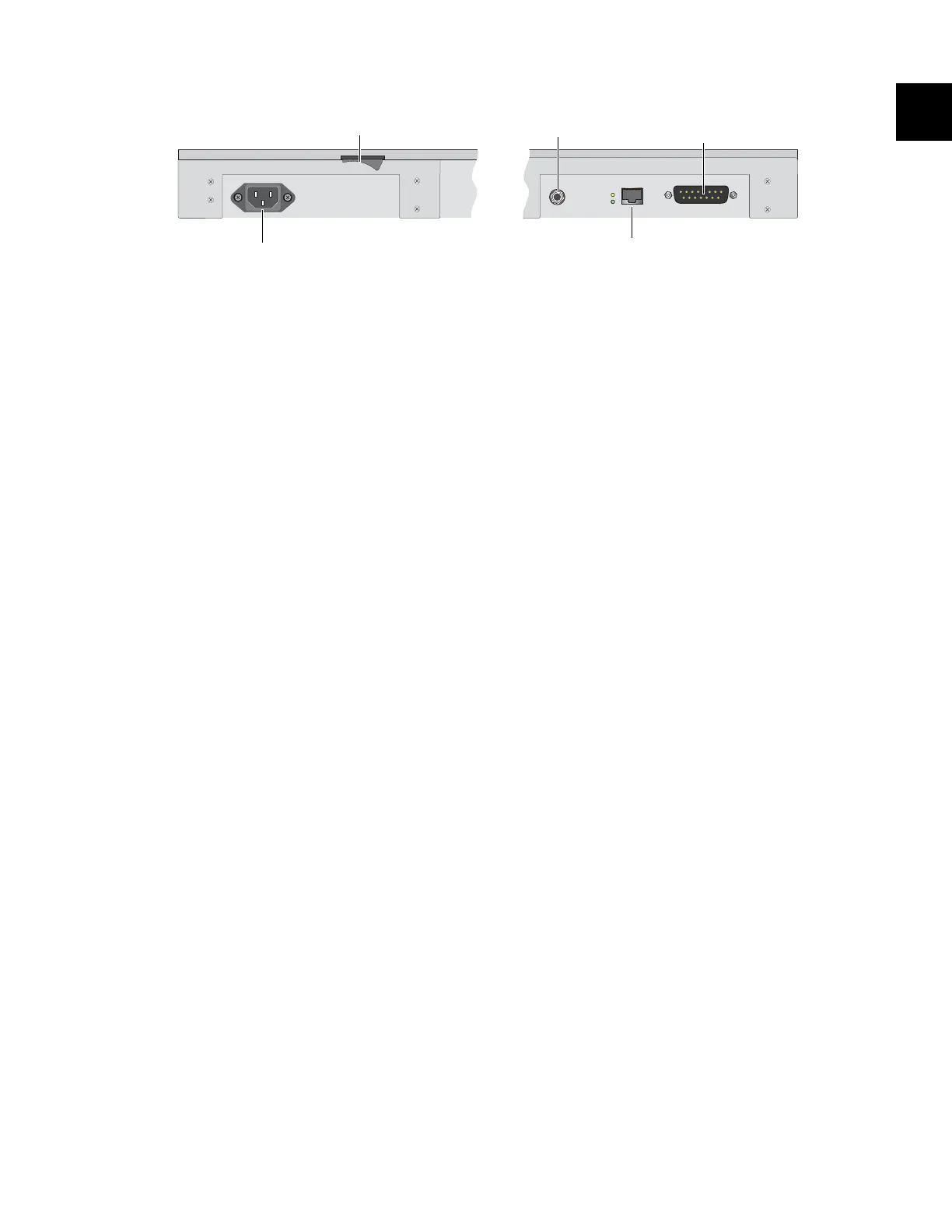
Main Unit Back Panel
AC Power
The AC Power connector accepts a standard AC power cable.
The D-Command Main Unit is auto power-selecting (100V to
240V) and automatically works with a standard modular
power cord when connected to an AC receptacle in any
country.
Power Switch
The Power switch applies power to the D-Command Main
Unit.
Footswitch Jack
The footswitch jack on the back panel of the D-Command
Main Unit is a 1/4-inch TRS jack that supports two footswitch
connections. See “Footswitch Connections” on page 18.
Ethernet Connector
The Ethernet connector on the back panel of the D-Command
Main Unit provides communication to Pro Tools. See “Ether-
net Connections” on page 17.
XMON Monitoring System Connector
The 15-pin connector on the back panel of the D-Command
Main Unit provides remote control of all audio monitoring
functions from the D-Command Monitoring section. See
“XMON Monitoring System Connection” on page 19.
Figure 2. D-Command Main Unit back panel connectors
Footswitch jack
Ethernet connector
XMON Monitoring System
connector
AC Power
Power switch


 To Next Page