DK50018 - Bluetooth accessory and switching decoder Bluetooth connecon
DK50018 - Bluetooth accessory and switching decoder
www.digikeijs.com
*R-Bus, B-Bus are registered trademarks of Modelleisenbhan GmbH. XpressNet and RS-Bus are registered trademarks of Lenz 18www.digikeijs.com
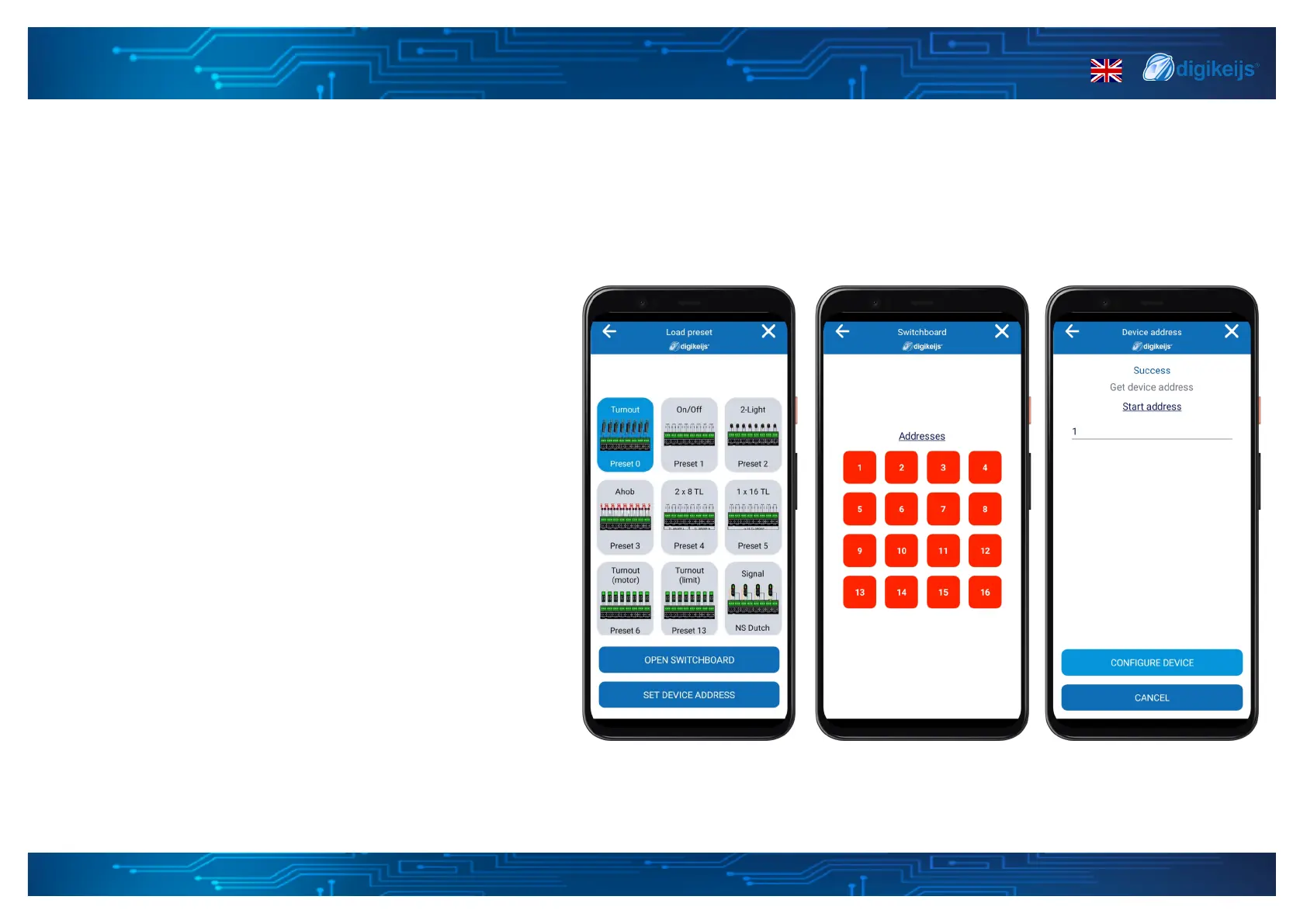
Load preset on all outputs
When the load preset on all outputs secon is loaded, the
app will show you which preset is currently acve. This pre-
set will be coloured blue. If a custom conguraon / preset
per output is loaded it will show the name of the acve con-
guraon. When you want to change the preset just select
the preset you need. The selected preset will now be col-
oured blue and will be acve.
Open switchboard
From the preset all output secon you can open the switch-
board to use or test your outputs by turning them on or o.
Set Device address
You can use the set device address to change the start ad-
dress of the device. When you open this secon it will show
you the current start address. You can change it by entering
a short or long address. When done please select the cong-
ure device buon and the start address will be changed.
3.1.7 Load preset on all outputs


 To Next Page