DK50018 - Bluetooth accessory and switching decoder Bluetooth connecon
DK50018 - Bluetooth accessory and switching decoder
www.digikeijs.com
*R-Bus, B-Bus are registered trademarks of Modelleisenbhan GmbH. XpressNet and RS-Bus are registered trademarks of Lenz 23www.digikeijs.com
www.digikeijs.com
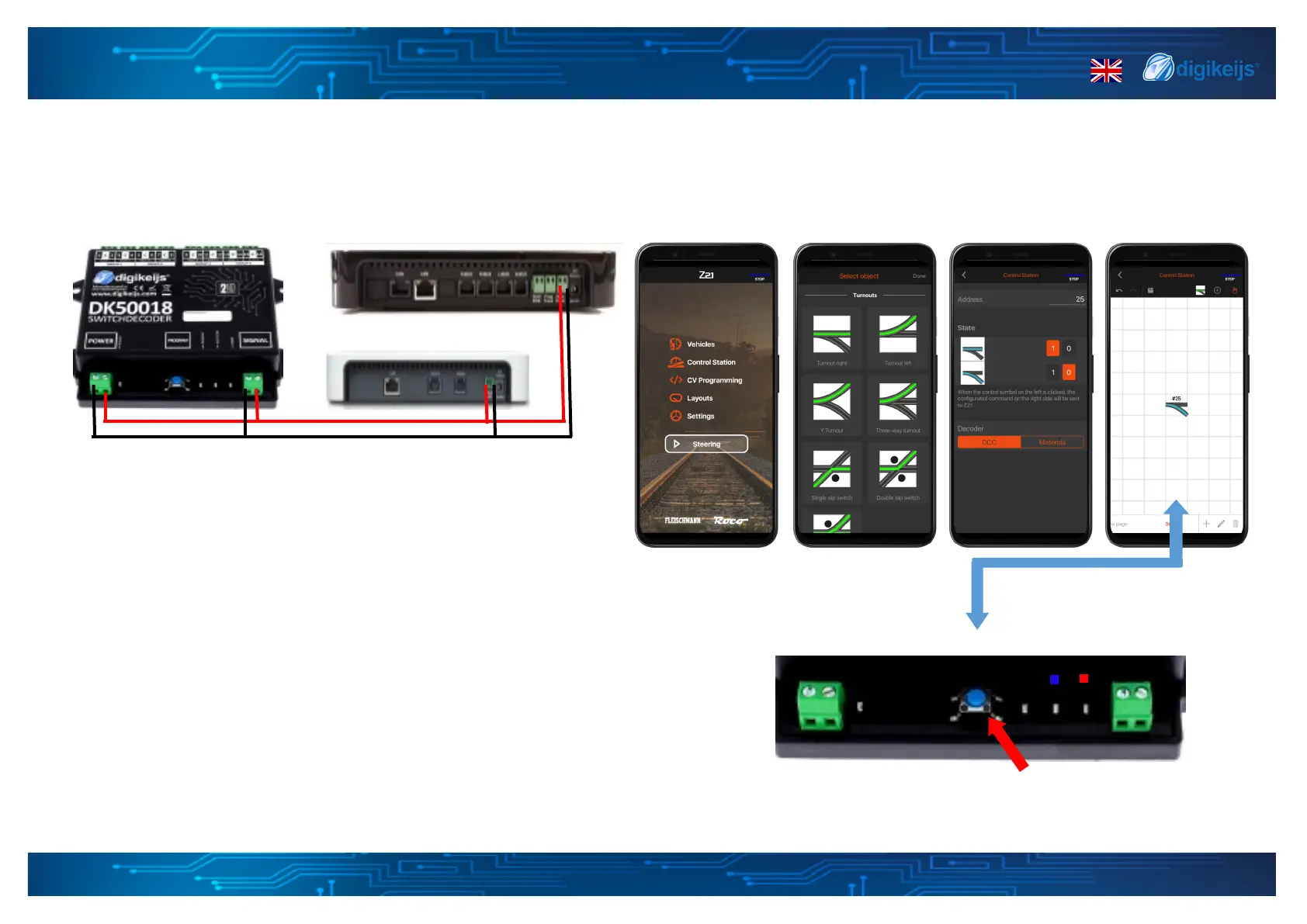
Programming of the base address (output 1).
1. Connect the DK50018 to the output of the z/Z21 main channel.
2. Open the Z21 app and select control staon
3. Add a new turnout and change the address to your liking
4. Press the programming buon on the DK50018. The yellow LED
lights up.
5. Press the programming buon on the DK50018. The yellow LED
6. Press the corresponding switch symbol on the display. The yellow
lights up. The LED on the DK50018 will go o which means it was
succesfull.
*
4.1.2 Z21 App — Set device start address


 To Next Page