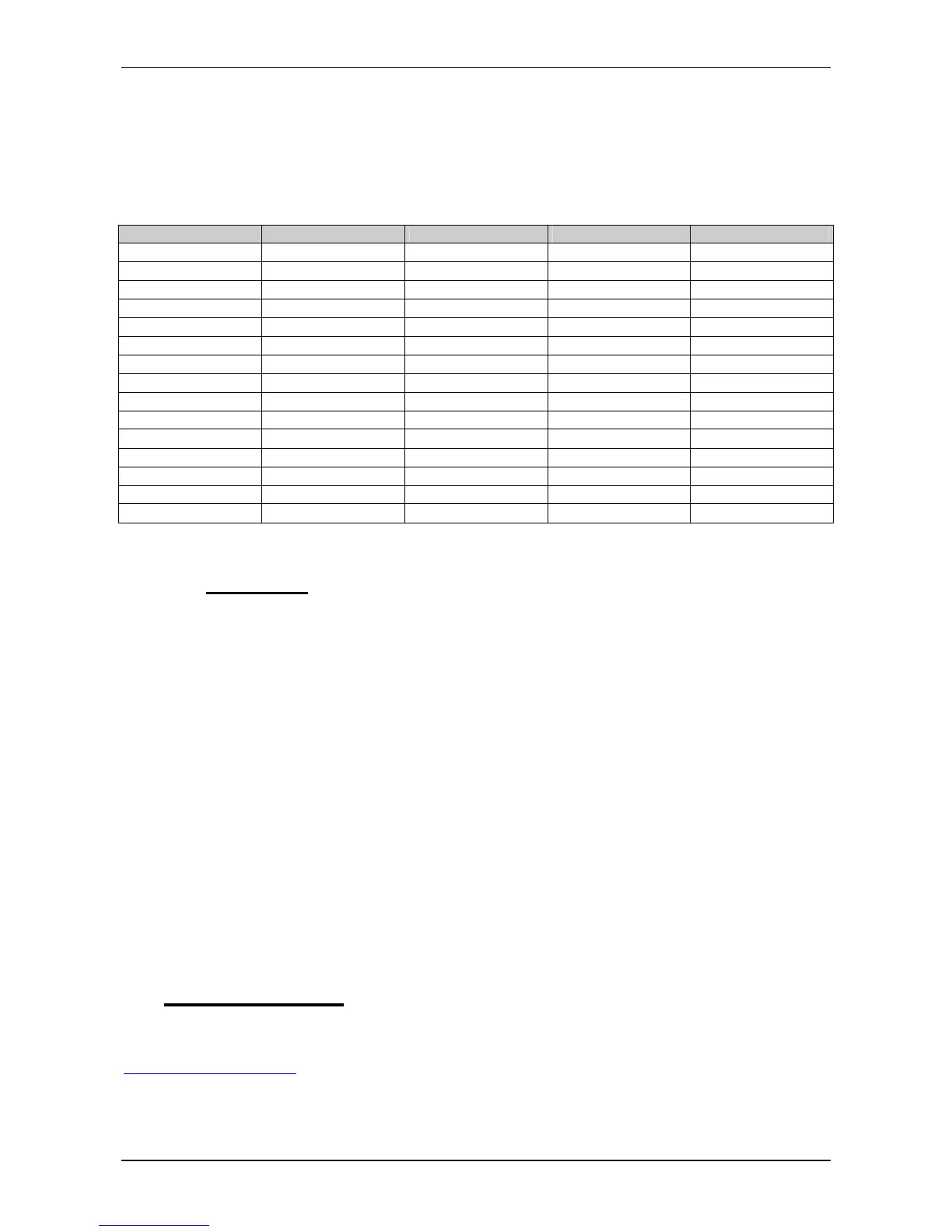
Signal Name
D0 2
− −
15 ERROR#
D1 3
− −
13 SLCT
D2 4
− −
12 PE
D3 5
− −
10 ACK#
D4 6
− − 1
1 BUSY
ERROR# 15
− −
2 D0
SLCT 13
− −
3 D1
PE 12
− −
4 D2
ACK# 10
− −
5 D3
BUSY 11
− −
6 D4
AFDT# 14
− −
14 AFDT#
INIT# 16
− −
16 NIT#
SLCTIN# 17
− −
17 SLCTIN#
STROBE# 1
− −
1 STROBE#
GND 25
− −
25 GND
11.1.4 Restrictions
Keep the following restrictions in mind, when using the ESC or writing programs that should also work with
redirection:
• WindowsNT denies direct access to hardware I/O ports. If you plan to use REMHOST in a WindowsNT
environment, an additional software package is required, that gives access to the specific I/O ports. This
software package can be achieved by FS FORTH-SYSTEME.
• Avoid direct writes to video RAM. There is no mechanism to detect and transfer these outputs.
• Since DOS7 of Windows95, standard console output is partially written to the video screen. So you will
see only some characters displayed on the host machine, while the rest is displayed on the target’s
video display.
• Avoid video calls that uses registers other than AX, BX, CX and DX. To speed up video output, only
these registers will be transferred. The other registers will be typically used as pointers to data buffers.
• Formatting of remote floppy is not supported.
• Don’t rely on „Keyboard Intercept“ INT15/4F. This function is no longer available.
• KEYB.COM is no longer needed on the target machine. Instead, the current keyboard handler of your
host computer is automatically used.
• Don’t press Ctrl-Alt-Del, while redirection is active. This will not reboot your target system, but your
host machine !
12 SOFTWARE
On the MICROSPACE Application CD you will find all tools and drivers you will need to work with the card.
If you are not sure about the topicality of the software, please visit our homepage at
http://www.digitallogic.com to get the latest relases !


 To Next Page