DIGITAL-LOGIC AG MSM586SEN/SEV Manual V1.5E
105
14 INSTALLING THE FLASHDISK DOC2000
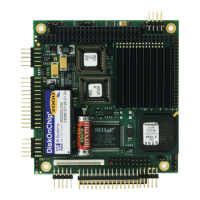
On the SSD 36pin socket a DiskOnChip DOC2000 module from M-Systems may be installed.
This device is also available at DIGITAL-LOGIC AG.
Operating Systems:
DOS, DL-DOS, RTX-DOS, WIN 3.11, ROM-WIN are working with these drives.
All other non DOS compatible systems need a driver.
Give attention to the pin 1 orientation in the 32pin SSD socket.
Latest drivers are available at http://www.m-sys.com
14.1 Enabling and formatting of the DiskOnChip-module
Enabling:
No handlings needed, apart of checking the jumper positions in the chapter JUMPERS.
Format:
1. Boot up from the standard floppydisk A: or from a harddisk.
2. Enter the tooldisk from M-Systems containing the format tool DFORMAT.EXE
3. Start format utility
The screen should inform about the status of the flashdisk.
4. Enter the DOS-Bootdisk and transfer the bootfiles with SYS A: C:
From this moment, the flashdisk is now the bootable drive C: and if any harddisk is conencted
it changes to letter D: and E:
14.2 Compact Flash (CF)
Procedure to prepare a CF to be bootable:
DOS:
1. Check, if CF gets recognized in the BIOS setup
2. Use FDISK to erase partition
3. Use FDISK to create a new partition
4. Use FORMAT to format the CF
5. Use SYS to copy the system files onto the CF
• You might set the parameters manually (CYL/SEC/HEAD/LBA/etc)
• Not every CF on the market might get recognized. They might behave differently in starting time.


 To Next Page