Optimized layout for A4 print.
24
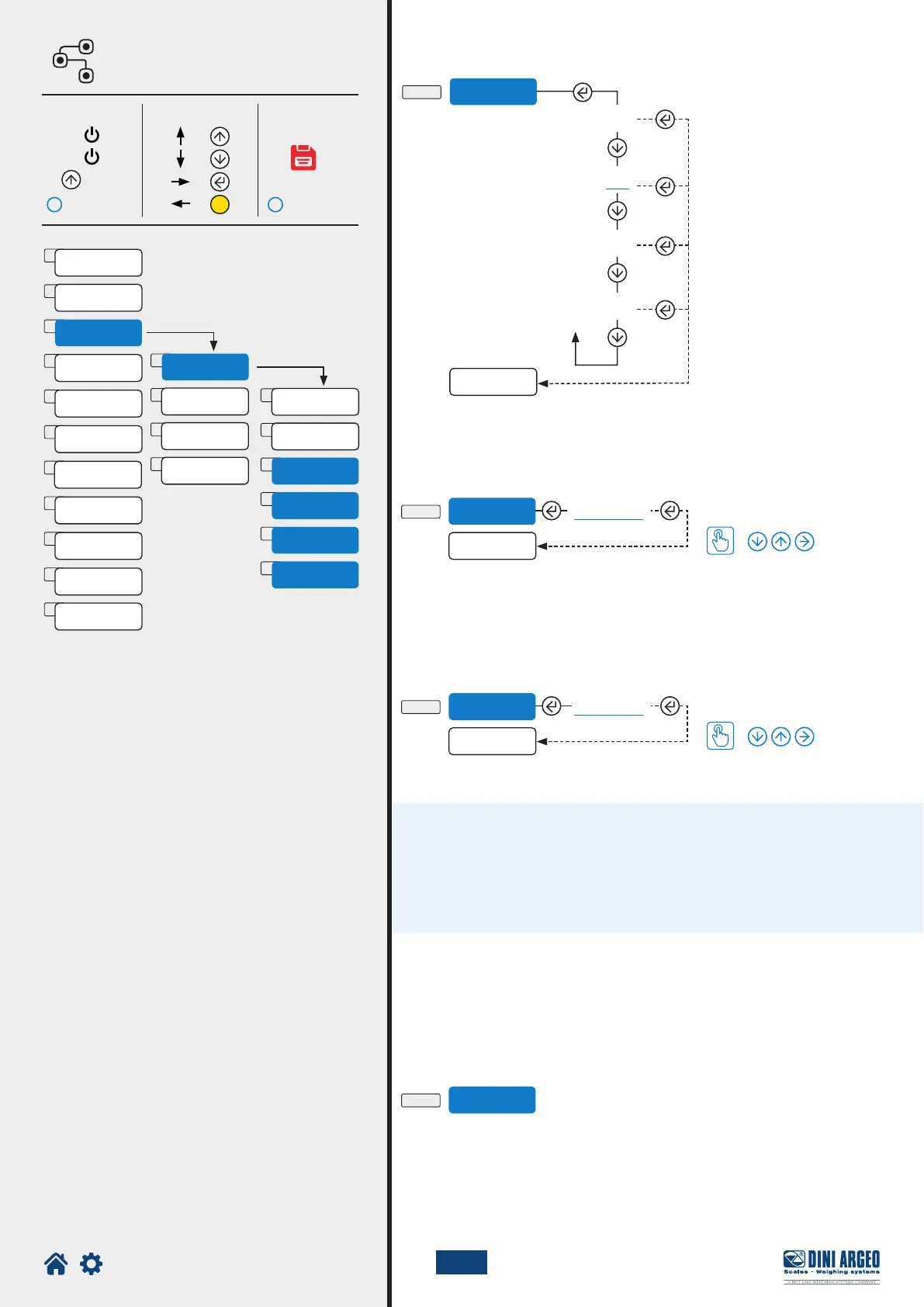
RANGE 2
Zero
C-1-4
C-1-5
C-1-6
ranGE 1
ranGE 2
Zero
000000
002500
deCi = 0
div = 10
ranGe 1 = 1000
ranGe 2 = 2500
MENU
DIV
U.M.
DECIM
1
2
3
RanGe 1
4
5
6
RanGe 2
Zero
1. O =
=
=
=
2. On
3.
C
1
2
3
4
CAL.PAR
Metrol
Cal.ADj
Cal.man
i
i
U.M.
CAPAC
G
kG
t
lb
C-1-3
K
C
Cal.adV
E
laYoUT
D
Serial
A
CAl
B
0.CAL
F
SCreen
H
Scr.Sav
I
reset
J
diaG
AdvanC
G
autoff
TECH_MAN_ENG_LTP
Scale capacity. Set Max or Range 1 (Max range = 800.000)
Range 2
For multirange scales, set the second weighing range.
Start of the advanced calibration procedure:
Example of multirange conguration at 1000/2500 kg, division 10/20 kg.
Set:
Zero
Enter Browse Save and exit
How to set the value
How to set the value
Page 15 Page 15
Unit of measure
For use by the manufacturer.





 To Next Page