UltiMate 3000 Nano and Cap - System Installation and Application
7
2 Installation
2.1 Facility Requirements
After unpacking the modules of the UltiMate 3000 system, allow the units to warm up for
approximately 4 hours before connecting them to the power supply. This delay allows any
condensation that might have occurred during shipping to evaporate. After 4 hours, check the
modules; if the condensation is still there, allow them to continue to warm up (without
connecting them to the mains) until the condensation is completely gone.
Install the system in the laboratory on a stable surface that is free of vibration. Make sure that the
surface is resistant to solvents. Avoid locations with extreme changes in temperature (such as
direct sunlight or drafts) and high humidity. Allow sufficient clearance behind the system for
power connections and ventilation.
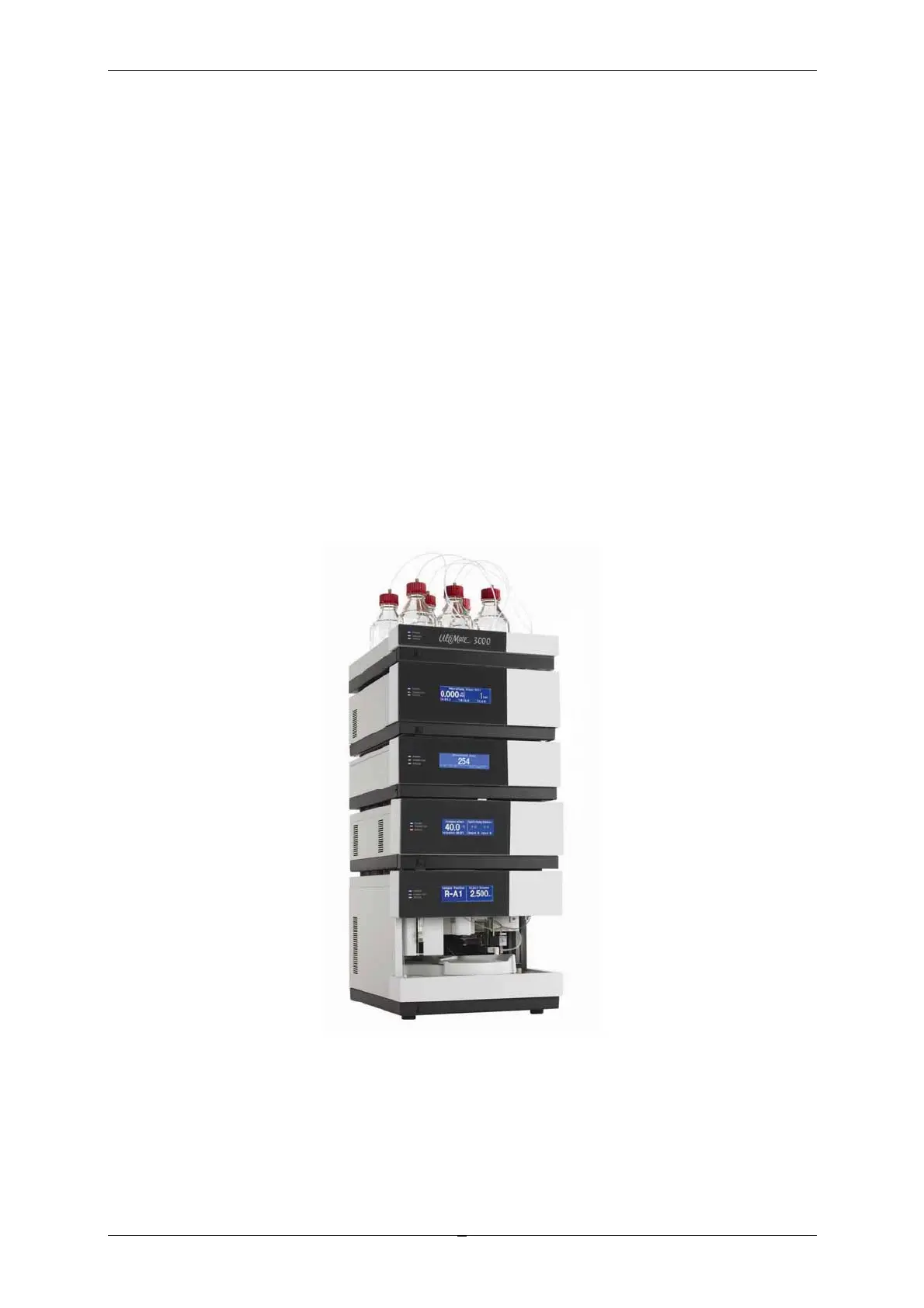
Dionex recommends that you stack the individual modules of an UltiMate 3000 system, for
example, as shown below. Note that the arrangement of the system modules depends on the
application (→ Application Examples and Fluid Connections, page 13).
Fig. 1: Example for an UltiMate 3000 system
Autosampler
Flow Mana
e
Pump
Solvent Rack
Detecto



 To Next Page