.4
5%
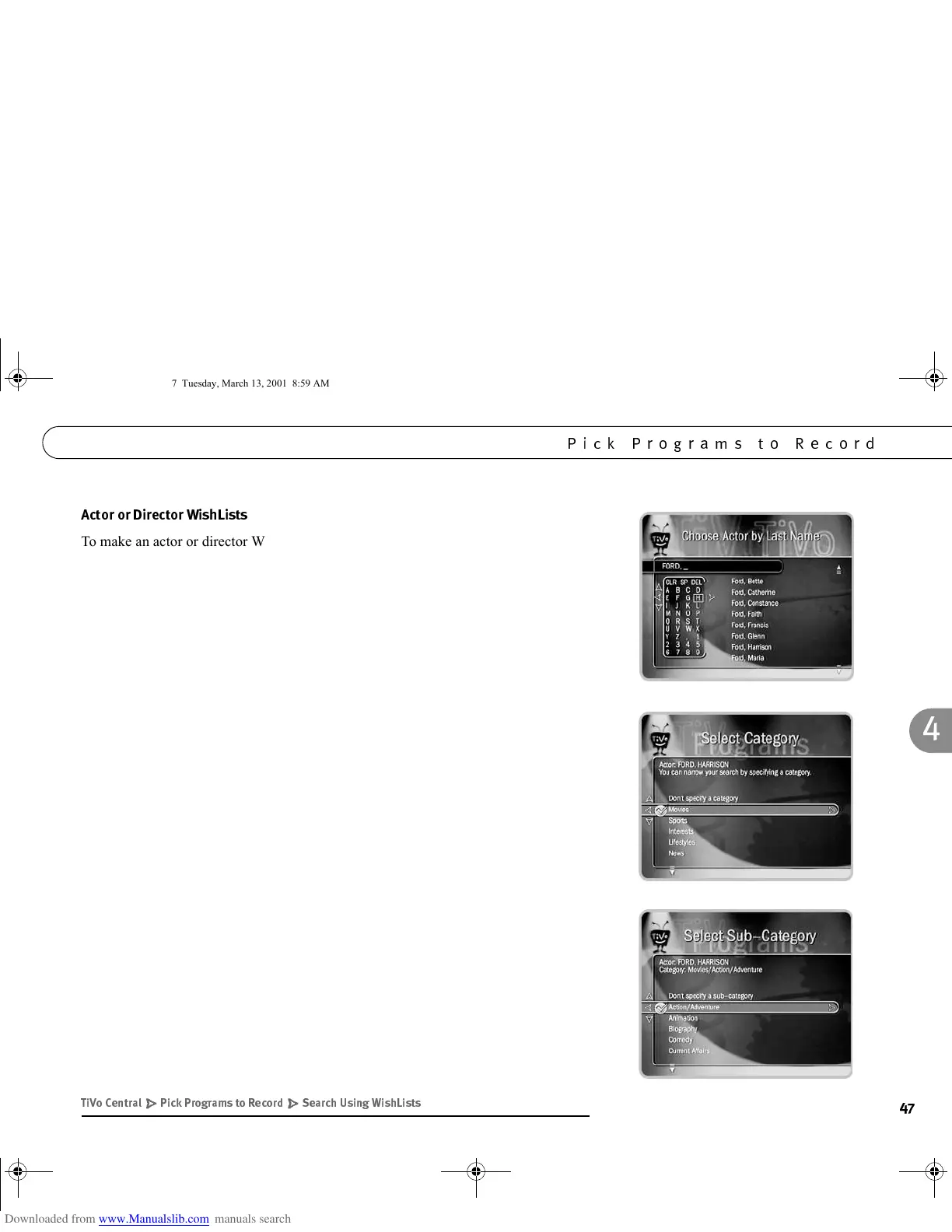
To make an actor or director WishList:
1. Spell the person’s last name by using the arrow keys to move the selection box
around the keypad and pressing SELECT to enter a highlighted letter. The CLEAR
button on the remote deletes everything entered so far; the BACK button
backspaces; FORWARD inserts a space.
2. As you select letters, a list of names appears to the right of the keypad. If you see
the person’s name, press RIGHT arrow until the highlight is in the list. Use the UP
or DOWN arrow to highlight the name, then press SELECT or RIGHT arrow. The
TiVo Service constantly updates the list with new names.
To use a name that is not on the list, enter the name in the format: “LAST NAME,
FIRST NAME”. When you are finished with the last name, select the comma on
the keypad; a comma and a space following it will be added to the name. You must
match the spelling of the name exactly. However, if the name includes a hyphen
(e.g., “Zeta-Jones, Catherine”), replace the hyphen with a space (“Zeta Jones,
Catherine”). When you finish, and the full name is spelled out on the right side of
the screen, use the RIGHT arrow to highlight the name then press SELECT or
RIGHT arrow.
3. You can add a category and sub-category to your WishList. For example, if you
want movies with Harrison Ford, but not documentaries or talk shows, you could
select the “Movie” category.
( " - )* '#)#
/$%
GC Viewer's Guide.book Page 47 Tuesday, March 13, 2001 8:59 AM



 To Next Page