76
DIRECTV PLUS
®
DVR USER GUIDE
Main Menu - Parental, Fav’s & Settings
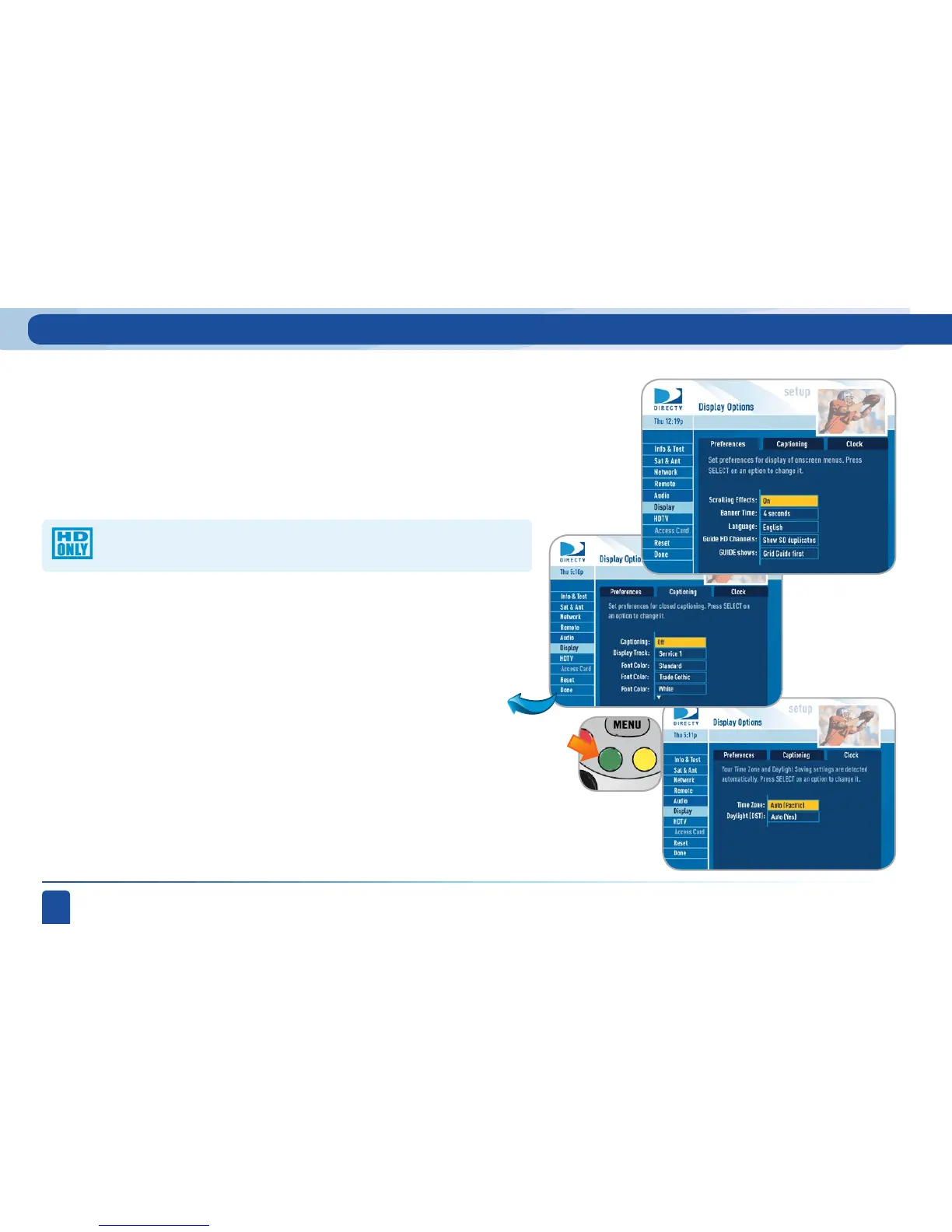
This important section allows you to customize how several pieces of
important DIRECTV and system information are displayed on your TV. Choose
the Preferences tab to set whether you want lists (i.e. the program guide
and your Playlist) to display in smooth scrolling or in blocks as you page up
and down. Set the channel banner time to determine how quickly the banner
disappears after moving to a new channel. Choose your preferred on-screen
text language.
Display:
Go to the Clock tab to set your time zone and whether you want the receiver to
show Daylight Savings time or not.
Move to the Captioning tab by using the arrow keys (or pressing the GREEN
button) and select your preferred options. You can customize how closed
captioning appears, or whether it appears at all.
Choose whether you want the first press of the GUIDE button to take you
directly to the program guide or to go to the category filter first. (No matter
which one you choose, pressing GUIDE a second time shows you the other
option.)
Choose whether you want the guide to show you HD channels and
their duplicate SD channels or to hide the SD duplicates.



 To Next Page