50
Dirtywave M8 Operation Manual
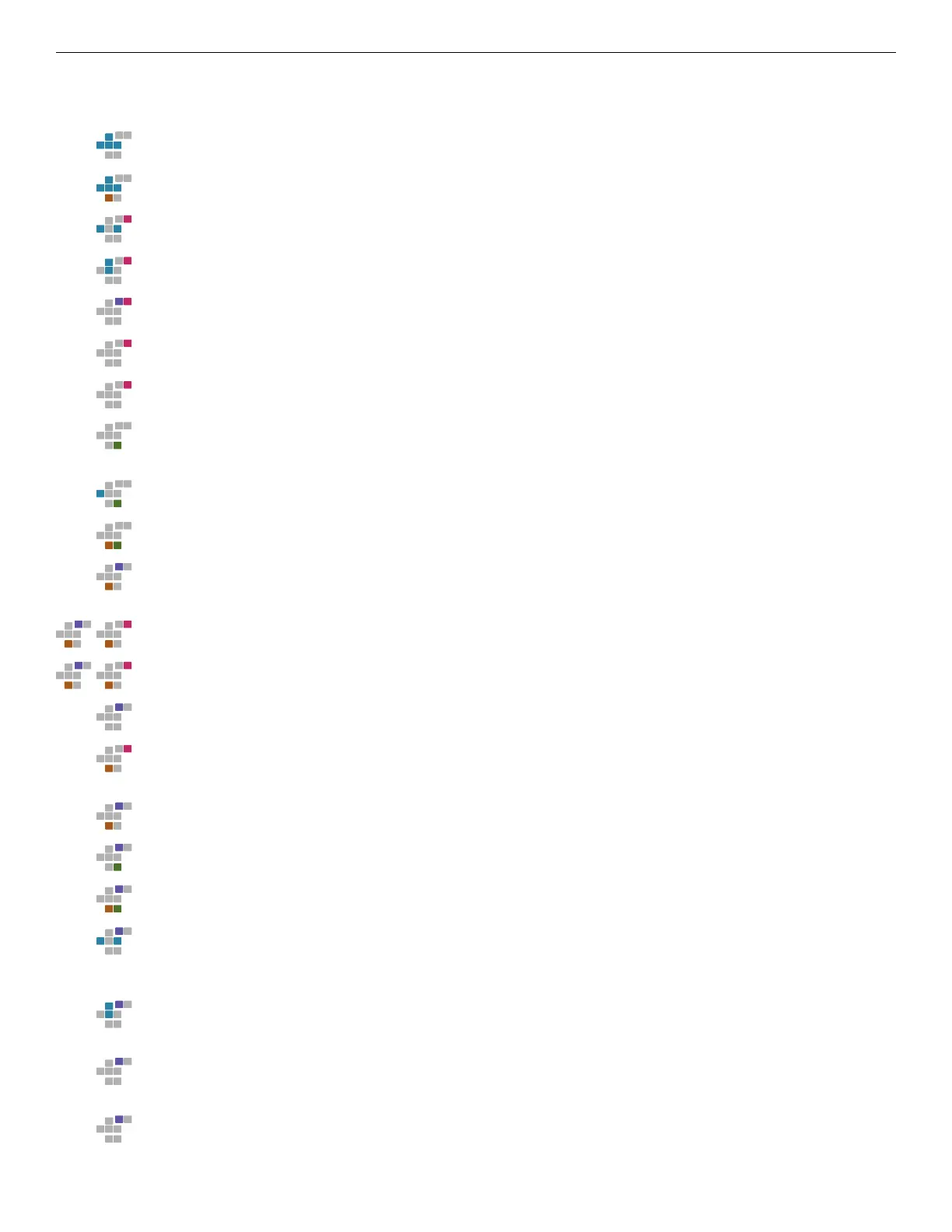
Key Shortcuts
UP or DOWN or LEFT or RIGHT
Move cursor position.
SHIFT + [UP or DOWN or LEFT or RIGHT]
Screen navigation.
EDIT + [LEFT or RIGHT]
Edit value-Fine.
EDIT + [UP or DOWN]
Edit value - Coarse. On command column-displays command help / selection screen.
EDIT + OPTION
Clears or cuts value to default setting. On le browser - delete selected le prompt.
EDIT (double-tap)
Increments chain, phrase, or instrument to next available empty slot.
EDIT + [Touchscreen LEFT/RIGHT]
On instrument screen edit currently selected parameter.
PLAY
On song screen - play song at cursor position. On chain and phrase-play chain or phrase.
On instrument and sample le browser - preview selected le.
LEFT + PLAY
While playing song on the song screen, cues selected row for playback.
SHIFT + PLAY
Play song from current song position.
SHIFT + OPTION
Toggles selection mode. On Instrument screen-copies current instrument. On le
browser - sort current directory.
SHIFT +[OPTION, then EDIT]
Clones a chain, phrase, or instrument toanew slot.
SHIFT +[OPTION, then double tap EDIT]
On song screen - clonesachain and all phrases within the chain to new slots.
OPTION
While in selection mode-copy the current selection. (see SHIFT + OPTION)
SHIFT + EDIT
Paste copy buer. While in selection mode on phrase and table-interpolate values in
selection.
OPTION + SHIFT
Mute current track. (Release option button rst to hold mute)
OPTION + PLAY
Solo current track. (Release option button rst to hold solo)
OPTION + SHIFT + PLAY
Clear all mutes and solos
OPTION + [LEFT or RIGHT]
On song screen - solo all tracks to the left or right of cursor. On chain and phrase -
jump to the track left or right of selected track. On instrument, table, and groove -
increment current view by +/- 1.
OPTION
+ [UP or DOWN]
On song screen - Jump 16 rows up or down. On Chain and phrase-navigate to previous
or next phrase or chain in song.
OPTION + [Touchscreen LEFT/RIGHT or Touchscreen UP/DOWN]
On instrument or mixer screen - Maps touchscreen axis to selected parameter.
Refer to the "MIDI MAPPING" conguration accessible via project screen.
OPTION + [MIDI Input CC]
On instrument or mixer screen - Maps MIDI input to selected parameter.
Refer to the "MIDI MAPPING" conguration accessible via project screen.



 To Next Page