61
Controlling Other Components
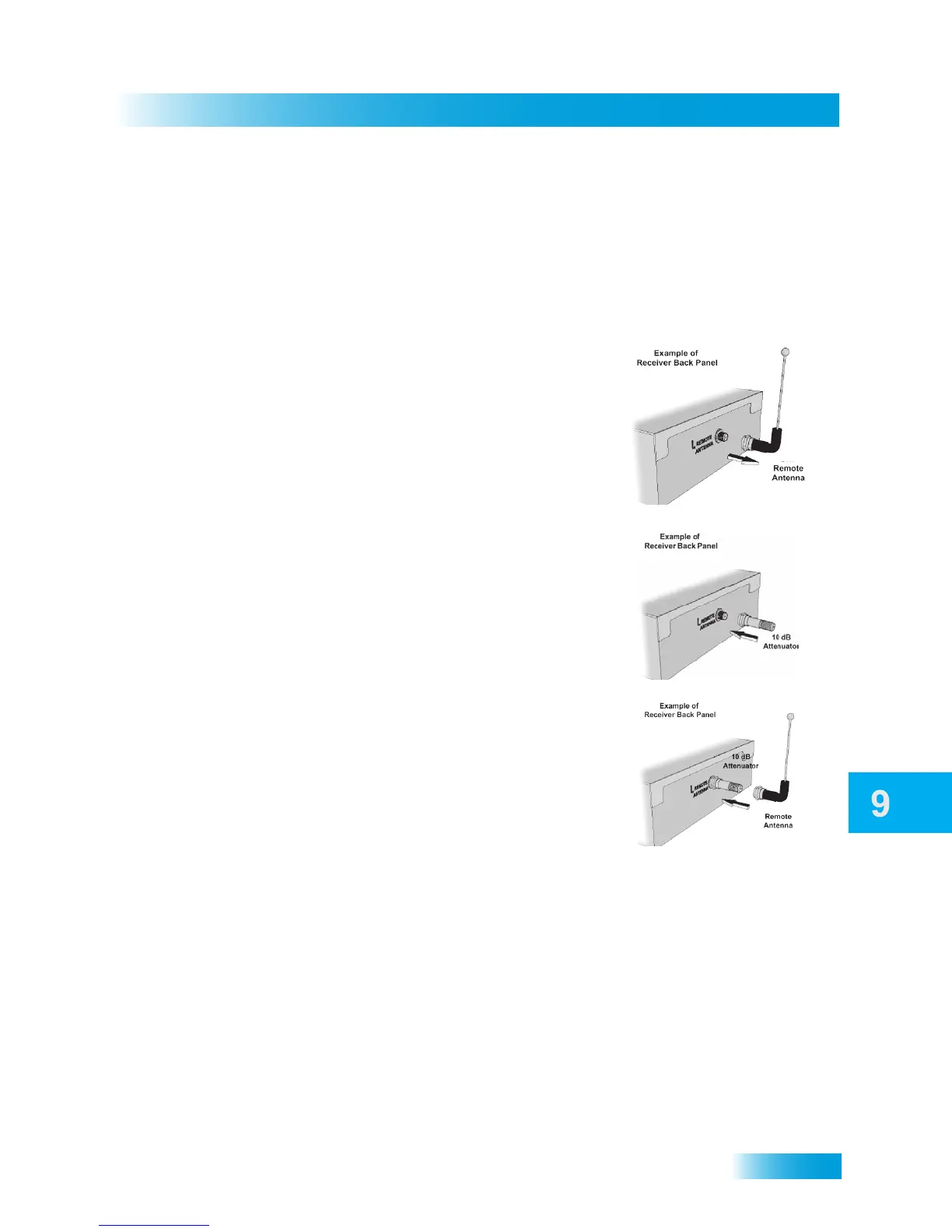
Installing a UHF Attenuator
Unwanted UHF signals may interfere with signals from the remote control to the receiver.
To prevent such interference, you can install a 10 dB attenuator (available from many
consumer-electronics parts stores). Adding this attenuator will help keep out stray UHF
signals, but it will also cut down how far away you are able to use the remote control.
CONTROLLING OTHER COMPONENTS
To use the remote to control other devices (such as a TV, a VCR or DVD player, and an
audio tuner or amplifier, or a second DISH satellite receiver), you must first program it to
control these other devices. You can do this by either following the instructions in Setting
Up Using Device Code Tables on page 63, or the Setting Up Using Device Codes Scan
procedure described on page 64.
After you have programmed your DISH remote to control your other devices (in TV, DVD,
and/or AUX modes), you may find that not all of the commands used by the devices’
original remote controls function as you expect. The learning function of your DISH
remote control can support these commands. See the instructions on page 66.
1 Remove the remote-control antenna from the
R
EMOTE ANTENNA input jack on the receiver’s back
panel.
2 Attach a 10 dB UHF attenuator to the REMOTE
A
NTENNA input jack.
3 Attach the remote-control antenna to the 10 dB
UHF attenuator.










 To Next Page