76
Using Shared View
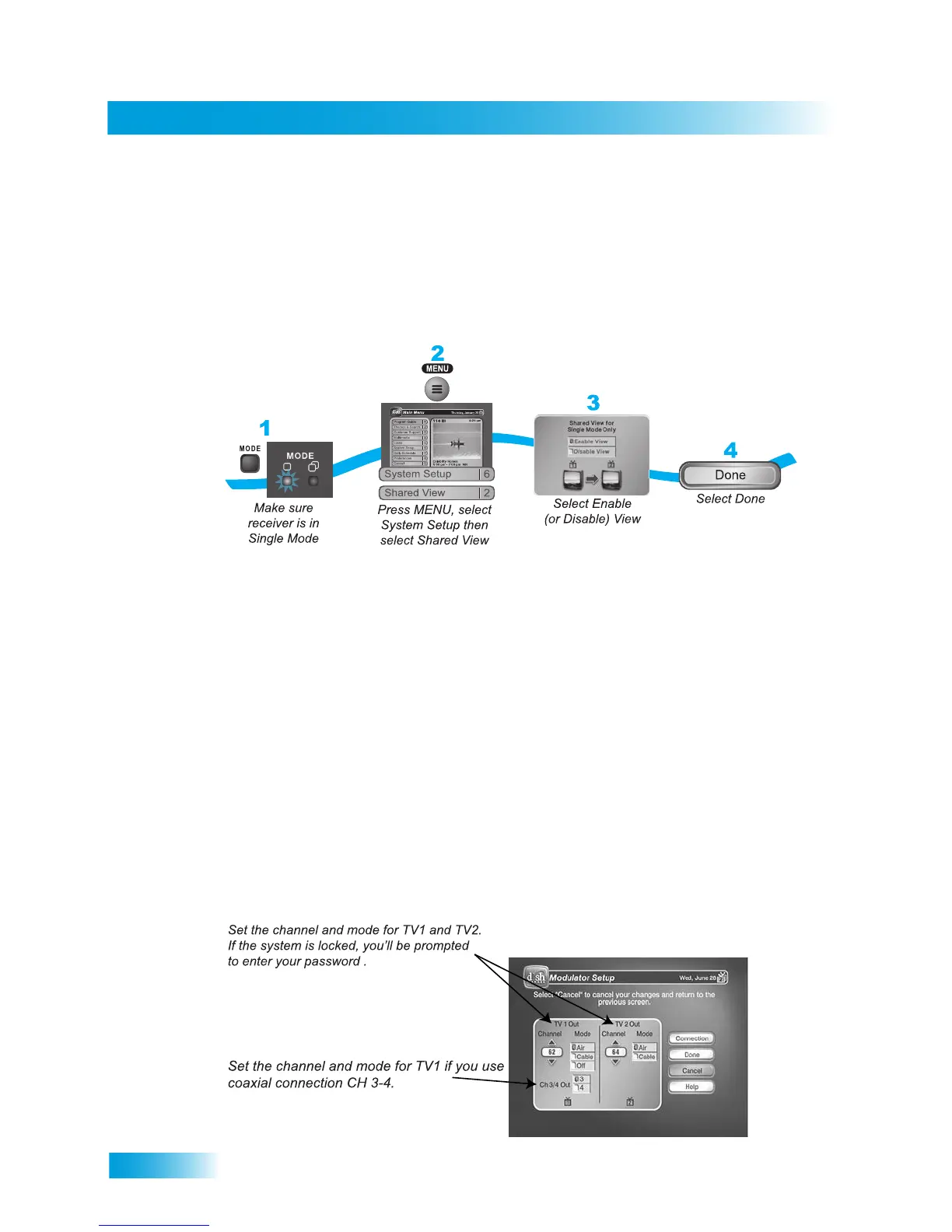
USING SHARED VIEW
Shared View is a feature of Single Mode that lets you activate the TV2 audio and video
outputs to display the same programming as the TV1 outputs. While using this feature,
both the Remote Control 1 and Remote Control 2 for your satellite receiver can control
what is displayed on all TVs connected to the system. This feature is available only in
Single Mode.
Note 1: Make sure you are using Remote Control 1 and TV1 because you cannot enable
or disable this feature using Remote Control 2.
Note 2: If you do not want to display programming on any other TV besides TV1 and you
do not want Remote Control 2 to control the receiver, then select Disable View. After you
select Done, TV2 will show a message on screen that says Shared View is currently
disabled.
MODULATOR SETUP
If you have both TV1 and TV2 connected to the receiver with coaxial cables (see
page 90), you can decide which channel you’d like to use to view programming from
DISH. If you have the system locked, then you’ll have to enter the password to enable
TV1’s Modulator output on this screen. Important: Make sure your TV can tune to the
channel you pick before you change the setting on this screen.










 To Next Page