69
Controlling Other Components
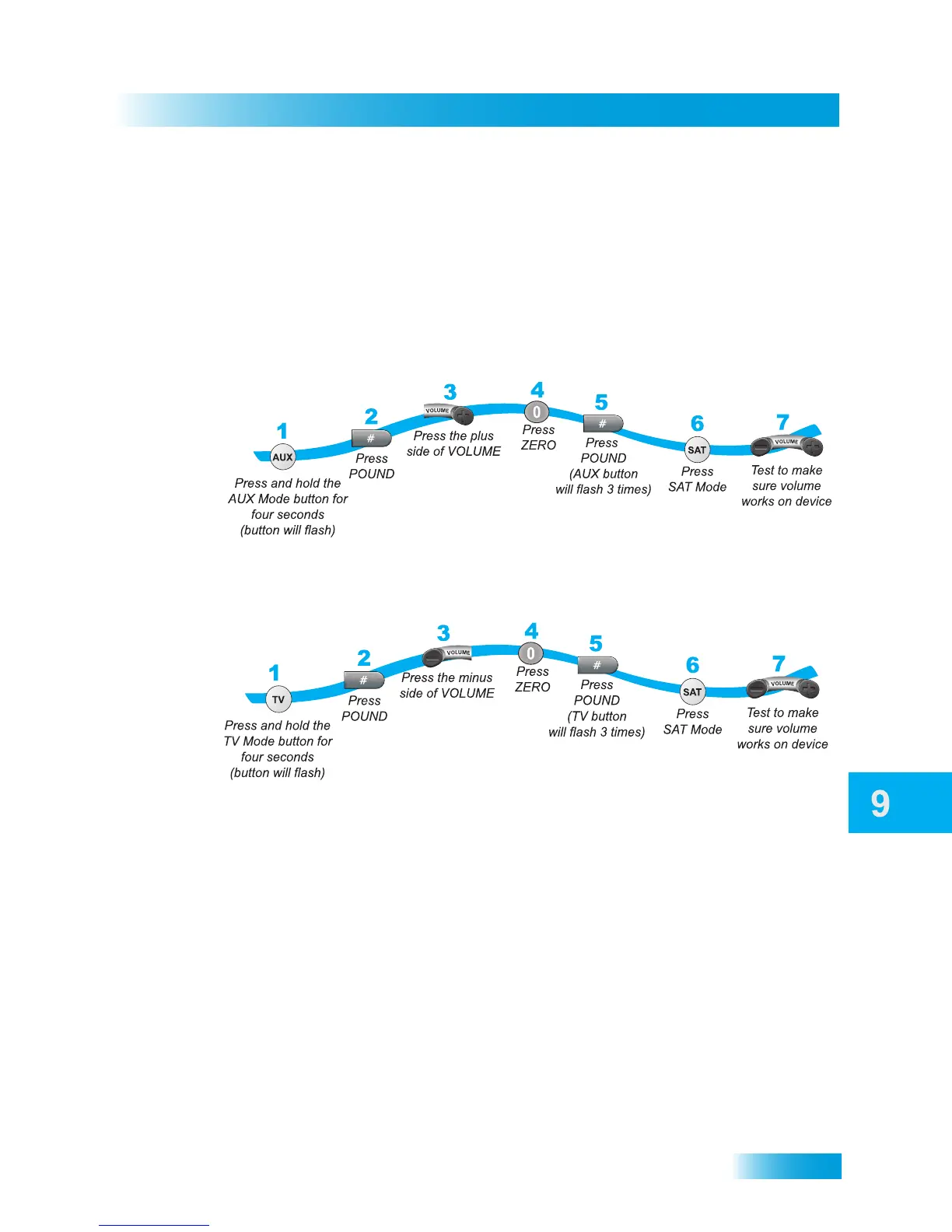
Switching Between TV and AUX Volume Adjustment
When the remote control is setup to operate your TV, the VOLUME and MUTE buttons
adjust your TV volume. If you prefer the volume and mute functions of the remote to adjust
the volume of a remote-controllable audio receiver or amplifier instead of the TV, this
capability can be set up using the AUX mode of the remote control.
To set the remote to control the AUX device’s volume (steps 1-5 set up the remote
and steps 6-7 make sure the remote functions correctly):
To set the remote back to control the TV volume (steps 1-5 set up the remote and
steps 6-7 make sure the remote functions correctly):
Programming to Control a Second Satellite Receiver
If you have another DISH satellite receiver installed, you can use the new DISH remote in
AUX mode to control it along with your new receiver. When you program the remote to
control this other receiver, the remote will send out IR and UHF (but not UHF Pro) signals
to the receiver. You can program the remote to control any other DISH satellite receiver,
except for the following:
• TV2 on DISH 322, ViP222, ViP622 DVR, DISH Player-DVR 522, 625 and 942
• DishPlayer 7100/7200
Perform the following tasks to program the remote to control a second satellite receiver in
AUX device mode:










 To Next Page