17
IP1950EN - 2013-09-13
Before connecting the power supply, make sure the plate data correspond to that of the
mains power supply.
An omnipolar disconnection switch with minimum contact gaps of 3 mm must be included in
the mains supply.
Check that upstream of the electrical installation there is an adequate residual current circuit
breaker and a suitable overcurrent cutout.
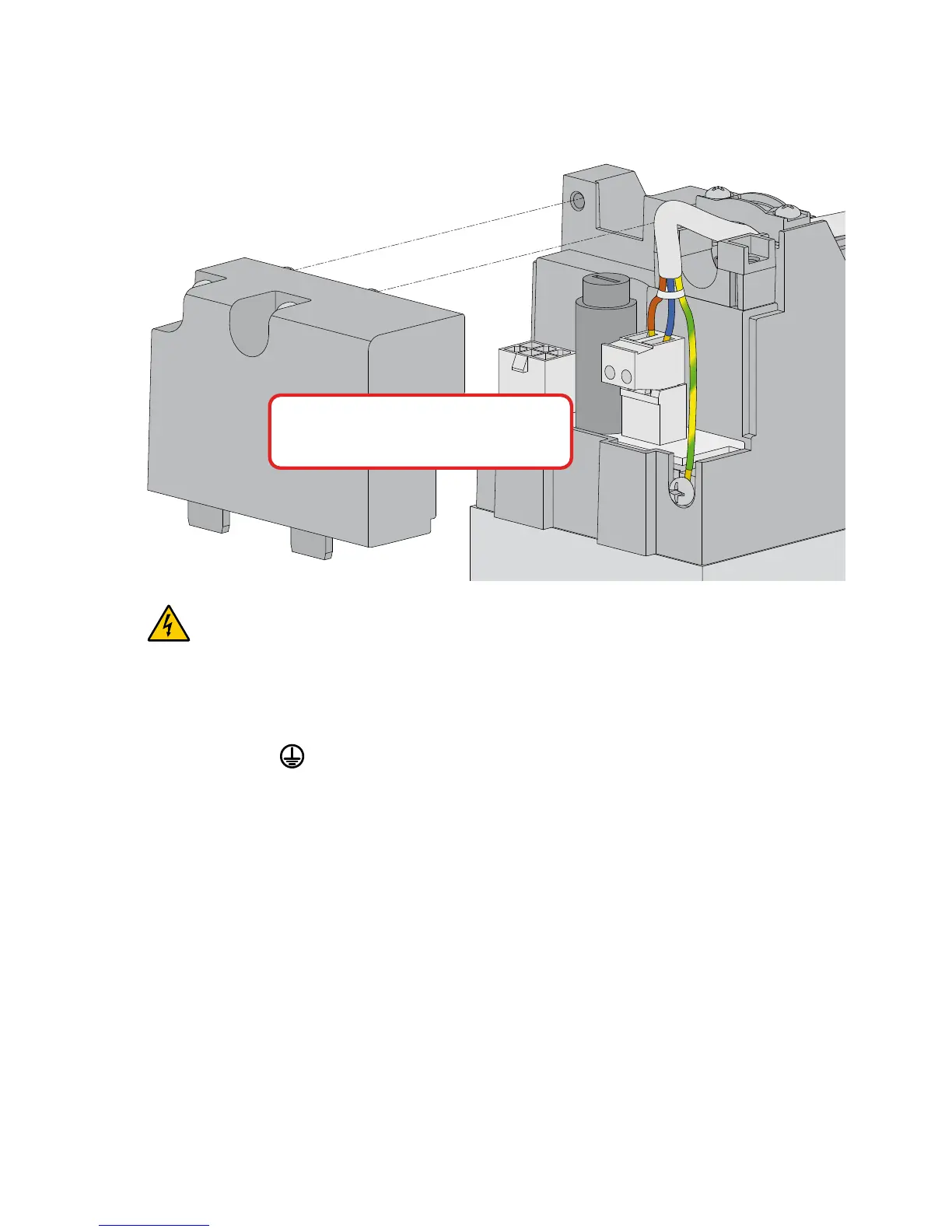
Use a H05RN-F 3G1,5 or H05RR-F 3G1,5 type electric cable and connect to the terminals L
(brown), N (blue), (yellow/green) in the automation. Make sure the yellow/green conductor
is at least 30 mm longer than the brown and blue conductors.
Secure the cable using the special cable clamp and remove the outer sheath near the terminal
only.
Connection to the mains power supply, in the section outside the automation, is made with
independent channels and separated from the connections to the control and safety devices.
The channels must penetrate a few centimetres inside the automation thorough a hole maxi-
mum Ø16 mm.
Make sure there are no sharp edges that may damage the power supply cable.
Make sure that the mains power supply (230 V) conductors and the accessory power supply
(24 V) conductors are separate.
Make sure the yellow/green conductor
is at least 30 mm longer than
the brown and blue conductors.
6. Electrical connections
Electrical wiring and starting are shown in the installation manual of control panel EL20.




 To Next Page