22
IP1950EN - 2013-09-13
DETACH AND DELIVER TO THE CUSTOMER
User instructions function selector
The STOP position prevents the batteries from engaging in case of emergency.
NOTE: for correct door operation and regular battery recharging, it is essential that the automatic
system be always powered with batteries connected (also during the night).
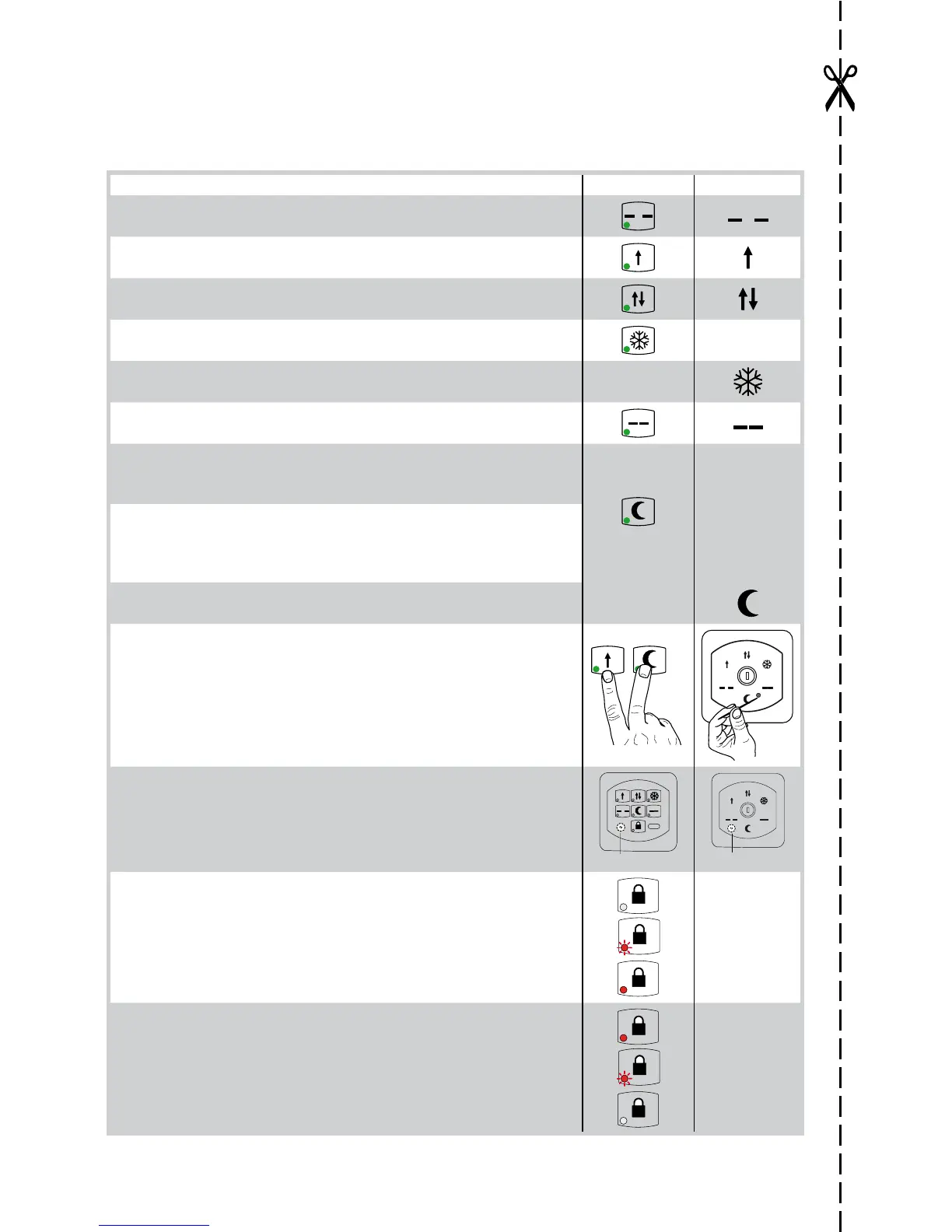
FUNCTION SELECTOR COME COMH-K
DOOR OPEN
The door opens and remains open.
4
TOTAL ONE-WAY OPENING
For one-way operation from the inside/outside of the door.
1
TOTAL TWO-WAY OPENING
For two-way door operation
2
PARTIAL OPENING
For two-way, one-way and partial opening operation.
3
PARTIAL OPENING
For two-way partial opening.
DOOR CLOSED
The door closes and remains closed and locked (if lock is present).
6
IMMEDIATE NIGHT-TIME CLOSURE (STOP)
The door stops immediately when the NIGHT-TIME CLOSURE key is
pressed for 3 s.
5
DELAYED NIGHT-TIME CLOSURE
Pressing the NIGHT-TIME CLOSURE key, the door closes after 10 seconds
(with J1=ON) or 60 seconds (with J1=OFF). This allows authorised door
management personnel to get out before it closes.
IMMEDIATE NIGHT-TIME CLOSURE
The door stops immediately when the NIGHT-TIME CLOSURE is selected.
POWER RESET
Cancels the data acquired, proceeding with a new acquisition after 3
seconds.
1
5
POWER
RESET
DMCS Jack
This is used to connect the DMCS software.
N.B.: The DMCS jack can be accessed by removing the function selector
switch cover.
1
4 5 6
3
2
DMCS jack
DMCS jack
SETTING THE CODE (with J3=ON)
The code can contain up to 5 numbers.
Press the LOCK key for 3 seconds.
Enter the numerical code. NOTE: the red LED flashes during this procedu-
re. Press the LOCK key for 3 seconds.
If the LED remains steady on, the selector is protected by an access code.
CANCELLING THE CODE (with J3=ON.)
Press the LOCK key for 3 seconds.
Enter the numerical code. NOTE: the red LED flashes during this procedu-
re. Press the LOCK key for 3 seconds.
If the LED is switched off, the selector is working and no access code is
set.




 To Next Page