1834-065-B-10-14
21
1
2
3
4
5
6
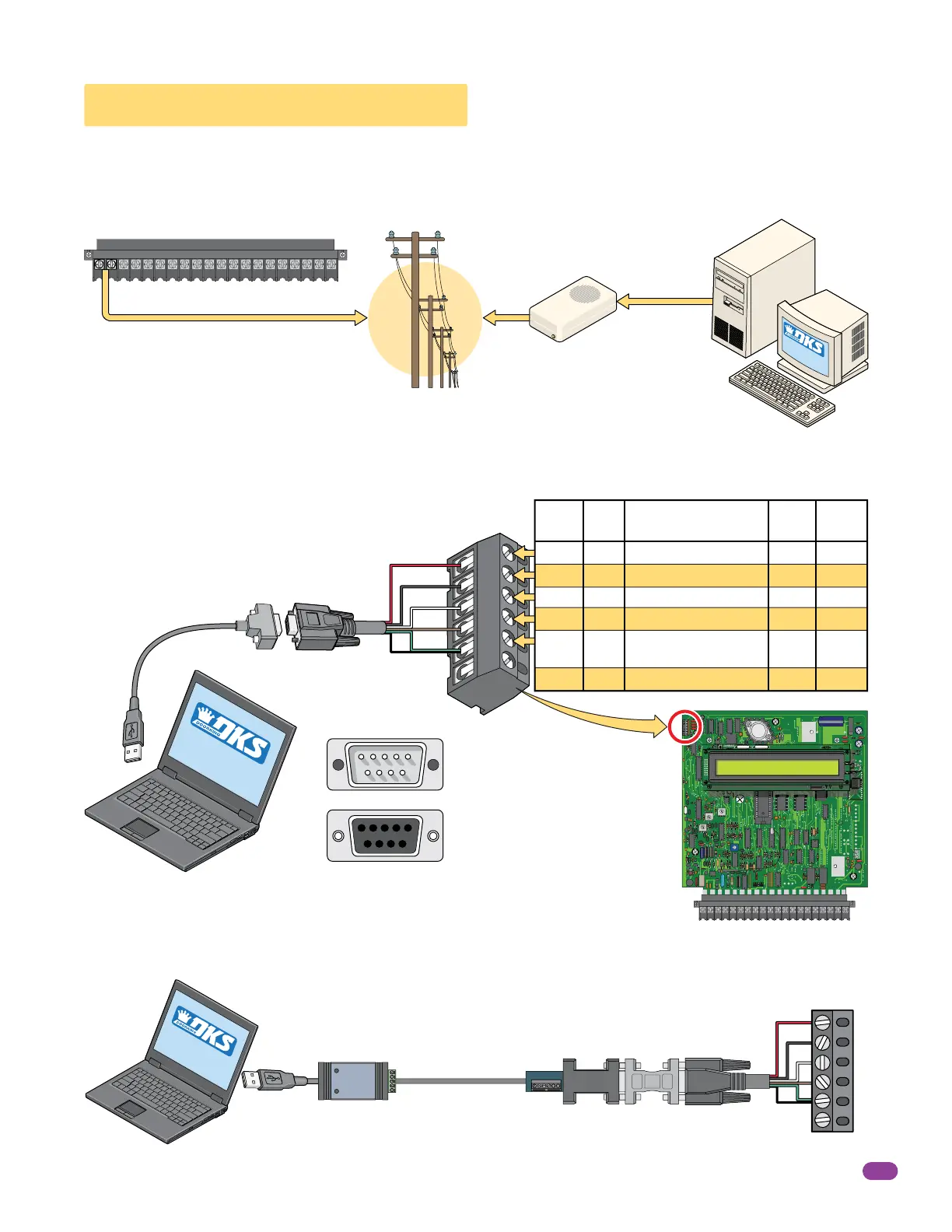
2.4 PC Connection Options
RS-232
Terminal
RS-232
Terminal
Telephone
Entry System
Circuit Board
Requires DoorKing RS-232 9-pin cable P/N 1818-040 and RS-232 to USB Adapter P/N 1835-037 to connect to PC. Sending
data to MULTIPLE entry systems in one programming step with RS-232 is limited to the number of RS-232 Ports installed.
Board
Pins
Wire
Color
1
2
3
4
5
6
1
2
3
4
5
6
DB-9
Pins
3
2
7
8
5
DB-25
Pins
Board
Function
2
3
4
5
7
Transmit Data
Receive Data
Request to Send
Clear to Send
Signal Ground - Shell
Not Used
Red
Black
White
Brown
Green/
Shield
Red
Black
White
Brown
Green
Shield
2.4.2 Direct Connection using the Circuit Board’s RS-232 Terminal
Use your EXISTING modem to connect your PC to the entry system. Phone modem can ONLY connect to one entry system at a
time.
2.4.1 Phone Modem Connection
The 6-pin terminal can be
removed for easy wiring.
Connecting the telephone entry system to a PC may be accomplished by SEVEN (7) different methods in this section.
Your PC
RS-232
DB-9 Pin Plug
P/N 1818-040
RS-232 to USB
Adapter
P/N 1835-037
USB
SOFTWARE
INSTALLED
Your PC
Your External
Phone Modem
or
Internal PC
Phone Modem
Phone Company
Telephone Entry System
Your PC
16AC16ACBAT1NO1NC1C2RY2CAZIMC
5VDCIMDSPKRCOMMICPSWCGNDPHONE
Main Terminal
100 ft Max.
DB-9 Pin #s
Male End
Female End
4000 ft Max.
Requires RS-422 adapter kit (DoorKing P/N 1508-055). Sending data to MULTIPLE entry systems in one programming step with
RS-422 is limited to the number of USB Ports installed.
2.4.3 RS-232 Terminal using RS-422/USB Connection
RS-232 to RS-422
Adapter
RS-422 to USB
Adapter
See 2.4.2
1234
678 9
9 8 76
5
54321
Telephone
Entry
System
Unlimited Connection Distance
SLOW Data Transfer Rate
RS-232
TD(A)
TD(B)
RD(A)
RD(B)
GND
+12V
Cat-5 Cable
Not included
SOFTWARE
INSTALLED
SOFTWARE
INST
ALLED
NC
NO
ON
CLK
SEN
SPK
VOL
FEED
BACK
RS 232
MIC
VOL
OFF
RING
321
321
321
MASTER
CODE
KEYPAD
16AC16ACBAT1NO1NC1C2RY2CAZIMC
5VDCIMDSPKRCOMMICPSWCGNDPHONE
CONTRAST



 To Next Page