1834-065-B-10-14
49
1. Press and enter your four-digit MASTER CODE (beep).
2. Press (beep).
PASS - The LCD display will indicate: RS232 HARDWARE PASS. One long tone will be heard: (Beeeeeep).
FAIL - The LCD display will indicate RS232 HARDWARE FAIL. Two short tones and a long tone will be heard:
(Beep - Beep - Beeeeeep).
3. Remove the jumper wires from the terminal after performing this test.
?
?
?
?
7
PQRS
1
SP
6.1.1 RS-232 Test
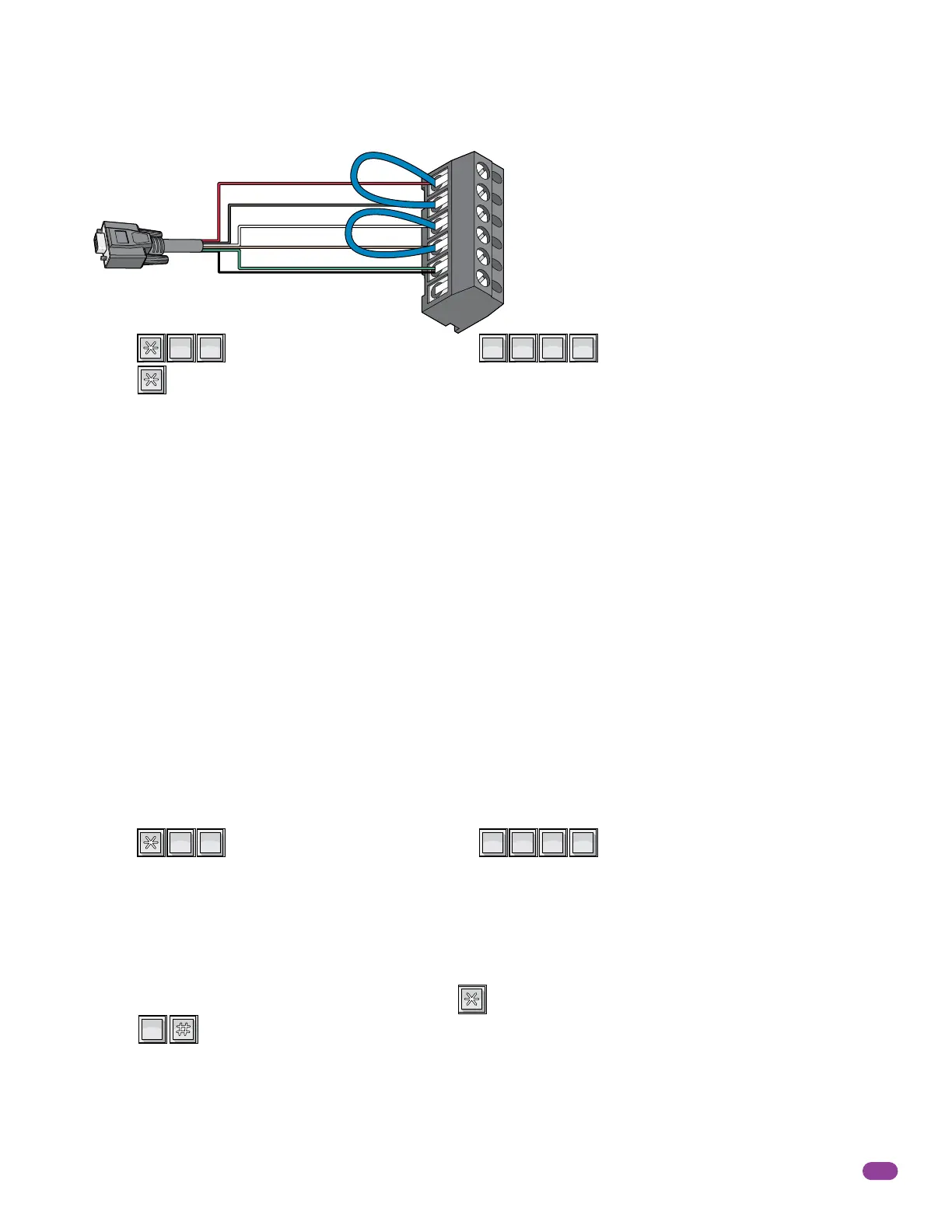
This test procedure will check the RS-232 hardware to determine a PASS or FAIL mode. You will need two short pieces of wire
to perform this test (jumpers). Connect the jumper wires as shown to the RS-232 terminal.
1
2
3
4
5
6
RS-232 Terminal
Red
Black
White
Brown
Green
Shield
The 6-pin terminal
can be removed
for easy wiring.
RS-232
DB-9 Pin
Plug
This sequence will allow you to program different methods by which the telephone entry system will hang-up if a resident
denies a guest access by hanging up their telephone rather than pressing the “#” key to terminate the call.
Factory setting is 1, dial tone detect ON.
1. Press and enter your four-digit MASTER CODE (beep).
The LCD display will show: 0=N 1=DT 2=SIL 3=BTH.
0 – BOTH OFF. Unit hangs up after programmed strike time runs out.
1 – DIAL TONE detect ON. Unit hangs up after detecting 5-seconds of dial tone.
2 –SILENCE detect ON. Unit hands up after detecting 15-seconds of silence.
3 – BOTH ON.
2. Enter the hang-up option code _ (0, 1, 2 or 3), then press (beep).
3. Press TOGETHER to end this programming sequence (beeeeeep).
?
?
?
?
0
OPER
4
GHI
0
OPER
6.1.2 Automatic Hang-up Options



 To Next Page