1834-065-B-10-14
31
3.4 Programming Letters, Numbers and Messages
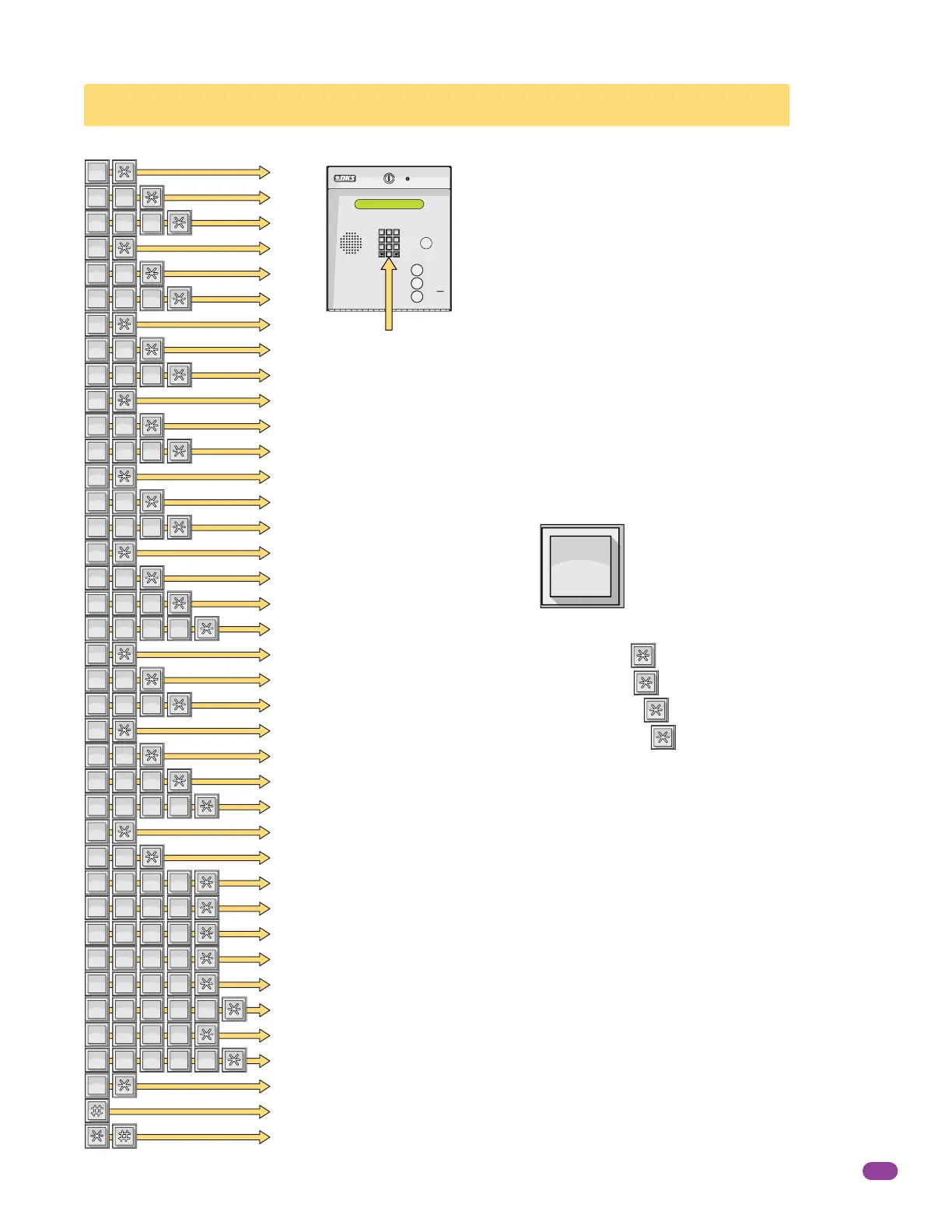
When entering names into the electronic directory using the system keypad or a
touch-tone telephone, pressing the key once will display the first letter listed on the
button, pressing twice will display the second letter, pressing it a third time will display
the third letter, and pressing it a fourth time will display the number (or fourth letter).
Example using the number 6 key:
Press one time to display the letter M, then press to enter it in the system.
Press two times to display the letter N, then press to enter it in the system.
Press three times to display the letter O, then press to enter it in the system.
Press four times to display the number 6, then press to enter it in the system.
This chart provides the sequence required to enter each letter and number from the
keypad into the system memory. A sequence is also provided to add a space, clear the
display if a mistake is made, and a sequence to skip a name if there is a desire not to
provide a name with a phone number.
6
MNO
A
B
C
D
E
F
G
H
I
J
K
L
M
N
O
P
Q
R
S
T
U
V
W
X
Y
Z
0
1
2
3
4
5
6
7
8
9
Space
Clear
Skip Name
...To DisplayPress...
1
SP
1
SP
1
SP
2
ABC
2
ABC
2
ABC
2
ABC
2
ABC
2
ABC
2
ABC
2
ABC
2
ABC
2
ABC
3
DEF
3
DEF
3
DEF
3
DEF
3
DEF
3
DEF
3
DEF
3
DEF
3
DEF
3
DEF
4
GHI
4
GHI
4
GHI
4
GHI
4
GHI
4
GHI
4
GHI
4
GHI
4
GHI
4
GHI
5
JKL
5
JKL
5
JKL
5
JKL
5
JKL
5
JKL
5
JKL
5
JKL
5
JKL
5
JKL
6
MNO
6
MNO
6
MNO
6
MNO
6
MNO
6
MNO
6
MNO
6
MNO
6
MNO
6
MNO
7
PQRS
7
PQRS
7
PQRS
7
PQRS
7
PQRS
7
PQRS
7
PQRS
7
PQRS
7
PQRS
7
PQRS
7
PQRS
7
PQRS
7
PQRS
7
PQRS
7
PQRS
8
TUV
8
TUV
8
TUV
8
TUV
8
TUV
8
TUV
8
TUV
8
TUV
8
TUV
8
TUV
9
WXYZ
9
WXYZ
9
WXYZ
9
WXYZ
9
WXYZ
9
WXYZ
9
WXYZ
9
WXYZ
9
WXYZ
9
WXYZ
9
WXYZ
9
WXYZ
9
WXYZ
9
WXYZ
9
WXYZ
0
OPER
The keypad on this telephone entry system has all the letters of
the alphabet, the numbers 0 through 9, and a space key printed
on it. This allows the keypad to be used to program all names and
numbers into the systems electronic directory.
Note: Names should not be programmed from a remote location
using a touch-tone telephone.
Note: Only upper case letters can be programmed using the
keypad. Upper and lower case letters may be programmed using
the Remote Account Manager Software (PC).
3.4.1 Programming Letters and Numbers from Keypad
7
8
9
4
5
6
1
2
3
0
OPER
WXYZ
TUV
PQRS
MNO
JKL
GHI
DEF
ABC
SP
CALL
Z
A
System Keypad



 To Next Page