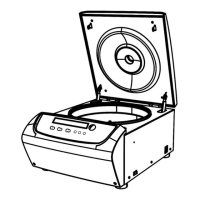
8.1.2 Standby Cooling ( D3024R )
When the centrifuge is powered on, the refrigeration system will cool down the chamber to the setting
temperature.
⚫ The standby cooling will run automatically and control the chamber temperature once the lid is close.
⚫ The standby cooling will stop running once the lid is open.
Note:
⚫ When standby cooling is running, please don‟t open the lid frequently to avoid gathering excessive
water steam.
⚫ To extend the life time of centrifuge, recommended don
‟
t set the temperature under - 4℃ by standby
cooling.
8.1.3 Set the operation parameters
Press the button to select required parameters. The parameter can be modified when the parameter is
flashing. Clockwise rotate the parameter button to increase parameter value; counter-clockwise rotate the
parameter button to decrease parameter value. Parameter button rotate faster, parameter value
increase faster. The minimum speed increment is 100 rpm, the minimum time increment is 1 second.
(1)Set the speed
⚫ Press the select button until the speed rpm is displayed.
⚫ When the speed button is selected, the speed symbol will flash the speed value.
⚫ The minimum speed value you can set 500rpm, the minimum increment is 100rpm.
⚫ Rotate program button clockwise to increase speed value, rotate the program button anti-clockwise
to decrease speed value.
⚫ You can speed-up set the speed value by rotating program button quickly.
⚫ There is a circulating function to increase/decrease the speed values. Rotate the program button
clockwise to change settings from small → large → maximum → minimum. Rotate the program
button anti-clockwise to change settings from large → small → minimum → maximum.
(2)Set the time
⚫ Press button , time value flashes in the time setting mode.
⚫ Rotate the program button to set running time from 30 seconds to 99 minutes.
⚫ When time displays HD, this is a continuous running mode.
(3) Set the temperature (D3024R):
⚫ Press select button , temperature value flash into temperature setting mode.
⚫ Rotate the program button , and input temperature value range from -20℃ to 40℃.
⚫ When temperature symbol flash, indicating refrigeration system is running, not flashing indicates the



 To Next Page