7.8 RS485 Network
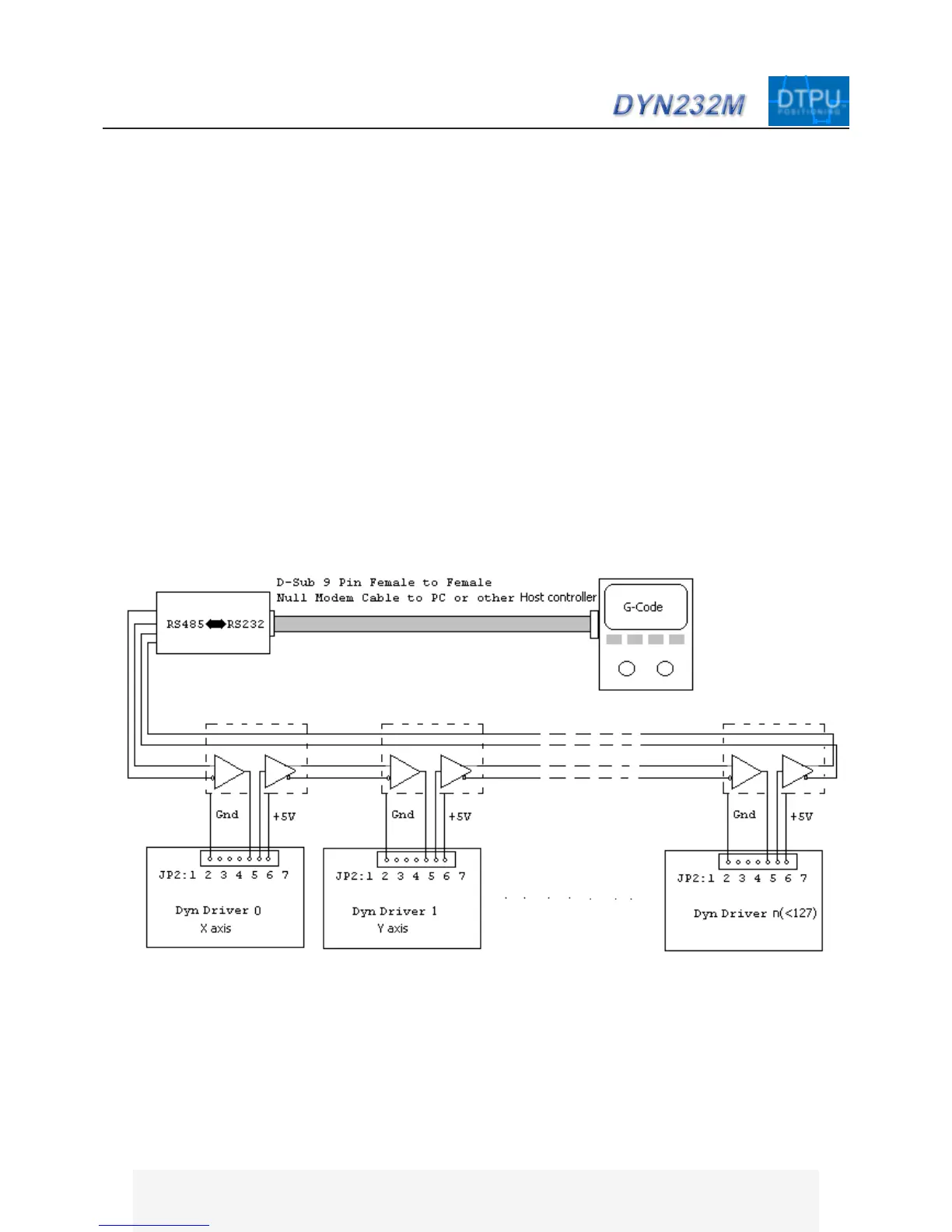
Several Drives can be connected by RS485 after every Drive on the RS485 net have been designated an individ-
ual, or broadcasting ID number.
The RS485 check box must be checked if RS485 network is used which means there are at least two or more
Drive on the net, then every servo drive status and configuration can be read or set according to the ID number
on the servo setting dialog box. The ID number cannot be assigned to a particular Drive if RS485 network is
connected.
The Servo Drive ID number CAN ONLY BE SET when there is only ONE drive connected, then assigned a
new ID number to that drive without checking the RS485/232 Net check box (in the DMMDRV software).
The RS485 network is a serial network, if there is a packet in the network, one Drive will receive it first, if the
packet’s ID number is the same as the Drives, that packet will be received and processed by the Drive, otherwise
that packet will be relayed to the next Drive.
The Drive ID is contained in the first byte of the packet. When a packet is received, the drive only reads the first
byte, it will receive if ID is correct and relay to next drive if ID does not match. Data flow on the serial RS485 net
is very fast and efficient.
Every drive has a RS485NET node which contains a RS485 buffer such as LTC491.


 To Next Page