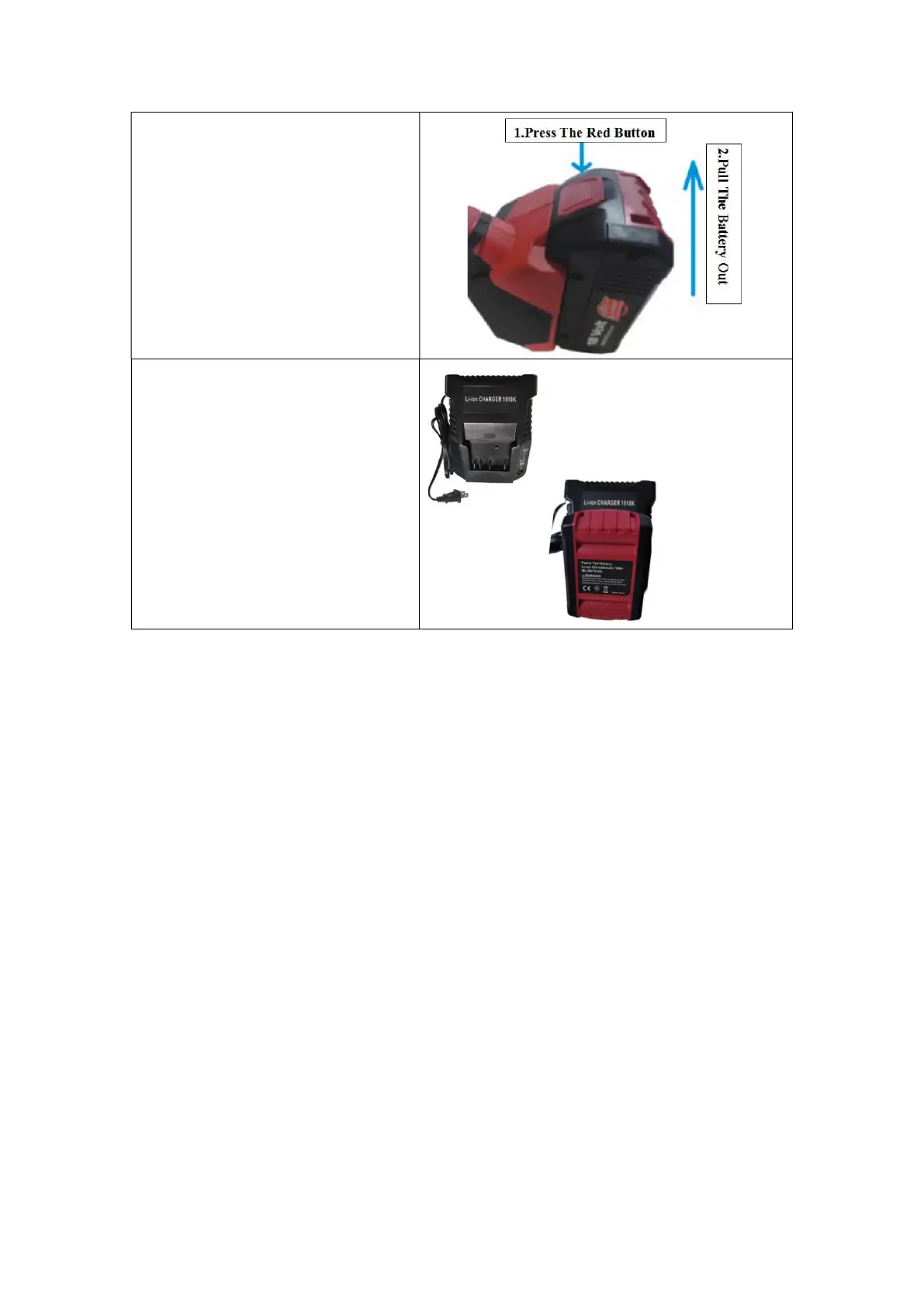
Battery Disassembly:
Remove the battery following the
direction shown in the figure. When
removing the battery, move it out while
pressing and holding the red button, as
shown in the right figure.
Battery Charging:
Insert the battery to be charged into the
charger slot and plug it into a power
supply, as shown in the figure on the
right
!Warning:
Insufficient battery power may lead to insufficient welding of the packing straps
Please cut off the strap if the strap welding is not enough!
The battery must be charged before using the machine again.
5.2 Operation Function Description
5.2.1 Operation Panel And Buttons
Start preparation:
1. Operation panel unlocking and locking:
Plug in the power supply (battery), and the machine is in the locking state, at this time any
button on the operation panel is invalid.
Unlocking Method for the Operation Panel: Press the button DEC (for about 2s), and then
press the Welding button B to unlock it after hearing a sound of Beep.
After parameters are set, you can also press the button DEC for 2s, and then press the
Welding button to lock the operation panel after hearing a sound of Beep.
Note: The machine will enter the locking state again if no operation is performed within
30s after the tool is unlocked.
2. Waking-up from the sleep state:


 To Next Page