6-3
EN
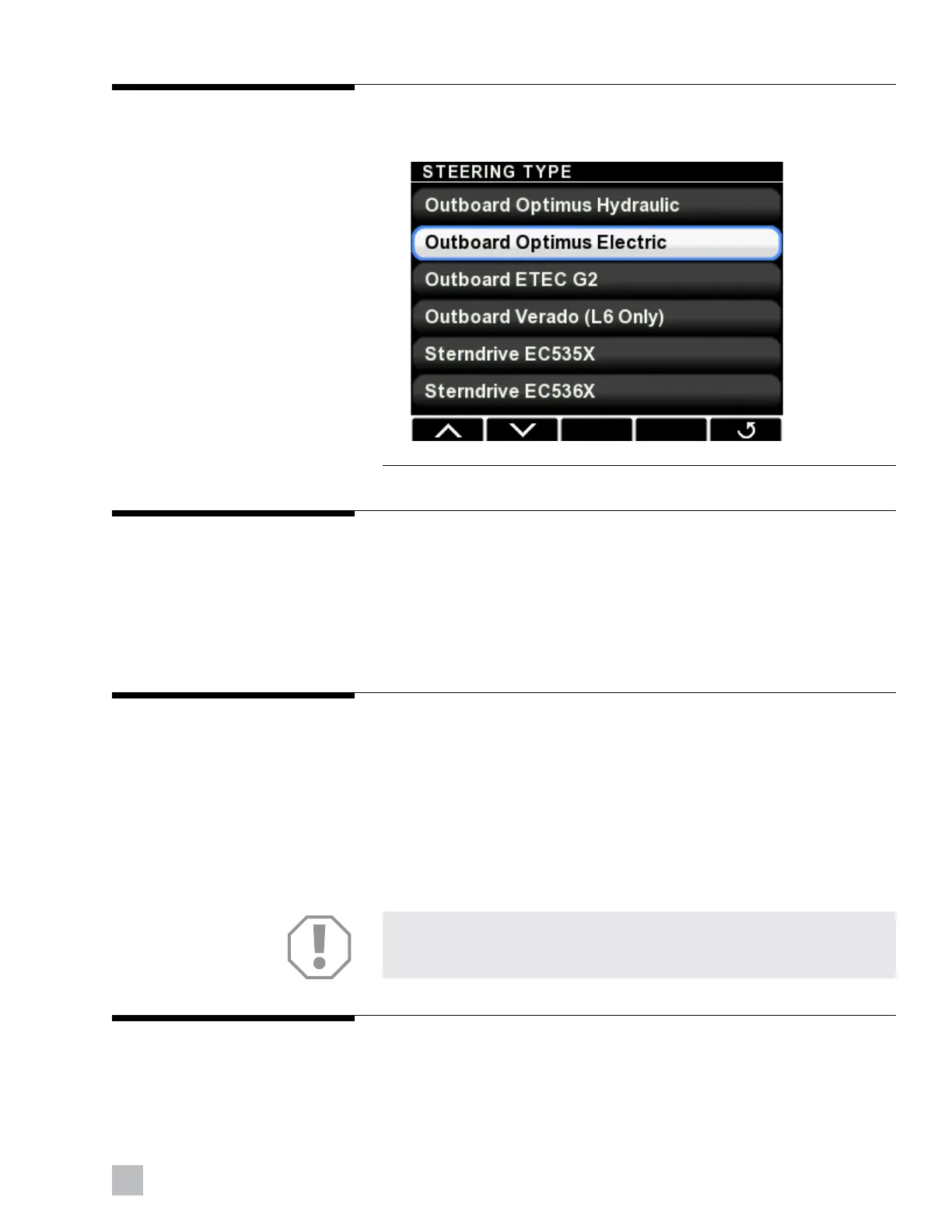
Figure 6-3.
6.2.2 Select steering type
Select Outboard Optimus Electric from the list, as shown in figure 6-3.
6.2.3
6.2.4
6.2.5
Select number of devices
The CANtrak will display a list of devices based on the system type. Use the +
and – buttons to change the quantity of each device to match the system.
These parameters tell the system how many of each device to look for on
the CAN network. If the numbers do not match you will get repeated error
messages from the display.
Select device locations
Each device on the network must be “instanced” correctly when there are
more than one of each type present. Instancing means teaching the system
which actuator is port, which is starboard, and which helm is main station,
and which is 2nd station.
The CANtrak will list all the devices on the CAN network along with their
serial numbers. Match the devices by the serial numbers and use the + and
– buttons to toggle between Port or Stbd, and Main or 2nd (or 3rd in
supported systems) station.
Select RPM source
The only valid RPM source is the default, CAN3, so you do not need to
change anything.
NOTICE!
Damage to the outboard engines may occur if the electric steering
actuators are not instanced correctly.





 To Next Page