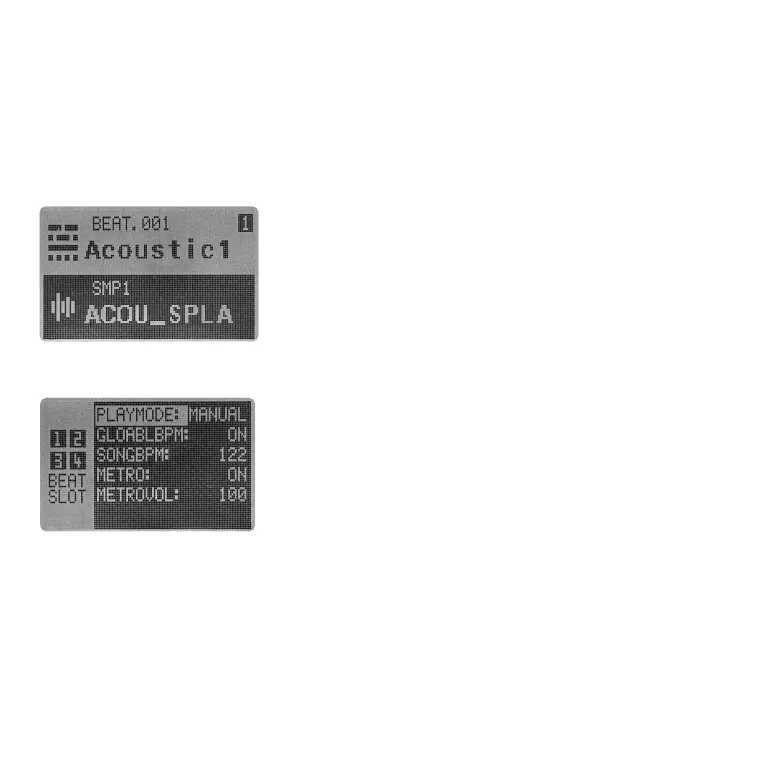
In PAD mode (REC needs to be inactive), press BEAT + [1]~[4]
to switch between SLOT_1 to SLOT_4. If the pattern is not
playing, the BEAT SLOT should switch immediately. While the
sequence is running, the switch will hold until next bar.
You can check the current selected BEAT SLOT at the MAIN page,
via a number from 1 to 4 located on the upper right corner.
After editing your KIT, press SAVE + KIT to save the edit. You will need to select where you want to
save your KIT using VALUE encoder. And name the KIT in the following KIT RENAME page.
3.3.1 SWITCH BEAT SLOT
3.3 BEAT SLOT
To extend the pattern length and make the Essential D1 more playable, BEAT SLOT is introduced.
With this feature, you can load up to 4 BEATs in 1 SONG. While playing back, you can either switch
between 4 BEATs manually or chain them together to get a 16 bars long pattern.
As shown above, KIT file in Essential D1 contains all 12 channels'
sample names. When edit a KIT, you are choosing each channel's
sample. Select the channel you want to change the sample. You can
either hit the corresponding PAD directly or holding SHIFT to select
the channel without triggering the sample playback. Then press
down VALUE encoder to enter SMP SELECT page. Rotating VALUE
encoder to scroll throught the sounds. Press down the encoder to
3.3.2 EDIT A KIT
●
PLAYMODE: It's possible to chain all 4 BEAT SLOTs in order to let them switch automatically whil
running pattern. Press MENU and select BEAT SLOT. Set the PLAYMODE to AUTO instead of MANUAL
and you are ready to go.
●
GLOBAL BPM: Every BEAT has its BPM setting. But sometime, you might want all BEATs within a
SONG to play at the same speed. The GLOBAL BPM switch is designed to achieve this goal. By
turning ON this option, the Essential D1 will ignore the BPM value saved in BEAT, instead, it will run
all the BEAT at the speed of next parameter calls SONG BPM.
load the sample, or press SHIFT + [BACK] to exit SMP SELECT page without changing anything.
05 06 07
08 09 10 11 12 13 14
15 16 17 18 19 20
21
22 23 24 25 26 27 28
29 30 31 32



 To Next Page