● Holding this button and press the pad(s) in 01A BD - SMP4 PADS section to quantize the note in the
channel(s) you want. The quantize setting will be found on the BEAT EDIT page.
● Use SHIFT + [SWING] to enter the SWING SETTING page, where you can apply swings to the beat
currently playing.
QUANTIZE | [SWING]
20
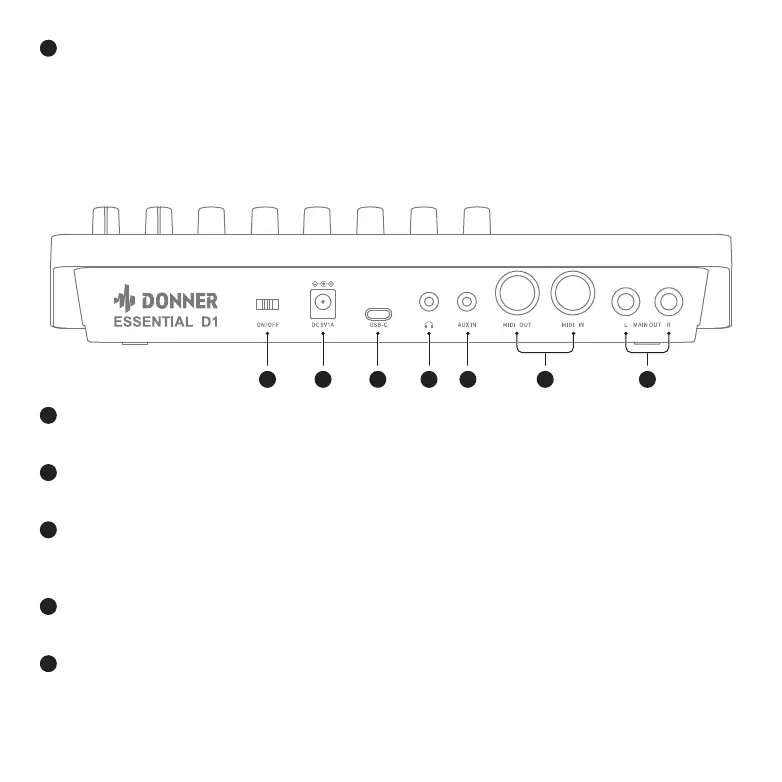
REAR PANEL
1 3
4 6
7
5
2
Switch the power on/off.
POWER SWITCH
1
Connect the included adaptor here.
DC IN JACK
2
Use this jack to connect Essential D1 to your PC / MAC for data transmission (MIDI I/O, File Manage-
ment & Firmware Update).
USB-C PORT
3
Connect a set of headphones to this jack.
HEADPHONES JACK
4
Use a 1/8" (3.5mm) audio cable to connect an audio device here.
AUX IN JACK
5
05 06 07
08
09 10 11 12 13 14
15 16 17 18 19 20 21
22 23 24 25 26 27 28
29 30 31 32



 To Next Page