●
SONG BPM: SONG BPM is saved under SONG instead of BEAT. When GLOBAL BPM is set to ON, the
sequencer will playback all 4 BEAT SLOT at the speed set by this parameter.
●
METRO & METROVOL: These two options are used to control the internal metronome which is
useful for recording in finger drumming. METRO serve as the switch of the metronome. METROVOL
is used to balance the volume between the metronome and the sample playback engine.
3.4 BEAT
Essential D1 can store 256 BEATs. The first 64 BEATs are pre-loaded as the factory content, designed
by Loopmasters. While the factory BEATs are labeled in music genre that correspond to the factory
KITs, it's possible and fun to combine different BEAT and KIT to get happy accident.
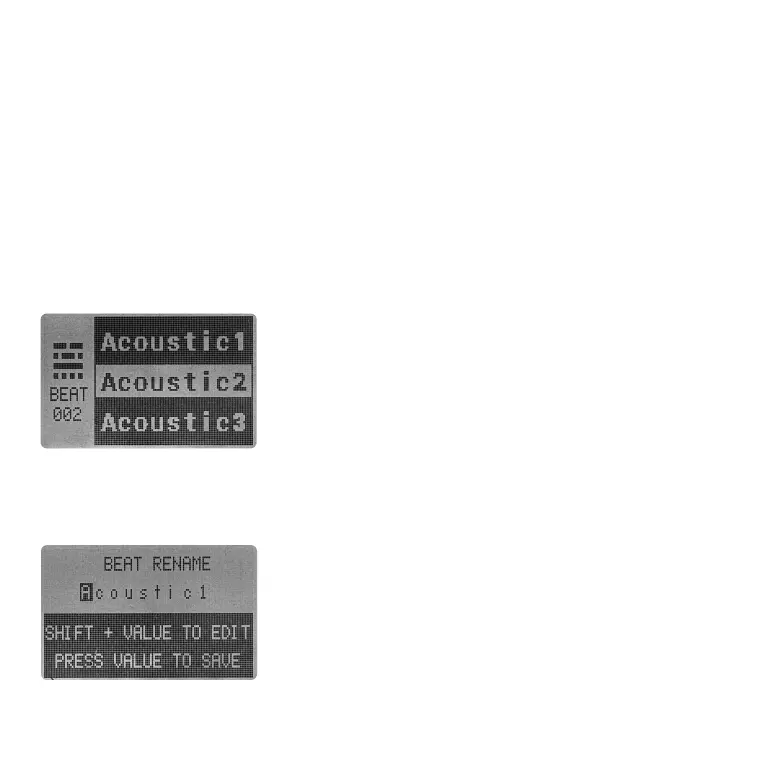
Press BEAT to enter BEAT SELECT page. Use VALUE encoder to
scroll throught the BEAT POOL and load the BEAT.
3.4.1 LOAD A BEAT
Press SAVE + BEAT to save the BEAT. You will need to select where you want to save your BEAT using
VALUE encoder. And name the BEAT in the following BEAT RENAME page.
3.4.2 SAVE A BEAT
Just like the SONG. A BEAT name can hold up to 9 characters. In the
rename page, rotate VALUE encoder to select character.
Use SHIFT + VALUE to edit the selected character. Press VALUE
encoder to save the new BEAT NAME.
You can press SAVE + BEAT again to cancel the saving process and
return to MAIN page at anytime.
05 06 07
08 09 10 11 12 13 14
15 16 17 18 19 20 21
22 23 24 25 26 27 28
29 30 31 32



 To Next Page