4.6 STEP SEQUENCING
Essential D1 featuring a 64 steps (at most) step sequencer with PARAMETER LOCK and SUB STEP
function. To edit the BEAT via step sequencer, you will need to press SHIFT + [SEQ] to enter SEQ
mode first.
In SEQ mode, each of the 16 pads represents a step (16th note) in the sequencer. Press a pad will
activate / deactivate a specific step. The active step will light up with color that match the channel.
The selected channel will also shows on the screen.
To switch to other channels in SEQ mode, hold SHIFT and press one of the 12 pads from BD to SMP4.
4.6.1 SELECT CHANNEL
Every BEAT in Essential D1 can hold at most 64 steps, which means 16 pads can only show portion of
steps. In this situation, switching page is needed. Hold SHIFT and press one of the 4 pads from [1] to
[4] to switch between pages. Depends on the BEAT Length set in BEAT EDIT (SHIFT + [EDIT]), pads [2]
to [4] might not light up as the BEAT does not contain enough steps.
4.6.2 SWITCH PAGE
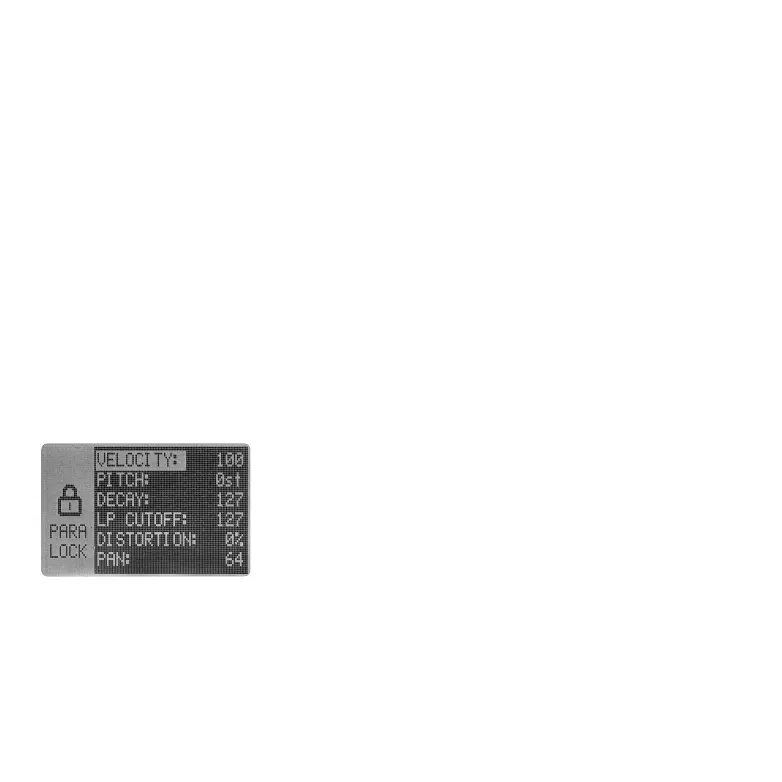
Press and hold one of the active steps for about 1.5 seconds will
enter the PARAMETER LOCK page for the step. The pad will turn pink
and the PARAMETER LOCK page will show up on the screen. Here you
can set multiple parameters specific for the selected step. Pretty
much every channel parameter and the step velocity can be locked
step by step, making the BEAT more versatile.
4.6.3 PARAMETER LOCK
In PARAMETER LOCK page, use VALUE encoder for navigation and editing parameter lock. The locked
parameter will be indicated with "*" at the end, LP CUTOFF: 110* etc. Parameter that locked will
remain the setting as the BEAT is playing, even if you change the parameter manually.
If you are happy about the setting, just press the selected step (pad) again to exit PARAMETER LOCK
page. The pad will flash if any parameter is locked.
To delete the parameter lock, just deactivate and reactive the step via double press the pad.
05 06 07
08 09 10 11 12 13 14
15 16 17 18 19 20 21
22 23 24
25 26 27 28
29 30 31 32



 To Next Page