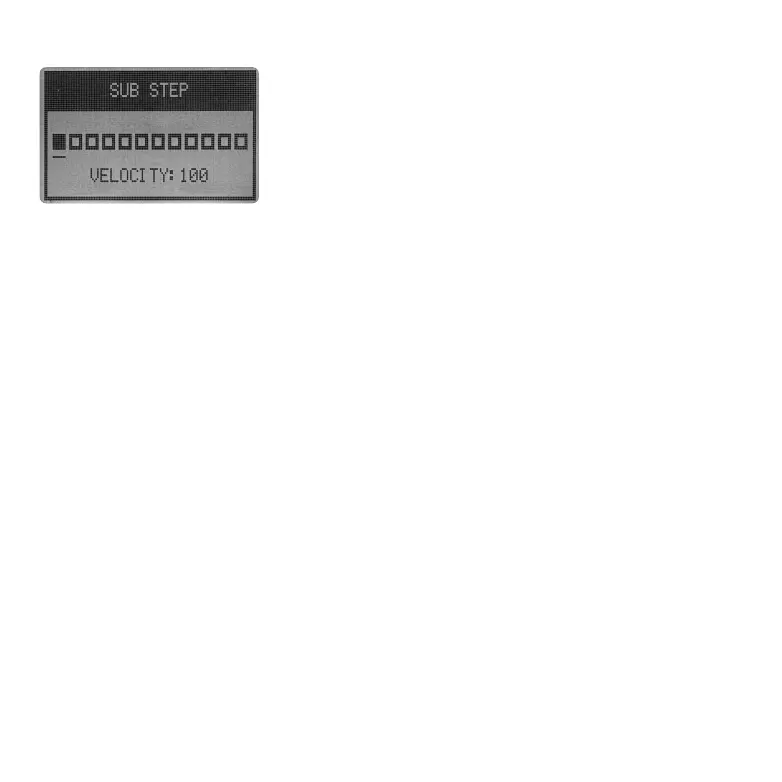
In PARAMETER LOCK page, there is a SUB STEP option. Select it via
VALUE encoder will enter a sub-window where you can set multiple
triggers within one step (16th note).
The SUB STEP extends the resolution of Essential D1's sequencer.
Instead of triggering the notes in solid 16th note measure, you can
either shift the trigger a little bit off-grid or place multiple triggers in
one step.
4.6.4 SUB STEP
4.6.5 SUB STEP
In SUB STEP, one 16th note is divided into 12 equal sub-steps. Use VALUE encoder to select and
activate / deactivate sub-steps. While all 12 sub steps share one parameter lock, each sub-step will
get its dedicated step velocity. Hold SHIFT and rotate VALUE encoder can set the velocity of the
selected active sub-step.
To exit the SUB STEP page, press SHIFT + [BACK] or press the pad lights in pink to return to the MAIN
page.
Essential D1 featuring a 64 steps (at most) step sequencer with PARAMETER LOCK and SUB STEP
function. To edit the BEAT via step sequencer, you will need to press SHIFT + [SEQ] to enter SEQ
mode first.
In SEQ mode, each of the 16 pads represents a step (16th note) in the sequencer. Press a pad will
activate / deactivate a specific step. The active step will light up with color that match the channel.
The selected channel will also shows on the screen.
4.7 CLEAR ALL & CLEAR PART
To clear all of the content in a BEAT, press and hold CLEAR ALL button for about 1.5 seconds. All 12
pads will flash to indicate all 12 channels are clear.
If you only want to clear one of the channels, Hold CLEAR PART and press one of the pads from BD to
SMP4. Channel that clear will flash to indicate the content is clear.
4.8 UNDO
When switch between PAD and SEQ mode (SHIFT + [SEQ]), Essential D1 will save a snapshot of the
current BEAT. Any change done afterward can be restore using the undo function. Press SHIFT +
[UNDO] to apply the undo operation.
05 06 07
08 09 10 11 12 13 14
15 16 17 18 19 20 21
22 23 24 25
26 27 28
29 30 31 32



 To Next Page