OP000507Operating Controls
2-10
3. Combination Switch
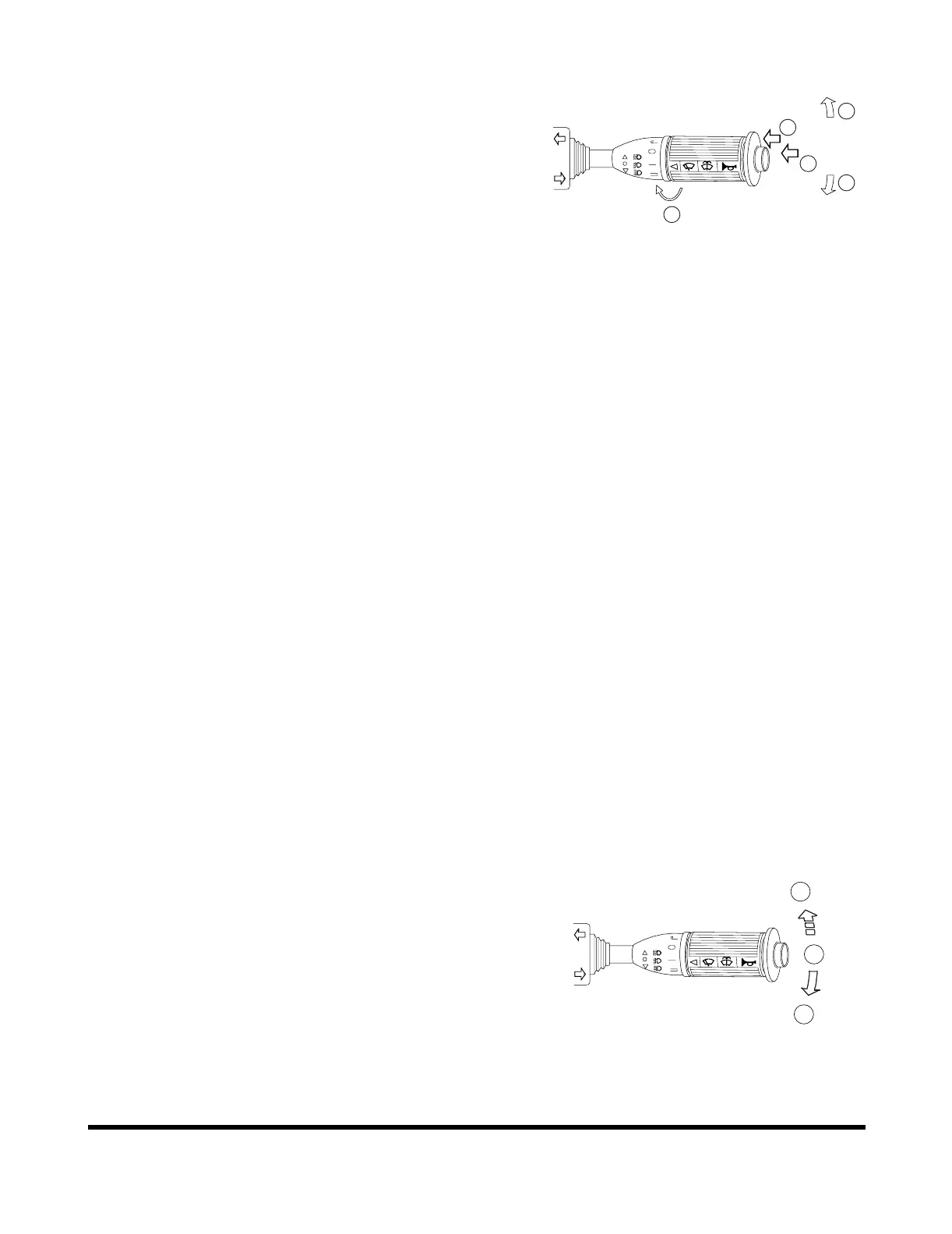
A. Left Side Directional Switch - Pushing lever
forward, activates left outside directional lights and
directional indicator light on instrument panel.
B. Right Side Directional Switch - Pulling lever back,
activates right outside directional lights and
directional indicator light on instrument panel.
NOTE: When turn is completed the lever
automatically returns to the "NEUTRAL"
position. Should it not, it can be manually
returned by hand.
NOTE: Turn signals will function with starter
switch in "OFF" position.
C. Window Washer Switch - When the outside area
of the lever is pressed, it activates the washer
pump and sprays fluid on the windshield. (Only
while being pressed.)
NOTE: Do not operate the windshield washer
without any fluid. If operate without any
fluid, the washer motor may be damaged.
Check level in washer tank, and add fluid
as required.
NOTE: Using soapy water or synthetic detergent
instead of window cleaning fluid, may
damage the wiper blade or painted
surfaces. Use standard window cleaning
fluid: SSK703
D. Horn Button - The center button on end of lever
activates horn. (Only while being pressed.)
E. Wiper Switch - Activates wipers when outside
area of lever is rotated.
J: Intermittent Mode - wipes every five seconds.
0: Stop (Off).
I: Normal Speed Mode.
II: High Speed Mode.
F. Push Down - Locks into position and light turns
"ON" the high beams.
G. Neutral Position - Normal low beams.
H. Pull Up - Momentarily turns "ON" both the low
beams and high beams. (Returns to "NEUTRAL"
position when released.)
NOTE: High and low beams will only function with the
headlight switch in the "||" position.
Figure 9
E
A
B
C
D
AHO0920L
Figure 10
F
G
H
HAAA4350


 To Next Page